PR tracking for platform engineering teams: complete 2026 guide
PR tracking for platform engineering teams needs context, not rankings. Find merged GitHub PRs, verify evidence, and build a clear performance-review narrative.

Platform engineering PR tracking is the practice of organizing merged pull requests and their context to explain what you delivered across shared systems. This guide covers PR tracking for platform engineering teams in 2026, with a workflow for individual developers preparing performance reviews or job searches—not a method for scoring colleagues.
Why PR tracking matters for platform engineering teams
Platform work can span shared libraries, deployment configuration, infrastructure repositories, and developer tooling. A review organized around one application repository leaves that work fragmented. Start with the systems you actually contributed to, not a presumed list of everything the platform team owns.
Your merged history answers a narrow question: which pull requests reached the merged state? It does not establish who benefited, whether a rollout succeeded, or how much design and incident work happened outside GitHub.
Use merged PRs as evidence pointers, not as a productivity score. A useful review connects each selected change to your role and an observable result. The same distinction matters when preparing a job-search narrative: implementation details need context, and confidential evidence stays private.
Keep that context in a brag document for software engineers. The document captures the explanation that a title, timestamp, and merge status cannot provide by themselves.
Build a repeatable tracking workflow
For your 2026 review, separate collecting history from interpreting it. First establish a reliable set of merged pull requests. Then add the explanation needed for a reviewer to understand your contribution without reconstructing the project.
The workflow below starts with GitHub search and a private worksheet. A dedicated history tool becomes useful only when you repeatedly browse the same periods and repository boundaries.
Define scope
Write down the purpose of the record before searching. A performance review needs evidence from the review period; a job-search document needs examples you can discuss without disclosing internal information. Those are different outputs, even when they start from the same merged history.
Use explicit dates rather than a label such as recent work. For January 2026, define a window beginning on January 1 and ending before February 1. Keep the repository scope beside those dates so you can explain what the record includes.
Also distinguish authored changes from reviewed changes. An authored merged-PR tally does not cover every contribution you made to a platform project.
- Record the review period with a start and end date.
- List the relevant organizations and repositories.
- State whether the record covers authored PRs or another contribution type.
- Separate organization work from personal repository work.
- Note design, incident, and mentoring work outside the PR record.
Find merges
Use GitHub pull request search for the manual starting point. A query such as is:pr is:merged author:@me merged:>=2026-01-01 merged:<2026-02-01 selects your authored, merged pull requests within January 2026. Add an actual repo:OWNER/REPOSITORY qualifier when you need a repository-specific result.
The date filter should match the event you are describing. If you are reporting merged work, use the merge date rather than treating creation time as delivery time. A PR opened before the review window can still belong in the window if it merged during it.
Search results remain bounded by your access. An empty result is a reason to inspect the query and repository visibility, not proof that you made no contribution.
- Search with both
is:prandis:merged. - Filter by your author identity for an authored-work record.
- Apply the agreed merge-date boundaries.
- Add repository qualifiers when checking a particular system.
- Inspect unexpected gaps before recording a tally.
Group history
A private worksheet works when you need an occasional lookup. Copy the relevant PR references, merge dates, and repository names, then group the entries by month or project. Keep the original references so you can reopen the evidence rather than relying on your summary.
Repeated searching becomes repetitive when you revisit several months or switch between organization and personal work. Pulltally is best for individual developers who repeatedly browse merged GitHub pull requests by month, organization, or personal repository. It tracks personal delivery history, not a productivity score.
Pulltally accesses pull request metadata with read-only access for this workflow. Signing in alone does not connect private organization repositories. That distinction matters when deciding which work belongs in your record and which repository access requires a separate decision.
- Use a worksheet for a one-off review preparation session.
- Group merged history by month before adding project themes.
- Keep organization and personal repository records distinguishable.
- Retain the original PR reference with each entry.
- Check repository access before interpreting missing history.
Add context
A title such as update deployment configuration does not explain the engineering judgment behind the change. Open the PR and identify the problem, your responsibility, and the evidence available in the discussion or associated records.
For a platform engineer, a useful entry might describe an inconsistent deployment setting, the configuration change you authored, and the rollout evidence you checked. This is an illustrative structure, not a claim that every configuration change improved reliability. State the result only when you have supporting evidence.
Keep 3 fields separate: contribution, context, and outcome. If the outcome is still unverified, record the delivered change without presenting the intended benefit as an achieved result.
- Describe the problem the change addressed.
- Explain the implementation or decision you owned.
- Identify collaborators without taking credit for their work.
- Attach evidence for any claimed outcome.
- Mark unresolved results as unresolved.
Check evidence
Before turning the record into review prose, reopen the selected PRs. Verify that each one is merged, belongs within the defined period, and supports the contribution you intend to describe. This check is especially important when similar changes appear across several repositories.
Several PRs can belong to one initiative. Group them under the initiative without treating each merge as a separate business outcome. Conversely, one PR can contain several changes; its size alone does not establish the importance of the work.
For your 2026 review, distinguish implementation from adoption. A merged migration helper establishes that the helper was merged, not that every intended team adopted it.
- Verify merge status and merge date.
- Check that each entry belongs to the defined repository scope.
- Group related PRs under their shared initiative.
- Separate delivered changes from adoption claims.
- Remove outcome statements that lack evidence.
Write summary
Write for a reviewer who does not remember the implementation details. Begin with the problem, explain your contribution, and finish with the supported result or current status. Put the PR references behind that explanation rather than making the reader interpret a list of titles.
A useful pattern is: addressed an inconsistent deployment setting, authored the shared configuration change, and documented the rollout status. Add a result only if the evidence supports it. A concise explanation with a clear boundary is stronger than an impressive-sounding claim you cannot defend.
For a job search, prepare a separate version. Describe the engineering problem and your decisions without copying private repository names, customer information, or internal links into application materials.
- Organize the summary around initiatives rather than merge counts.
- State your role in each selected example.
- Use concrete verbs such as authored, migrated, documented, or reviewed.
- Keep internal evidence in the internal version.
- Remove confidential details from the job-search version.
Keep records
Maintain the explanation while you still remember the decisions. Save the search scope with your notes, and update the narrative when you have evidence about rollout or adoption. Do not silently change an old delivery statement into a broader success claim.
For a recurring 2026 record, repeat the same sequence: Define scope, Find merges, Group history, Add context, Check evidence, Write summary, and Keep records. Consistent boundaries make your own history easier to revisit; they do not make different engineers' counts comparable.
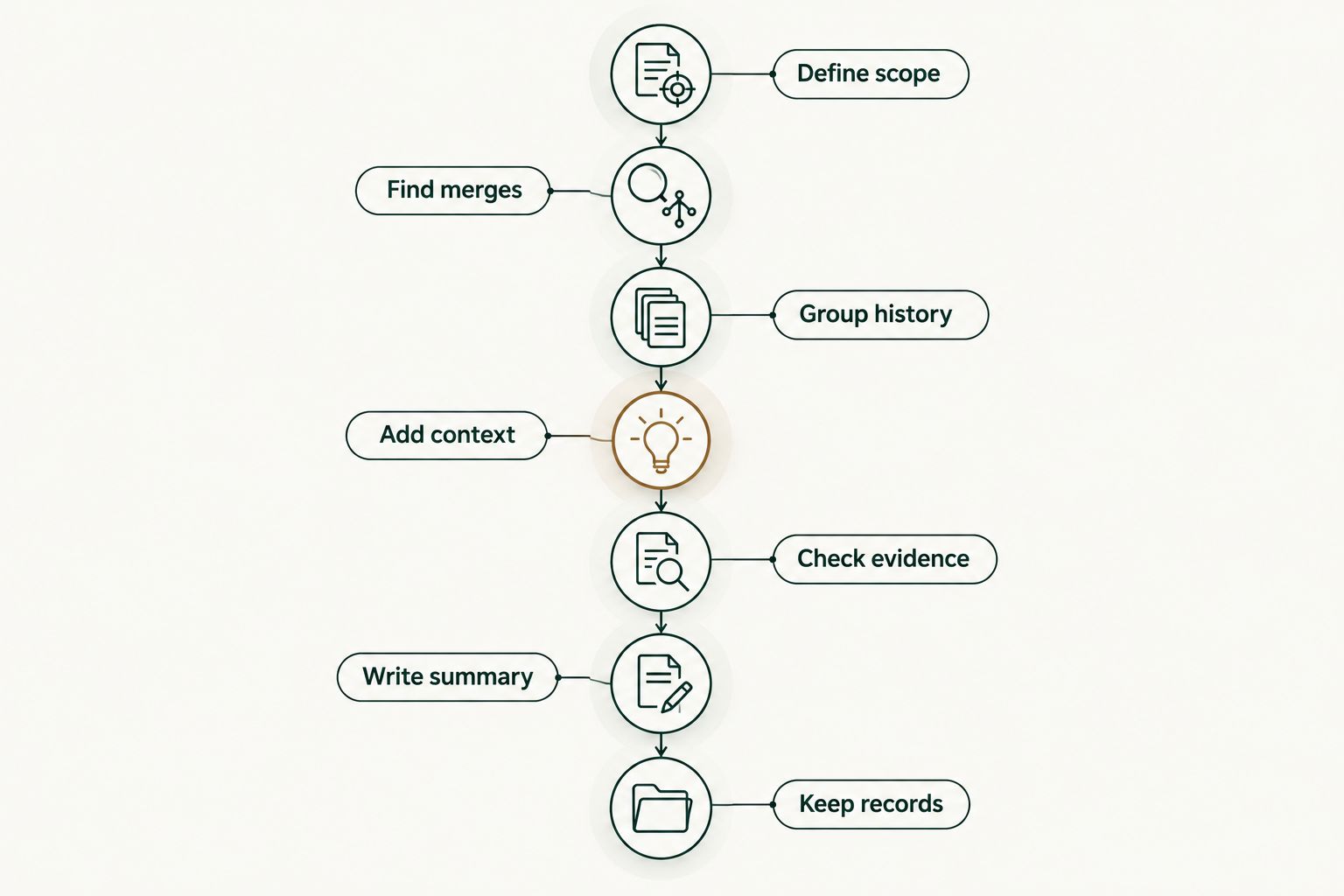
Keep the record focused on your own delivery and the explanation a future reader will need. A tally is a retrieval aid; the narrative carries the meaning.
- Save the date boundaries and repository scope with each record.
- Add context while the work is still fresh.
- Update outcomes only when supporting evidence exists.
- Preserve distinctions between authored, reviewed, and collaborative work.
- Keep confidential records in an approved location.
Compare tracking options for your workflow
Choose the smallest workflow that solves your actual task. GitHub search handles retrieval, a worksheet stores interpretation, and Pulltally organizes personal merged-PR history. These roles overlap, but none turns a merge count into an impact assessment.
| Option | Best for | Main advantage | Key limitation |
|---|---|---|---|
| GitHub search | Occasional merged-PR lookups | Explicit author, repository, and merge-date filters | Repeated searches still require you to organize the results and add context |
| Private worksheet | Review narratives with project context | Keeps contribution, evidence, and outcome together | You must maintain the entries and verify the source references manually |
| Pulltally | Individual developers revisiting merged history | Browses and summarizes merged PRs by month, organization, or personal repository | Personal delivery history does not establish team productivity or business impact |
Keep the interpretation separate from the retrieval method. You can produce a useful review with manual searches, and a history tool does not remove the need to check evidence. If your task is team-level reporting rather than personal review preparation, define that reporting requirement separately.
Common mistakes platform engineers make
Treating merges as a performance ranking
PR counts do not encode scope, difficulty, mentoring, or incident response. Use the tally to locate work, then explain the contribution. Do not compare colleagues using counts collected under different repository or authorship boundaries.
Losing cross-repository context
A platform initiative can involve related changes in several repositories. Keep those references together under a shared initiative, while preserving each original PR. Otherwise, your review becomes a set of disconnected edits rather than an explanation of the work.
Presenting intended benefits as measured results
A change intended to simplify deployments does not, by itself, prove that deployments became simpler. State what merged and what you verified. Keep adoption, reliability, and time-saving claims out of the summary unless you have evidence for them.
Assuming sign-in connects private organization work
Signing in alone does not connect private organization repositories in Pulltally. Check the actual access boundary before interpreting missing history. Do not broaden access merely to make a report look complete; follow your organization's requirements.
Copying private evidence into job applications
Internal PR links are useful for an internal review, not as public portfolio material. Prepare a separate explanation that preserves your contribution without exposing private code, infrastructure details, or customer information.
FAQ
What's the best way to start PR tracking for platform engineering teams?
Start with a defined date window, repository scope, and authored merged-PR search in GitHub. Add context to selected changes before turning the history into a performance-review summary.
Is Pulltally a team productivity scoring tool?
No. Pulltally provides personal delivery history for individual developers browsing and summarizing merged GitHub pull requests by month, organization, or personal repository. A merge tally is not a productivity score.
Does signing in connect my private organization repositories?
No. Signing in alone does not connect private organization repositories. Check the repository access boundary before expecting organization work to appear in your history.
What data does the tracking workflow access?
Pulltally uses read-only access to pull request metadata to support browsing and summarizing merged history. Read-only access describes the access mode; it does not mean every private organization repository is connected.
Should I track when a pull request opened or when it merged?
Use the merge date when your record describes merged delivery within a review period. Creation dates answer a different question and can place work in a different period.
Can I use merged PR counts in my performance review?
Use merged PR counts as a way to organize supporting history, not as proof of performance. Explain your role, the problem addressed, and any outcome supported by evidence.
How do I turn private platform work into a job-search example?
Describe the engineering problem and your contribution without sharing confidential evidence. Keep private repository names, internal links, customer information, and sensitive implementation details out of public application materials.
One last thing
Before closing your 2026 review document, read one selected example without opening its PR. Can you explain the problem, your role, and the evidence-backed result from the summary alone? If not, add context rather than another tally.
The most useful record is not the longest list of merges. It is the one that lets you recover the reasoning behind your work without asking a reviewer to reconstruct it.