How much does GitHub PR tracking software typically cost?
How much does GitHub pull request tracking software cost? Compare personal history with team reporting, check permissions, and avoid paying for unused scope.

GitHub pull request tracking software has no single standard cost; compare the current plan against the history and reporting you actually need in 2026. The subscription amount is only part of that decision: account for recurring search work, permission setup, and whether the result gives you useful evidence for a performance review or job search.
How much does GitHub PR tracking software typically cost?
Evaluate the cost against a specific reporting task, not a feature list. If your task is collecting your own merged work for a review, compare an occasional GitHub search with a personal history tool such as Pulltally. Do not start with organization-wide reporting unless you actually need an organization-wide answer.
The comparison below separates workflows rather than quoting changing subscription amounts. Check the current payment terms for any software you consider, then establish whether its accessible data covers the work you need to find.
| Approach | Best for | What it gives you | Limitation to check |
|---|---|---|---|
| GitHub search | An occasional, narrowly scoped lookup | A filtered list of matching pull requests | You must repeat searches and assemble the review evidence yourself |
| Pulltally | Individual developers revisiting merged PR history | Browsing and summaries by month, organization, or personal repository | Personal delivery history is not a productivity score; private organization access is a separate consideration |
| Organization-wide reporting | A reporting task that genuinely spans a team | A broader evaluation scope to request from a vendor | Confirm whose work is included and whether that scope serves your personal task |
Why this matters
A developer preparing a 2026 performance review needs evidence of delivered work, not just a count. A useful record identifies what merged, where it merged, and what that change contributed. A larger reporting scope does not automatically make that personal record more useful.
For a job search, the task is narrower still: find work you can discuss accurately without sharing confidential details. Paying for additional reporting does not resolve that judgment. Start with the evidence you need, then choose the least repetitive way to collect it.
How to work out your actual cost
Use the same task to evaluate every approach. Otherwise, you are comparing a quick repository lookup with a much broader reporting project and calling the difference a software decision.
- Set the review period. Choose the dates your review actually covers. As an example, January through March 2026 is a 3-month period; it is not the same task as checking the most recent month. Keep the period identical when comparing search results with a history tool.
- Define whose pull requests count. For a personal delivery record, start with pull requests you authored and that were merged. Reviewing a colleague's change is a different contribution. Keep review activity separate rather than mixing it into an authored-PR total.
- List the relevant repositories. Include the personal repositories and organizations that belong in your record. If you worked across 2 repositories, check both explicitly. A result from just one repository does not describe your complete work for the period.
- Check access before comparing output. Establish which repositories the software can read. Private organization repositories need separate attention; signing in alone does not connect them. A clean summary of an incomplete scope is still incomplete.
- Read the current payment terms. Check the billing interval, the scope covered by the plan, and any commitment attached to it. Treat each as a question to verify, not an assumption about how a particular vendor charges.
- Compare the finished result. Ask whether you can browse the relevant merged pull requests and turn them into review evidence without rebuilding the list. A tally that still leaves you repeatedly searching for titles, dates, and context has not finished your task.
The useful comparison is a completed review record against the work required to maintain it. Do not assign a made-up monetary value to the time saved. Observe your own process instead: which searches you repeat, which records you copy, and which details you still need to verify.
Keep the evaluation small enough to inspect. Start with 1 month of work, verify that the scope is correct, and then expand to the full review period. This gives you a practical accuracy check without assuming that a larger result is a better result.
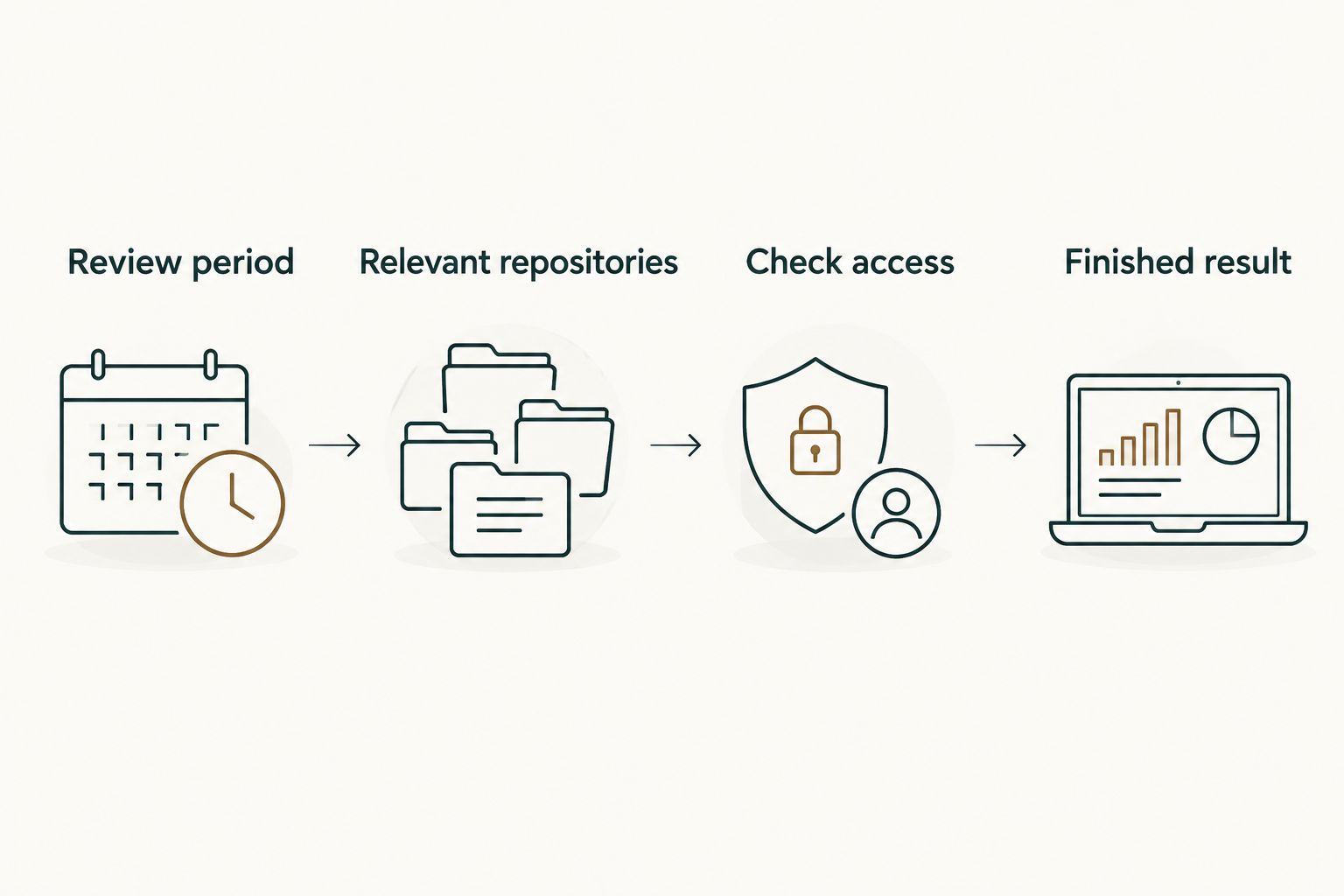
The sequence is straightforward: define the period, define the repositories, check access, and inspect the resulting history. Resolve scope problems before treating a total as evidence.
GitHub search: best for an occasional lookup
GitHub search is a useful baseline when you need to find a specific slice of merged work. You control the query and inspect the matching pull requests directly. That makes it a practical starting point before you decide whether a separate tracking workflow is necessary.
For an example covering January through March 2026, use a query such as:
is:pr is:merged author:@me merged:2026-01-01..2026-03-31
The query selects merged pull requests authored by your signed-in account within that date range. Add a repository or organization qualifier when you need to narrow the scope. Keep a copy of the query alongside your notes so you can repeat the same lookup rather than reconstructing it later.
The advantage is direct inspection. You can open a result, read the description, and check whether it supports the claim you intend to make in your review. A PR title alone is not always enough to explain the work.
The limitation is repetition. If your review requires separate monthly notes across personal and organization repositories, you must maintain those searches and assemble the context yourself. Use GitHub search when the lookup is occasional; assess a history tool when repeating the lookup becomes the task.
Personal PR history: best for repeated review preparation
A personal history workflow fits a developer who regularly needs to answer the same questions: what merged this month, what shipped within an organization, and what belongs in a personal project record. Those questions align with browsing and summarizing merged pull requests by month, organization, or personal repository.
Pulltally is best for individual developers who repeatedly assemble merged GitHub pull request history for reviews or job searches. Its relevant role is replacing repetitive searching, not assigning a score to your performance.
Consider a developer updating review notes throughout 2026. The useful result is a browsable record that helps the developer find the underlying work again. The next step remains human: explain the problem, your contribution, and the outcome supported by the pull request and its surrounding context.
The benefit is a focused workflow for personal delivery history. The limitation is equally important: merged-PR metadata does not establish the full impact of a change or capture every kind of engineering contribution. Keep planning, debugging, incident response, and review work in your notes when they matter, even if they do not appear as authored merged pull requests.
Organization-wide reporting: check whether you need it
Organization-wide reporting is a different evaluation from finding your own merged work. If your actual question concerns a team's reporting needs, define that scope explicitly before looking at software terms. Do not assume that an individual history workflow answers questions about everyone else's work.
For personal review preparation, ask what the broader scope adds to your finished document. If the answer is simply more data about other people, it does not address the core task of describing your own contribution. A more extensive report is not automatically more relevant evidence.
The potential benefit is coverage of a genuinely broader question. The drawback is the need to establish whose records belong in the report and who should have access to them. Choose the scope that matches the question; do not expand the question to justify the software.
Why the cost decision varies
The useful cost comparison changes with your workflow. These factors determine what you need to evaluate; check the vendor's current terms to establish whether and how they affect the subscription amount.
- Reporting frequency. An occasional lookup and a recurring monthly review involve different amounts of repeated searching. Evaluate the frequency you will actually maintain, not an ideal routine you have not adopted.
- Review period. A single month and a full review period require different evidence collection. Keep the date range fixed across comparisons so each approach answers the same question.
- Repository scope. Personal repositories and organization repositories belong to different access contexts. List the repositories you need before judging whether the output is complete.
- Private organization access. Signing in is not the same as connecting private organization repositories. Confirm the connection needed for your work rather than assuming those results will appear.
- Finished output. Browsing merged history, recording a monthly tally, and writing a review narrative are related but different tasks. Identify which steps the software handles and which remain yours.
- Reuse of the record. A record used for monthly notes, a performance review, and interview preparation has a different workflow from a one-off lookup. Check whether you can return to the same evidence without repeating the original search.
Avoid a comparison based only on the length of a feature list. The decisive question is whether the approach returns the right work, under the right permissions, in a form you can use.
Is a monthly PR tally enough for a performance review?
A monthly PR tally is a starting point, not a complete performance review. It tells you how much merged work appears within the selected scope, but the count does not explain complexity, responsibility, or impact.
For each contribution you include, write down the problem, your role, and the evidence for the result. Keep the underlying pull request available for verification. Separate what the record establishes from what you remember and still need to confirm.
This matters when comparing months in 2026. A larger count is not automatically a stronger contribution. Use the tally to find and organize work, not to rank the value of your months.
Can I use the same history for a job search?
Yes, you can use merged pull request history to identify work worth discussing in a job search. The history helps you recall specific contributions; it does not grant permission to share private code, internal links, or confidential business details.
Build an interview note around the problem and your decisions rather than copying the pull request verbatim. Check what you can disclose, remove sensitive details, and retain only claims you can explain accurately. A personal record and a public portfolio have different audiences.
What should I check about permissions?
Read-only access to pull request metadata supports browsing and summarizing merged history without write access to that data. Signing in alone does not connect private organization repositories. Treat identity, repository connection, and reporting scope as separate checks.
Before relying on any history, verify that the relevant repositories are connected and that the results match the access you expect. If a private repository is outside the connected scope, do not interpret its absence as a lack of delivered work.
For a 2026 review, record the scope beside the tally: the period, the author filter, and the repositories included. That context makes the record understandable when you return to it later. It also stops a partial tally from being mistaken for a complete account of your contribution.
FAQ
How much does GitHub pull request tracking software cost?
The cost depends on the software and its current payment terms; compare those terms against your reporting scope. For personal review preparation, establish whether you need occasional searching or recurring merged-PR history before choosing a plan.
What's the best approach for an occasional GitHub PR lookup?
GitHub search is a useful starting point for an occasional lookup. Filter by author, merged status, date, and repository scope, then inspect the matching pull requests.
When is Pulltally useful for GitHub PR tracking?
Pulltally is useful when an individual developer repeatedly browses and summarizes merged GitHub pull requests by month, organization, or personal repository. Its purpose is personal delivery history, not a productivity score.
Does signing in connect my private organization repositories?
No, signing in alone does not connect private organization repositories. Confirm the repository connection and reporting scope before assuming private work is included.
Does PR history tracking need write access?
The described workflow uses read-only access to pull request metadata. Check the permissions requested by any software before connecting it.
Can merged PR counts measure my productivity?
Merged PR counts are not a productivity score. Use them to locate work, then explain the contribution and its context rather than treating the total as a performance rating.
How should I check a tool before using it for my review?
Start with 1 month of known work and verify the author, merge dates, and repository scope. Expand to the full review period only after the results match the evidence you can inspect.
One last thing
Save the scope alongside the total. A PR count without its date range, author filter, and repository coverage is difficult to interpret later. Those details turn a number into a record you can check.
Before paying for a tracking workflow, repeat your real review task and inspect the result. If the software removes recurring searches while preserving the evidence you need, you have a concrete reason to consider it. If an occasional GitHub query already finishes the task, keep that simpler workflow.