GitHub PR tracking for data engineering teams: complete 2026 guide
GitHub PR tracking for data engineering teams: use merged history as evidence, not a score. Find changes, verify outcomes, and write clearer performance reviews.

Data engineering teams’ GitHub PR tracking is a record of pull request activity used to connect code changes with delivery history, review evidence, and technical handoffs. For an individual data engineer, merged PRs provide a starting point for explaining pipeline, model, and infrastructure work—but a merge does not prove that a change reached production or improved a data product.
Why GitHub PR tracking matters for data engineering teams
A data engineering review needs more than a list of commits. A schema migration, an orchestration change, and a test adjustment describe different kinds of work, even when each appears as a single merged PR.
Use merged PR history as evidence of changes, not as a productivity score. Your review should explain what you changed, why it mattered, and what evidence supports the outcome. Keep operational work outside GitHub in the same narrative rather than treating it as invisible.
For recurring history lookups, Pull Tally lets individual developers browse and summarize merged GitHub pull requests by month, organization, or personal repository. It fits the history-retrieval part of the workflow, not the task of proving production results.
Consider a 2026 performance review covering a pipeline refactor. The PR identifies the implementation; a deployment record establishes release status; a validation result supports the claim that the intended behavior worked. These are separate pieces of evidence. Do not compress them into an unsupported statement that the merge alone completed the project.
Build a review-ready PR tracking workflow
Use this sequence for your own contribution history, even when the repositories belong to a larger data engineering team. Start with GitHub search and a document; add a history tool only when repeating the search becomes the part you want to replace.
The sequence is: Set scope, Find merges, Group changes, Record evidence, Check access, and Write summaries. Each step answers a different question, from what belongs in the review to what you can safely say about it.
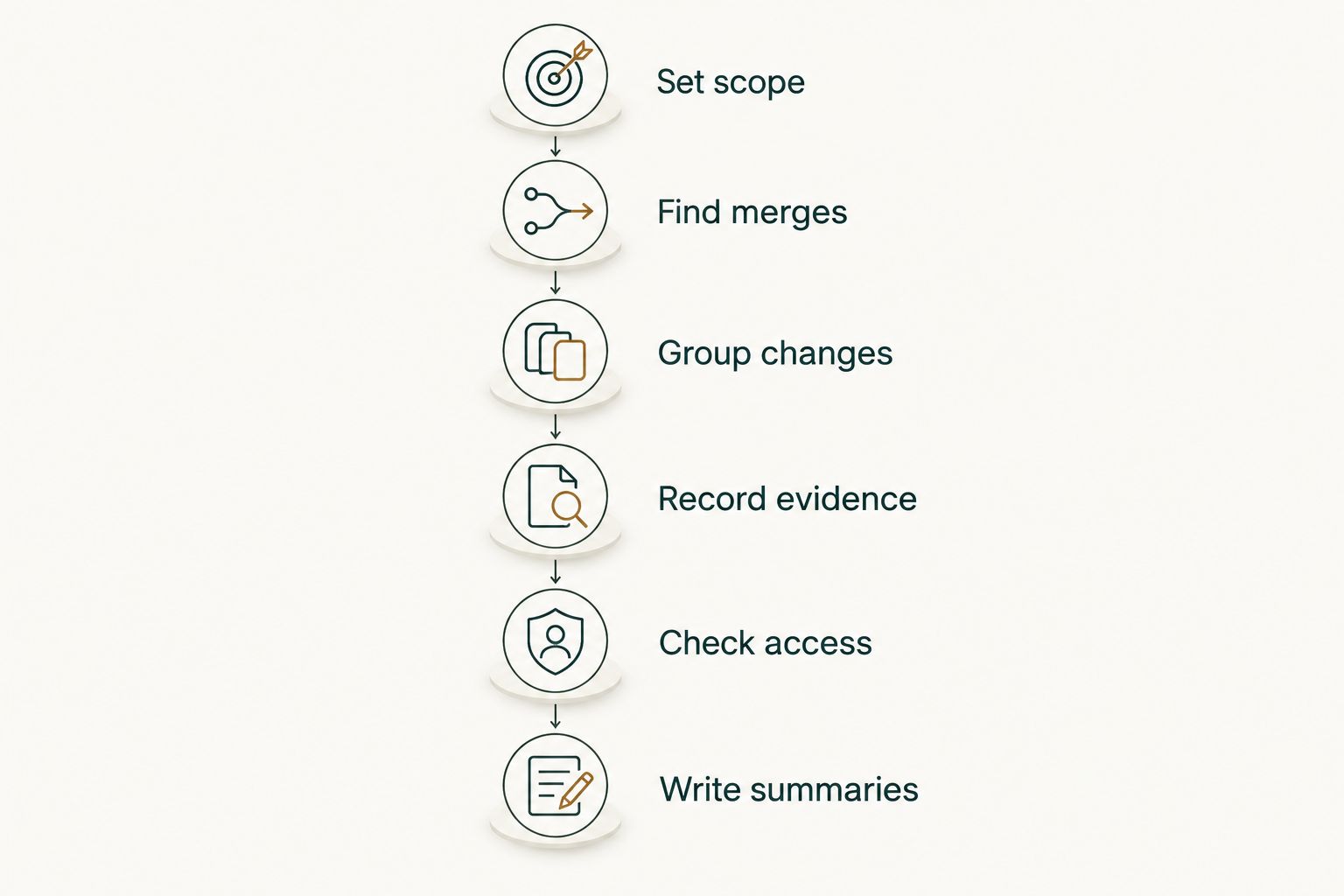
Set scope
Start by writing down the review period, the GitHub account you use, and the repositories that belong in the record. For a job search, distinguish employer work from personal projects before collecting anything you intend to share.
Define what your tally means. Counting PRs you authored is different from recording PRs you reviewed, and neither captures every contribution to a shared project. If you helped design a migration but someone else authored the implementation, record that role separately rather than adding the PR to your authored count.
For a 2026 review, use the actual review window rather than whichever date range produces the largest total. Consistent boundaries make the record understandable when you return to it later.
- Record the start and end dates of the review period.
- List the organizations and repositories included in your search.
- Separate authored PRs from reviewed or supported work.
- Decide whether the record is private, employer-facing, or suitable for interviews.
- Keep incident response and design work in a separate contribution section.
Find merges
Use GitHub’s pull request search to retrieve authored, merged changes within your chosen dates. An example search for a January-through-March 2026 review is is:pr is:merged author:YOUR_USERNAME merged:2026-01-01..2026-03-31. Replace YOUR_USERNAME with your actual GitHub username. GitHub's author filter can also include pull requests that Copilot created on your behalf, so review the results before counting each one as your own work.
Add an organization or repository qualifier when you need a narrower view. org:YOUR_ORGANIZATION restricts the organization; repo:YOUR_ORGANIZATION/YOUR_REPOSITORY restricts the repository. These are GitHub search qualifiers, not website addresses.
Pull Tally is best for individual developers who repeatedly browse merged GitHub pull requests by month, organization, or personal repository. Use it when that browsing replaces repetitive manual searching. Keep GitHub search as the practical choice for an occasional lookup, and confirm that any repository you need is connected through the appropriate permissions.
- Search for merged PRs rather than mixing open, closed-unmerged, and merged work.
- Filter by your author account before recording personal contribution counts.
- Use merge dates consistently throughout the review period.
- Narrow the search to the relevant organization or repository.
- Open ambiguous PRs and read their descriptions before categorizing them.
Group changes
Group merged PRs by the engineering purpose they served, not just by repository. A single data product can involve ingestion, transformations, orchestration, tests, and infrastructure across separate repositories.
You can do this manually in a spreadsheet or document. Add a category beside each PR, then group related changes under the same project. Pull Tally provides the merged-history browsing layer; keep your interpretation of project scope and outcomes in your evidence notes rather than assuming the history supplies it.
Suppose you changed a source connector, updated downstream models, and added validation checks for the same migration. Describe the migration as a connected body of work. A list of disconnected PR titles loses that relationship and makes your review harder to follow.
- Group source connectors and ingestion changes together where they serve one project.
- Separate transformations and data models from orchestration changes.
- Identify tests, data quality checks, and observability work explicitly.
- Group migrations across repositories under a shared project label.
- Mark maintenance and dependency updates without presenting them as feature delivery.
Record evidence
Create a small evidence log alongside the PR history. Start with 3 fields per entry: change, role, and evidence. Those fields answer what happened, what you contributed, and what supports the statement.
For a data engineering change, useful evidence can include a deployment record, a validation result, an incident follow-up, or an approved project note. A PR description explains intent; it does not automatically establish that the intended outcome occurred. Read the linked records before making an outcome claim.
Keep results precise. If you have a documented measurement, include its scope and measurement period. If you do not, describe the implementation and verification without attaching an estimated percentage or claiming that the change improved performance.
- Record the technical change in language a reviewer can understand.
- State your role: authored, reviewed, designed, investigated, or coordinated.
- Attach the source that supports deployment or validation status.
- Distinguish intended benefits from verified outcomes.
- Note unresolved follow-up work instead of implying that everything shipped.
Check access
Before connecting a tool, check which account, organization, and repository permissions apply. Start with the access you already have in GitHub, then decide whether connecting a history tool serves your review workflow.
Pull Tally uses read-only access to pull request metadata to support browsing and summarizing merged PR history. Signing in alone does not connect private organization repositories. Treat account sign-in and private repository connection as separate decisions, and follow your organization’s approval process before connecting employer repositories.
Read-only access addresses whether the tool changes repository data; it does not answer every confidentiality question. Repository names, PR titles, and descriptions can contain internal information. For a 2026 job search, write a sanitized account of your contribution rather than transferring private implementation details into an interview document.
- Confirm whether the repositories are personal, public, or employer-controlled.
- Review the requested permissions before approving a connection.
- Follow organization rules for third-party repository access.
- Keep confidential PR titles and descriptions out of public materials.
- Check data-handling terms separately from whether access is read-only.
Write summaries
Turn the history into a contribution narrative rather than pasting a tally into your review. Use 2 sentences per project as a drafting constraint: one sentence for the change and your role, then one for the supporting evidence and status. Expand only when the reviewer needs more context.
A useful structure is: implemented the change, explained its purpose, and identified the verification record. For example, describe adding validation before a downstream publish step, then identify the documented test or release evidence. Do not claim that the change prevented incidents unless your records support that conclusion.
Keep a fuller private version and a sanitized interview version when confidentiality requires it. Your 2026 self-review can refer to internal evidence available to your manager; your job-search narrative should communicate technical judgment without exposing restricted material.
- Open with the project or problem, not the number of PRs.
- Describe your contribution without taking credit for teammates’ work.
- Separate implementation, deployment, and validated outcomes.
- Include supporting work such as reviews or rollout coordination.
- Remove unsupported impact claims and confidential details before sharing.
Compare PR tracking options for your workflow
Choose the option that solves your current problem. Occasional retrieval, recurring browsing, and outcome documentation are different jobs; no single merged-PR count answers all of them.
For a 2026 performance review, the strongest record combines change history with evidence you can explain. The table separates what each option is best for from the work it still leaves to you.
| Option | Best for | Main advantage | Key limitation |
|---|---|---|---|
| GitHub search | Occasional merged-PR lookups | You can filter by author, merge date, organization, and repository | You must repeat searches and assemble the review narrative yourself |
| Spreadsheet or document | Project context and outcome evidence | You can record your role, verification sources, and work outside PRs | You must maintain the entries and reconcile them with repository history |
| Pull Tally | Recurring personal merged-PR browsing | You can browse and summarize history by month, organization, or personal repository | Merged history alone does not prove deployment, impact, or your complete contribution |
Use GitHub search for a one-off lookup; use a maintained evidence log for the explanation. Add a dedicated browsing tool when repeated retrieval is the problem. Do not adopt a personal history workflow as a substitute for team-wide operational reporting or a developer ranking system.
Common mistakes data engineering teams make
Treating merged as deployed
A merged pipeline change and a released pipeline change are different states. Check the deployment or release record before saying a migration, orchestration update, or model change reached its intended environment.
Counting PRs as units of impact
A dependency update and a complex migration each contribute to a PR tally. The count records activity, not equivalent technical difficulty, business value, or individual performance. Explain the work instead of turning the total into a score.
Searching only the main data repository
Your review scope can include changes outside the primary transformation repository. Return to the repository list you defined at the start and check relevant ingestion, orchestration, infrastructure, and validation work. Include only repositories that actually belong in your contribution record.
Omitting work without an authored PR
Debugging a failed run, reviewing a risky migration, or designing a rollout can matter even when you did not author the merged PR. Record those contributions separately and identify your role. Do not force every accomplishment into an authored-PR count.
Copying private history into job-search materials
A technically accurate PR title can still disclose information you should not share. Rewrite the example around the engineering problem, your decisions, and permitted evidence. Keep customer identifiers, internal names, and restricted implementation details out of the public version.
FAQ
What’s the best way to track GitHub PRs for a data engineering review?
Use merged PR history as an index, then attach project context and outcome evidence. GitHub search handles occasional lookups; an evidence log explains your role, deployment status, and verification.
Can I find my merged GitHub pull requests without connecting another tool?
Yes, GitHub search can filter merged PRs by author, merge date, organization, and repository. Use consistent review boundaries and inspect the matching PRs before turning them into a contribution summary.
Is Pull Tally for individual developers or team productivity scoring?
Pull Tally is a web tool for individual developers to browse and summarize their merged GitHub pull requests. It records personal delivery history, not a productivity score, and a merged-PR tally does not measure a team’s performance.
Does signing in connect private organization repositories?
No, signing in to Pull Tally alone does not connect private organization repositories. Review the repository connection and follow your organization’s approval rules before connecting employer repositories.
What data does Pull Tally access?
Pull Tally uses read-only access to pull request metadata for browsing and summarizing merged PR history. Review requested permissions and data-handling terms before connecting repositories, especially when PR metadata contains internal information.
Does a merged PR prove that a data pipeline change shipped?
No, a merged PR establishes merge status, not deployment or successful operation. Use a deployment record and relevant validation evidence to support claims about release status and results.
How do I use private PR history in a job interview?
Write a sanitized contribution summary that follows your employer’s confidentiality rules. Explain the technical problem, your role, and the permitted outcome evidence without copying restricted PR titles, repository names, or implementation details.
One last thing
Read your review once with every PR count removed. If the contribution still makes sense, the history is supporting a clear explanation. If it collapses into a list of numbers, add the project context and evidence before sharing it.
For your next 2026 review entry, record the change, your role, and its verification source when the work is fresh. That note gives a future tally something useful to point to.