How much does Pull Tally cost?
How much does Pull Tally cost? Check current terms, compare monthly GitHub PR tracking with manual search, and review read-only access before connecting accounts.

Check Pulltally for its current pricing terms before deciding whether to use it in 2026. Judge the cost against the manual GitHub searching it would replace, and review repository permissions separately: access is read-only, and signing in alone does not connect private organization repositories.
Why this matters
A pull request history tool earns its place when you keep repeating the same search. Preparing a performance review often means finding merged work across several months, separating organization work from personal repositories, and remembering why each change mattered. The search is only the beginning.
Pulltally is best for individual developers who repeatedly browse and summarize their merged GitHub pull requests. That is a narrower purpose than evaluating engineering performance or reporting an entire team's output. Personal delivery history, not a productivity score.
For a 2026 performance review, decide what evidence you need before comparing tools. A monthly list helps you find work; a useful review also needs your explanation of the problem, your contribution, and the result. Keeping those tasks separate prevents you from treating a tally as a finished self-review.
How much does Pulltally cost?
Use the current pricing terms on the site as the source for your purchase decision. Do not treat a feature description, a search-result snippet, or an older article as a price commitment. Confirm the applicable terms before taking any paid action.
Make that check against a specific task rather than a general desire to organize your work:
- Define the task. Write down whether you need a single merged pull request lookup, a monthly history, or evidence for a performance review.
- Define the scope. Identify the organization or personal repositories whose merged work belongs in that task. Keep unrelated work out of the comparison.
- Check current terms. Read the pricing and payment terms presented by the site. If a payment commitment is involved, understand it before accepting it.
- Review access. Confirm which repositories you intend to connect. Signing in alone does not connect private organization repositories.
- Compare the work. Ask whether browsing and summarizing your history replaces searches you otherwise repeat manually.
For example, a developer preparing a review covering January through March 2026 needs a defined period and the relevant repository scope. A developer checking whether a particular fix merged needs a much narrower lookup. Those are different jobs, even when both start with GitHub pull requests.
Do not turn the comparison into an estimated savings claim without measuring your own process. The useful question is concrete: does the tool replace the steps you actually repeat, or does it add another place to check?
GitHub search or a dedicated history tool?
Both approaches can support a personal review workflow. The choice depends on whether you need an occasional answer or a history you return to regularly.
| Option | Best for | What it helps you do | Limitation to account for |
|---|---|---|---|
| GitHub search | An occasional lookup | Find pull requests using filters for author, merged status, dates, and repository scope | You still organize the relevant results and write the explanation yourself |
| Pulltally | Recurring personal delivery history | Browse and summarize merged pull requests by month, organization, or personal repository | A merged history does not establish impact or replace your explanation of the work |
Choose GitHub search when the task is small and occasional. If you already know the repository and approximate merge date, start there. You do not need to introduce another tool merely to retrieve a single piece of evidence.
Consider a dedicated history tool when the task repeats. If every review starts with reconstructing the same monthly record across your organization and personal repositories, that repeated browsing is the relevant comparison. Assess the tool against that task, not against promises about becoming a better developer.
Neither approach tells the whole story of your contribution. A pull request title can identify a change, but it does not necessarily explain the constraint you worked under, the decisions you made, or the help you gave someone else. Add that context yourself.
Build a review workflow before choosing a tool
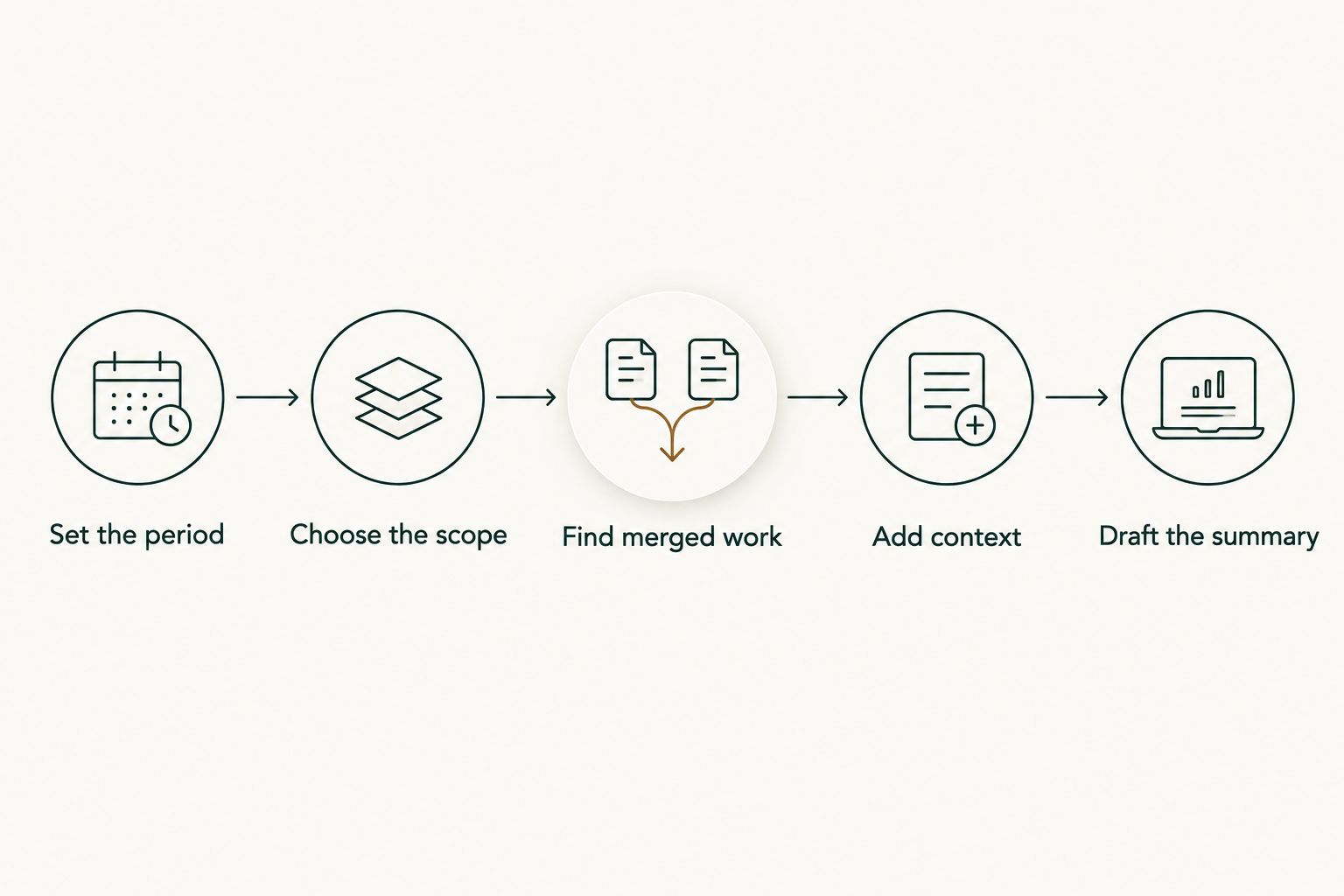
A clear workflow makes the cost decision easier because it shows exactly where manual searching happens. Use the same sequence for a performance review or a job-search evidence document, then adjust what you share for the audience.
Set the period
Choose a review window before gathering results. For a monthly record, January 2026 is a 1-month window; January through March 2026 is a 3-month window. A full calendar year contains 12 months, but that does not mean every review should include the entire year.
Use merge dates consistently when the task is to describe merged work. Mixing creation dates with merge dates changes which period a pull request belongs to. Label your notes clearly so you can understand the record when you return to it later.
Choose the scope
Separate organization work from personal repository work before drafting your summary. A performance review and a job application have different audiences, so the same history does not automatically belong in both documents.
For an employer review, identify the work relevant to that role. For a job search, keep confidential repository details out of materials intended for external readers. Access to a repository is not permission to publish its contents or internal context.
Find merged work
Start with pull requests you authored and that were merged during the chosen period. In GitHub search, is:pr, is:merged, and author:USERNAME establish that basic scope; USERNAME represents your actual GitHub username. Add a repository or organization filter when you need to narrow the results.
For a January 2026 search, a merge-date filter such as merged:2026-01-01..2026-01-31 defines the calendar month. Review the results rather than assuming the query alone produces a complete career record. Merged pull requests are the subject of this workflow, not every kind of contribution.
Add context
Turn each useful result into a short evidence note. Record the change, why it mattered, what you personally contributed, and where a reviewer can verify the description within the permitted audience.
Be precise about outcomes. If you cannot support a performance improvement, customer effect, or time-saving claim, describe the change without adding an estimated result. A clear account of a migration, bug fix, or maintenance task is stronger than an unsupported success metric.
Draft the summary
Group the evidence into themes your reader can understand: reliability work, maintenance, delivery of a feature, or improvements to a development process. Use only themes that match your actual work. Do not force every merged pull request into a headline achievement.
Keep the original history as supporting evidence and write the summary separately. That separation lets you shorten the narrative without losing the record behind it. It also makes later monthly updates easier to review.
Why the value varies between developers
The relevant differences are in your workflow, not in an assumed plan structure. Use these factors to decide whether a history tool belongs in your routine:
- How often you return to the history. An occasional lookup and a recurring monthly summary create different amounts of repeated searching.
- How you divide the work. Organization work and personal repository work need distinct scopes when they serve different audiences.
- Which period you need. A monthly record and a longer review window require different ways of organizing the same underlying work.
- What you are preparing. A performance review needs role-specific evidence; a job search needs an externally appropriate description of your contribution.
- How much context you already keep. A well-maintained evidence document changes what you need from a merged pull request history.
These factors help you evaluate usefulness; they do not establish a subscription price. Keep the decision tied to the task that exists today rather than a reporting habit you might never adopt.
A sensible 2026 comparison starts with your current method. Reconstruct a relevant period using that method, identify the repetitive steps, and assess whether a dedicated tool addresses them. Do not assume that more organized data automatically creates a stronger review.
What data does access cover?
Pulltally uses read-only access to pull request metadata for its history workflow. Its stated purpose is to let an individual developer browse and summarize merged GitHub pull requests by month, organization, or personal repository. Read-only access describes the access mode, not an unrestricted connection to every repository.
Signing in alone does not connect private organization repositories. Treat account sign-in and repository connection as separate questions when deciding what work to include. Review the requested scope before connecting organization work, and follow your organization's rules for external tools.
Permissions and purchase terms answer different questions. One concerns what data the tool can access; the other concerns what you agree to when using it. Check both instead of assuming that understanding one settles the other.
For a job-search document, review the final text independently of the access decision. Even a read-only workflow can produce notes that you should not share externally. Describe your role and contribution without exposing confidential details.
Do I need a tool for a single performance review?
Start with GitHub search if your task is a single, bounded lookup. Define the period, identify relevant merged work, and draft the review from those results. Evaluate a separate tool only when the browsing or organization becomes a repeated task.
A tool choice should follow the work, not create it. If your existing evidence document already contains the necessary context, use the repository history to verify details rather than rebuilding the document from scratch.
Does a higher merged pull request count mean better performance?
A higher merged pull request count is not a productivity score. The count describes merged pull requests within a chosen scope; it does not establish the difficulty, significance, or quality of the work.
Use a tally to locate evidence, then explain the contribution. Avoid comparing developers through counts when their responsibilities and types of work differ.
Can I use personal repository work in a job search?
Personal repository work belongs in a job-search summary when it supports the role you are applying for and is appropriate to share. Describe what you built or changed, the decisions you made, and the relevant evidence.
Keep organization work separate. If you cannot share a repository or internal detail, write an accurate description that respects those limits rather than copying private history into an application.
FAQ
How much does Pull Tally cost in 2026?
Check Pulltally's current pricing terms on its site before making a purchase decision in 2026. Compare those terms with the recurring GitHub searching the tool would replace.
Is GitHub search enough for an occasional merged pull request lookup?
GitHub search is a suitable starting point for an occasional merged pull request lookup. Filter by author, merged status, period, and repository scope, then review the results.
Who is a merged pull request history tool best for?
A merged pull request history tool fits individual developers who repeatedly reconstruct their delivery history for performance reviews or job searches. It supports finding evidence, not scoring productivity.
Does signing in connect private organization repositories?
Signing in alone does not connect private organization repositories. Review repository connection and permission scope separately from account sign-in.
Is access to my pull request data read-only?
Pulltally describes its access as read-only access to pull request metadata. Review the requested scope and your organization's rules before connecting work repositories.
Can a merged pull request tally prove my impact?
A merged pull request tally does not prove impact. Explain the problem, your contribution, and any outcome you can support with evidence.
Should I mix personal and organization repositories in my review?
Separate personal and organization repositories when they serve different audiences. Include only relevant work and keep confidential organization details out of external job-search materials.
One last thing
Write the explanation while you still remember the work. A merged pull request record preserves evidence of a change; your notes preserve why it mattered and what you contributed. Waiting until review time makes those different tasks collide.
For your next monthly update, browse the relevant merged work and add a short note beside the changes that matter. Keep the notes factual and audience-appropriate. Whether you use search or a dedicated history tool, that context is what turns a list into a useful account of your work.