How long does it take to write a self-review from GitHub PRs?
How long does it take to write a self review from GitHub PRs? Scope determines the work. Find merged PRs, check outcomes, and write an evidence-based review.

Writing a self-review from GitHub PRs takes both evidence-gathering time and writing time; there is no fixed duration that applies across developers. A filtered list of merged PRs reduces the searching, but you still need to explain your contribution, verify outcomes, and describe work that never became a pull request. Treat finding the work and explaining its impact as separate tasks.
Why this matters
When you prepare a performance review, the hard part is often remembering what happened across repositories and months. A PR list answers what merged. It does not automatically answer why the change mattered, what you owned, or what happened after release.
For a 2026 review, start with the review period and your employer’s questions rather than an unrestricted search of your entire history. The guide to tools that generate self-review summaries from GitHub PRs covers the evidence-gathering side; your review still needs a clear account of your responsibilities and results.
How long does it take to write a self-review from GitHub PRs?
The duration depends on the state of your evidence when you start. A developer with a defined review period, accessible repositories, and notes attached to completed work has a different task from someone reconstructing contributions from scattered PR titles.
A retrieved PR list is a starting point, not a finished self-review. Separate the work into finding contributions, interpreting them, and drafting the final account. That distinction makes your own time estimate more useful than an unsupported average.
| Approach | Best for | What it helps you do | What remains your responsibility |
|---|---|---|---|
| GitHub search | An occasional lookup in a defined scope | Find merged PRs using author, date, repository, or organization filters | Repeat searches as needed, group related changes, and verify outcomes |
| Pulltally | Individual developers repeatedly reconstructing merged PR history | Browse and summarize merged PRs by month, organization, or personal repository | Add context, explain ownership, and include work outside PRs |
| Existing review notes | Developers who recorded context while doing the work | Recover decisions, collaboration, and outcomes alongside PR references | Check that the notes match the review period and supporting evidence |
GitHub search gives you direct control over the query, but gathering a review across different scopes still requires manual organization. Existing notes preserve context, but notes alone do not establish that a change merged. Pulltally is best for individual developers who repeatedly browse merged GitHub PRs for performance reviews or job searches.
None of these approaches turns a merge count into a performance assessment. Choose the retrieval method that removes repetitive searching, then write from the evidence rather than from the total.
Build the review in separate evidence and writing passes
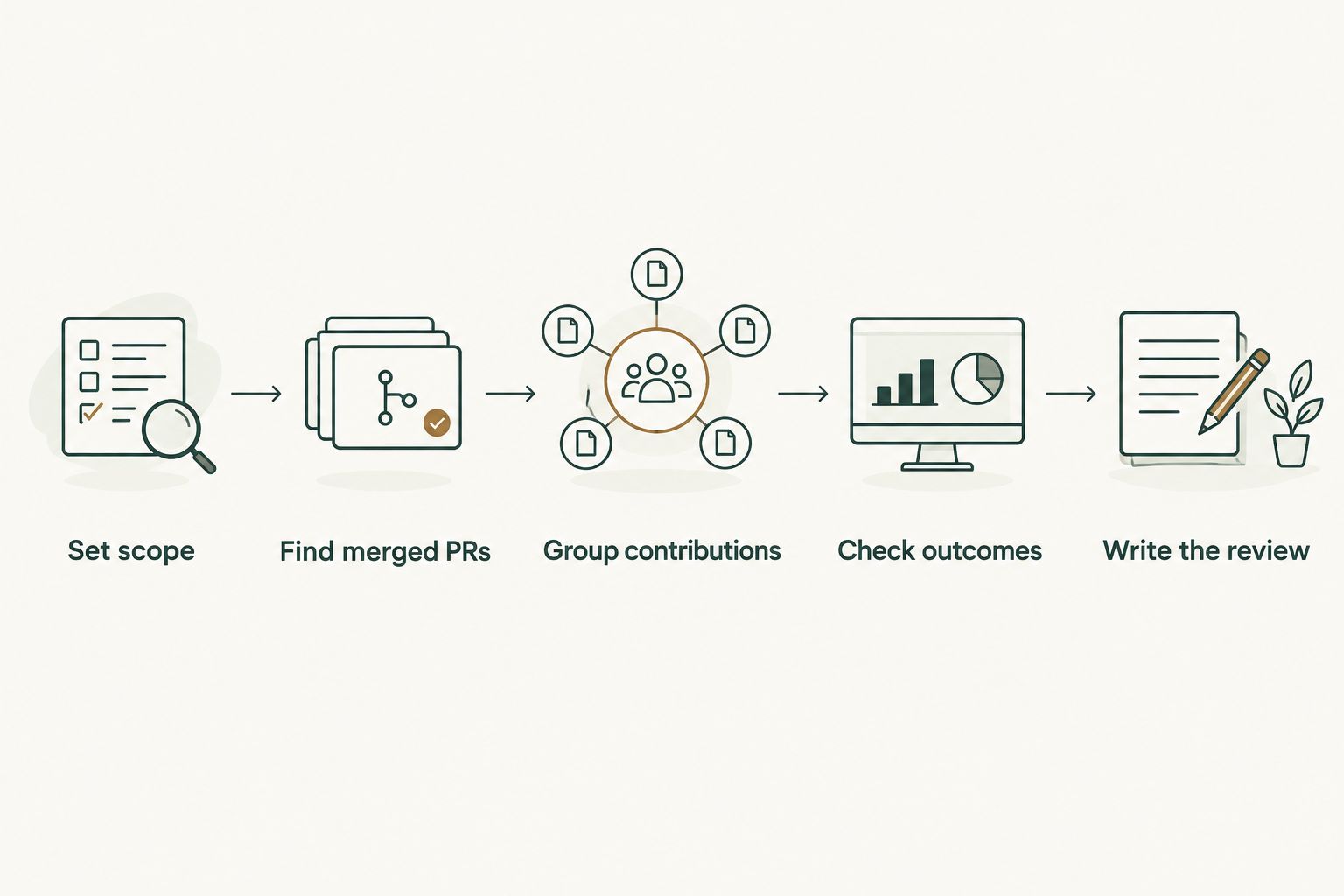
Use 2 separate passes: first gather and check the evidence, then write the narrative. This is a workflow recommendation, not a claim about how many minutes a review should take. It keeps you from polishing a paragraph before you know whether the underlying example belongs in the review.
Set scope
Choose 1 review period before searching. For example, a review covering January through March 2026 should use those boundaries consistently across your searches, notes, and final examples.
Also decide what you mean by your contribution. PRs you authored are not the same as PRs you reviewed, merged for someone else, or helped unblock. If the review asks about collaboration, keep that evidence alongside your authored changes instead of treating authorship as the whole record.
Write the scope at the top of your working document. Include the date range, relevant repositories or organizations, and the review questions you need to answer. These boundaries tell you when the retrieval task is complete.
Find merged PRs
For an authored-PR lookup while signed in to GitHub, a search can begin with:
is:pr is:merged author:@me merged:2026-01-01..2026-03-31
The merged: filter selects the merge date rather than the date the PR opened. That distinction matters when a change began before the review period but merged during it. Add a repository or organization filter when you need a narrower scope.
Check the results against the access you currently have. Search results cannot serve as a complete record of repositories you cannot access. If your review includes work from a previous organization, use records you are authorized to retain and share rather than trying to bypass access restrictions.
Group contributions
Group related PRs into contributions before you write paragraphs. A feature, migration, or reliability fix can involve several pull requests; listing each separately can make the review harder to read without explaining more.
Use 3 evidence fields for each candidate contribution:
- Contribution: What you changed and which part you owned.
- Evidence: The PR references and other records that support the account.
- Outcome: What happened, with a distinction between verified results and intended effects.
These fields keep the draft anchored to facts. A title such as “refactor validation” identifies a change, but it does not establish why the refactor was needed or whether it improved anything. Read the description, linked issue, and relevant discussion before choosing the wording.
Check outcomes
For every outcome sentence, ask what supports it. A merged PR supports that a change entered the target branch. It does not, by itself, prove deployment, adoption, reduced incidents, or customer benefit.
If a release record confirms deployment, describe deployment. If an issue documents a resolved bug, describe the fix. If the evidence stops at implementation, state the implementation and its purpose without inventing a downstream result.
For a 2026 review, keep outcome evidence within the relevant reporting context. A result observed outside the review period needs an explicit date distinction rather than being silently folded into the period’s achievements.
Write the review
Draft around the employer’s review questions, not the order of search results. Put the contribution first, describe your role, and then give the supported outcome. Add a PR reference where it helps the reviewer check the account.
Use plain verbs: implemented, fixed, reviewed, documented, investigated, or coordinated. Avoid replacing evidence with adjectives. “Implemented input validation for the import path” describes work; “made a major impact” leaves the reader asking what happened.
End the writing pass by checking attribution. If several developers contributed, distinguish your responsibility from the team’s result. That makes the review more precise without diminishing the work.
Why self-review writing time varies
The amount of reconstruction determines the work more than the number of PRs alone. Use these factors to assess your preparation task:
- Review scope: A defined month or reporting period gives you a clear search boundary. An undefined scope leaves you deciding what belongs while you write.
- Repository coverage: Work across organizations and personal repositories requires separate scope checks. Current access determines which records you can inspect.
- PR context: Descriptive titles, bodies, and linked issues explain more than terse titles alone. Thin descriptions send you back to the discussion or surrounding work.
- Contribution structure: Several PRs can belong to the same initiative. Grouping them takes judgment that a raw list cannot replace.
- Outcome evidence: Implementation evidence and impact evidence answer different questions. Verifying the latter adds work when it is not already in your notes.
- Work outside PRs: Reviews, mentoring, incident response, planning, and documentation need their own supporting records when they are relevant to the review.
For your next 2026 review, notice where you spend effort: searching, reconstructing context, checking results, or editing. Fixing the slowest stage is more useful than setting an arbitrary deadline for the whole task.
How can I estimate my own self-review writing time?
Estimate from a contribution you can actually inspect, not from a PR count. Take a representative piece of work through retrieval, context checking, outcome verification, and drafting. Record the elapsed time for each stage separately.
Then inspect the remaining contributions for differences. A well-documented fix and a cross-repository migration do not require the same reconstruction. Use your recorded experience to plan the remaining work, without assuming every PR takes an identical amount of time.
If you track preparation during 2026, keep retrieval time separate from writing time. That shows whether better monthly notes would help, whether searching is repetitive, or whether the main difficulty is explaining results.
Can a merged PR summary replace my self-review?
A merged PR summary cannot replace a self-review because it does not establish your full responsibilities or every outcome. It is useful evidence for code contributions, especially when you need to reconstruct work you no longer remember clearly.
Use the summary to identify candidates, then select examples that answer the review questions. Do not paste the entire history and ask the reviewer to infer the significance. Your job is to make the connection between the work, your role, and the supported result.
For job searches, apply the same rule more strictly: explain the contribution without exposing private code, internal links, or confidential business details. A useful account of your work does not require publishing the underlying repository.
Should I count PRs in a performance review?
A PR count describes activity within a chosen scope; it does not establish productivity or impact. If you include a tally, label the date range and explain what the tally includes.
Keep the count subordinate to the examples. A developer who split a change into several PRs has not necessarily delivered more value than someone who merged the same work in a single PR. Personal delivery history, not a productivity score.
This distinction also protects the review from accidental overstatement. Authored PRs, reviewed PRs, and merged PRs represent different activities, so do not combine them under an undefined total.
Check permissions before using private repository history
Pulltally uses read-only access to pull request metadata to support browsing and summarizing your delivery history. Signing in alone does not connect private organization repositories. Treat sign-in and private-repository access as separate steps, and check your organization’s rules before connecting work records.
Read-only describes the access; it does not remove your responsibility to handle confidential information correctly. Keep private PR details in approved review documents, and do not copy internal descriptions into a public résumé or portfolio without permission.
For a 2026 job search, prepare a shareable version of each example. Remove internal links and identifying details where required, while retaining an accurate description of your role. If you cannot disclose an outcome, do not substitute an invented metric.
FAQ
How long does it take to write a self review from GitHub PRs?
There is no fixed duration that applies across developers; the work depends on scope, available context, and outcome evidence. Separate finding merged PRs from checking contributions and writing the review.
What's the quickest way to find my merged GitHub PRs?
Start with a scoped GitHub search using is:pr, is:merged, author:@me, and a merged-date filter. Add repository or organization filters when you need to narrow the results.
Is Pulltally better than manual GitHub search for a self-review?
Pulltally is best for individual developers who repeatedly browse merged GitHub PRs by month, organization, or personal repository. Manual GitHub search suits an occasional lookup; either approach still requires you to explain your role and verify outcomes.
Does signing in connect my private organization repositories?
Signing in alone does not connect private organization repositories. Check the repository-access step and your organization's rules separately before connecting work history.
What access is used to browse my PR history?
Access is read-only and covers pull request metadata used to browse and summarize merged PR history. Keep confidential details in documents approved for that information.
Can I use merged PR counts as a productivity score?
Merged PR counts are not a productivity score. They describe activity within a defined scope, not the complexity, quality, or impact of the work.
What should I write when I cannot prove the impact of a PR?
Describe the verified contribution and its purpose without claiming an unverified result. A merge establishes that the change entered the target branch, not that it was deployed or produced a business outcome.
Can I use private GitHub PRs in a job-search self-review?
Use private work examples only within the disclosure rules that apply to them. Describe your contribution without exposing private code, internal links, or confidential details.
One last thing
A PR’s merge date and its release date answer different questions. Before you call something shipped, check the release evidence rather than relying on the merged label.
For your next review, keep a short outcome note beside each contribution as the work happens. Record what you owned, where the evidence lives, and what result you can support. That reduces later reconstruction without turning your delivery history into a score.