How long does it take to set up Pull Tally?
How long does it take to set up Pull Tally? Start with sign-in, then confirm read-only repository access before using merged PR history for your next review.

Pull Tally setup takes as long as signing in and establishing read-only access to the repositories you want to include; signing in alone does not connect private organization repositories. Treat setup as complete when you can browse the merged GitHub pull requests relevant to your review or job search, rather than when you have merely signed in.
How long does it take to set up Pull Tally?
Plan around access, not a fixed minute count. The useful endpoint is a history you can browse and summarize for the repositories and months that matter to you. An authenticated account and an accessible private organization history are not the same thing.
| Approach | Best for | What it gives you | Limitation |
|---|---|---|---|
| Pull Tally | Individual developers repeatedly reviewing merged PR history | Browsing and summaries by month, organization, or personal repository | Signing in alone does not connect private organization repositories |
| GitHub search | An occasional lookup with a defined author, repository, and date range | A filtered list of matching pull requests | You still select examples and write the account of your contribution |
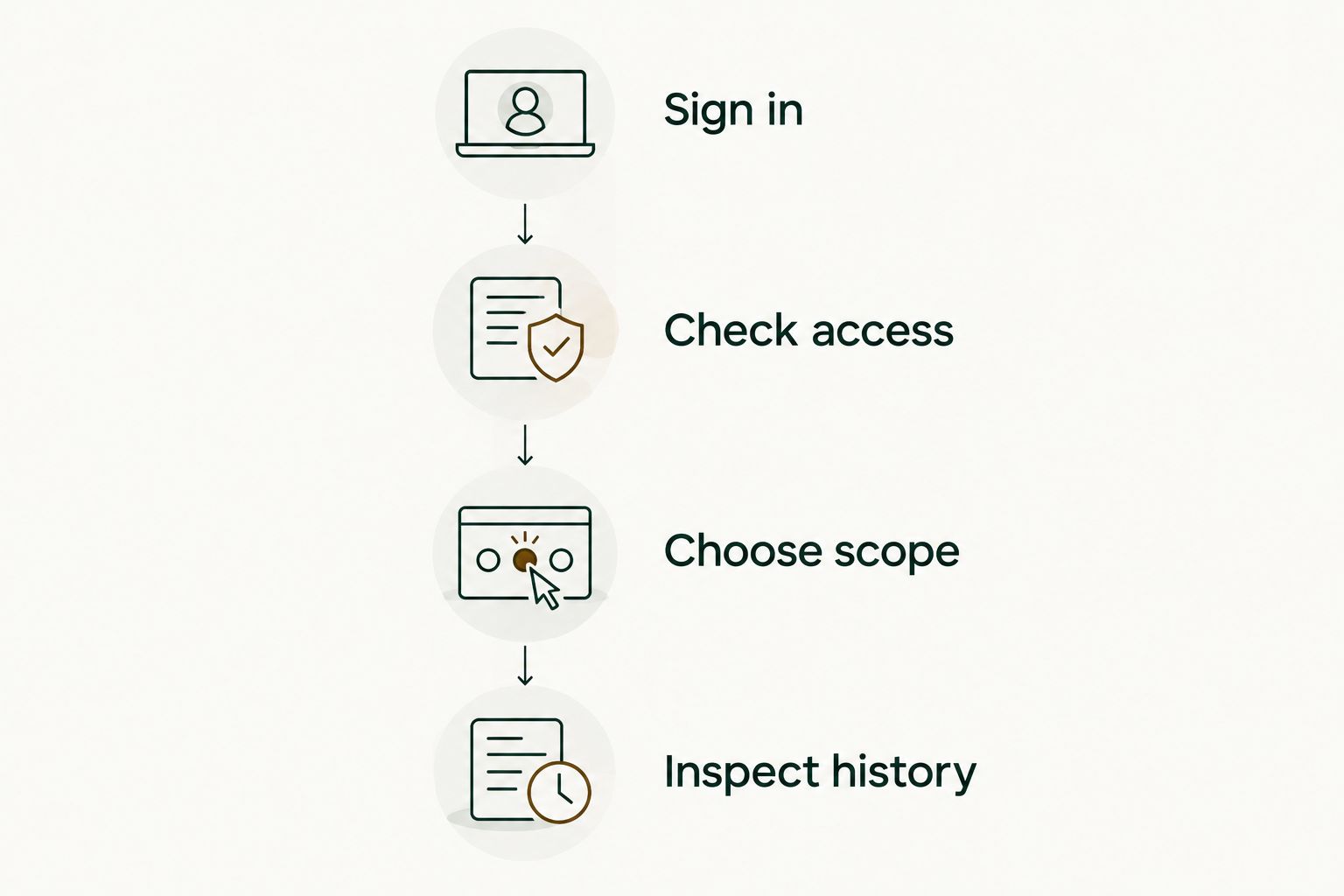
Use the following checkpoints to decide whether setup has reached the point you need. These are completion checks, not a promised sequence of interface screens.
- Sign in. Establish your identity, but do not treat authentication as proof that every repository is connected.
- Check access. Confirm read-only access to the pull request metadata you intend to use. Private organization repositories require attention beyond signing in alone.
- Choose scope. Decide whether your review concerns an organization, personal repository, or monthly history.
- Inspect history. Browse the merged PRs for that scope and check that the work you expected to find is represented.
A personal project and an employer's private organization are different scopes. If your review depends on the employer's repositories, seeing personal work does not establish that you have finished setting up the relevant history.
Why this matters
For a performance review, an incomplete history creates an incomplete starting point. You need to know which repositories and dates your summary covers before using it to recall work or choose examples.
Pull Tally is best for individual developers who repeatedly browse merged GitHub pull request history for reviews or job searches. It replaces repeated manual searching where a monthly or repository-based view fits the task. For a single known PR, a direct GitHub lookup remains useful.
Personal delivery history is not a productivity score. A merged PR tells you that a change was merged; the count alone does not establish its difficulty, business effect, or your entire contribution. Keep the history separate from the explanation you write about it.
Separate sign-in from repository access
Signing in answers the identity question. Repository access answers the scope question: which pull request metadata can you browse and summarize? Do not combine those questions into one assumption about setup.
The access described here is read-only access to pull request metadata. That data supports the tool's stated job: browsing and summarizing merged GitHub pull requests. Read-only describes the permission level, not evidence that every organization repository is connected.
Before using private work in a review, confirm that you are looking at the organization and repositories you intend to include. If you can see a personal repository but not the employer repository relevant to your review, do not substitute the personal history and call the review complete.
For a job search, distinguish access from permission to disclose. Being able to view a private PR does not authorize you to publish its title, description, or internal details. Write about your contribution within your employer's confidentiality rules, and leave confidential links out of public material.
Choose the history you actually need
A useful setup starts with a defined question. Decide what you are trying to remember before deciding whether the available history answers it.
A monthly review
For a monthly review, choose 1 calendar month. January 2026, for example, runs from January 1 through January 31. Your task is to inspect merged work in that interval and select changes that deserve an explanation.
Do not treat the resulting count as the review itself. A small change that fixed a recurring problem and a large implementation both need context. Add what changed, why it mattered, and what evidence you can share.
A quarterly self-review
For a quarterly self-review, choose 3 calendar months. January through March 2026 is a concrete example. Keep the repository scope consistent as you browse those months so that your notes describe the same body of work.
If your work spans personal and organization repositories, decide which belongs in the review. A side project is useful evidence for some job applications, but it is not automatically part of an employer performance review.
An annual review or job-search history
For an annual review, choose 12 calendar months. A 2026 review can use January through December when that matches your employer's review period; use the employer's actual dates when it does not.
For a job search, start with the role's requirements instead of a raw annual total. Select merged changes that help you explain relevant experience. Then remove confidential details before turning internal evidence into an external example.
These intervals describe the history you want to review, not setup duration. A longer reporting period changes the evidence you inspect; it does not justify a claim about how many minutes setup takes.
What determines the setup work?
The setup work follows the scope and access requirements of your task. These factors are concrete checks, not estimates of waiting time:
- Private organization access. Signing in alone does not connect private organization repositories. Check that scope separately when your review depends on it.
- Personal repository scope. Decide whether personal work belongs in the summary you are preparing. Do not confuse access to a personal repository with access to employer work.
- Organization scope. Identify the organization whose merged PR history you need. A summary from a different organization does not answer the same review question.
- Monthly scope. Choose the month or months relevant to the review. An accessible history with the wrong date scope is still the wrong evidence set.
- Your intended output. A monthly tally, a self-review narrative, and a job-search example use the same history differently. Decide which one you need before collecting notes.
The stopping rule is relevance: you can stop checking setup when the accessible merged history matches the repository scope and period you intend to use. Writing the review is a separate task.
Check the result before writing your review
Pick a merged PR you already know belongs in the selected scope. Use it as a reference point when inspecting the history. This is a practical check of your selection, not a guarantee that every contribution is represented.
Check its repository and merge date. A PR opened outside your chosen month but merged within it belongs to a merge-date question. A PR opened within the month but merged later answers a different question.
Keep three questions separate:
- Does this change belong to the repository scope I chose?
- Was it merged within the period I am reviewing?
- What does this change let me explain about my contribution?
The first two questions check your evidence selection. The last one turns a record into a useful review note. Do not ask the tally to supply meaning that belongs in your explanation.
For a 2026 self-review, record enough context that you can understand the example later. A short note about the problem, your change, and the supporting PR is more useful than an isolated count. Include an outcome only when you have evidence for it.
Can I use GitHub search instead of setting up another tool?
Use GitHub search for an occasional lookup. A defined query is a useful alternative when you already know the author, repository, and reporting period. Repeated monthly browsing is where a dedicated history view becomes relevant.
For example, this GitHub search asks for your authored PRs merged during January 2026:
is:pr is:merged author:@me merged:2026-01-01..2026-01-31
The date filter concerns merging, not opening. Add a repository or organization restriction when your question concerns only that scope, and check the results before using the count in a review.
Search does not remove access boundaries. It is an alternative way to locate records you can access, not a route around private repository permissions. You also still need to choose examples and explain the work.
Does signing in connect my employer's private repositories?
Signing in alone does not connect private organization repositories. If your performance review depends on employer work, check access to that organization separately before treating the history as ready.
Avoid using visible personal PRs as a proxy for missing employer history. They describe different work. Keep the review scoped to the repositories that support the claims you intend to make.
When is setup complete enough to start a self-review?
Setup is complete enough when you can inspect merged PR history for the scope and period you need. You do not need to turn every PR into a review bullet before beginning the writing task.
Start with changes you can explain clearly. Describe the problem, your contribution, and the evidence. Use the history to recall work, not to rank yourself by the number of merges.
FAQ
How long does it take to set up Pull Tally for a performance review?
Setup takes as long as signing in and establishing read-only access to the repository scope you need. Signing in alone does not connect private organization repositories; confirm that you can browse the relevant merged history before starting your review.
Does signing in automatically connect my private organization repositories?
No. Signing in alone does not connect private organization repositories, so check organization access separately when your review depends on employer work.
What data does the tool access?
The access described is read-only access to pull request metadata. That metadata supports browsing and summarizing merged GitHub pull requests by month, organization, or personal repository.
Should I use GitHub search for just one month?
GitHub search is useful for an occasional monthly lookup. Define the author, merge-date range, and repository scope, then inspect the results before using them in a review.
Can a merged PR count measure my productivity?
No. A merged PR count describes delivery history, not a productivity score; it does not establish the difficulty, impact, or full scope of your contribution.
Can I put private PR details in a job application?
Repository access does not give you permission to disclose confidential work. Follow your employer's confidentiality rules and describe your contribution without publishing protected details.
What should I check before relying on a monthly summary?
Check the repository scope and merge-date period before relying on a monthly summary. Use a known merged PR as a reference point, then select examples you can explain with evidence.
One last thing
A PR's opening month and merging month can differ. If you are reviewing merged work, inspect the merge date before deciding that a change is missing from a monthly history. This distinction matters whether you use a dedicated history tool or GitHub search.
Once the scope is right, stop treating setup as the main task. Choose the work you want to explain and write the context that the metadata cannot supply: the problem, your contribution, and the supported result.