GitHub PRs to an annual work recap: complete 2026 workflow
Turn github prs to annual work recap with a repeatable 2026 workflow. Find merged PRs, check access, group evidence, and write a clear, factual self-review.

Instead of manually searching GitHub again before every review, turn your merged pull requests into a monthly evidence ledger and use it to write your annual work recap. This 2026 workflow connects repository history to review-ready accomplishments without treating PR counts as a productivity score.
Why this matters
A merged PR tells you that a change entered a repository. It does not, by itself, explain the problem, your contribution, or the result. Your annual recap needs those connections, not a longer list of links.
Pulltally is best for individual developers replacing repeated merged-PR searches with browsable personal delivery history. Use Pulltally when you repeatedly browse and summarize merged work by month, organization, or personal repository. Keep GitHub search for an occasional lookup.
For a 2026 performance review, build the evidence first and write the narrative second. For a job search, use the same process but remove confidential details before sharing anything outside your organization.
Before you start
- Account and repository access: Use the GitHub account associated with your work. Confirm that you can access the repositories you intend to include. Pulltally uses read-only access to pull request metadata; signing in alone does not connect private organization repositories.
- Review scope and working document: Choose your review dates, organizations, and personal repositories. Prepare a private document or spreadsheet with fields for month, repository, PR reference, problem, contribution, outcome, and supporting evidence.
- The gotcha: authorship is not contribution: An author-filtered search excludes PRs you reviewed but did not author. Merged PR history also excludes unmerged work. Record mentoring, design, incident response, and review contributions separately rather than forcing them into the PR tally.
A full calendar-year recap covers 12 months. If you are preparing it before December ends, record the actual cutoff date instead of presenting an incomplete period as the whole year.
Choose your evidence collection method
The collection method should match how often you need the history. Neither a search result nor a summary replaces checking the underlying work.
| Method | Best for | What it contributes | Advantage | Limitation |
|---|---|---|---|---|
| GitHub search | An occasional review-period lookup | Filtered pull request results | You can express author, repository, organization, and merge-date filters directly | You still need to group results and write the context |
| Pulltally | Repeated personal delivery-history lookups | Browsing and summarizing merged PRs by month, organization, or personal repository | Replaces repetitive searches for the same history | PR history alone does not establish business impact or capture every contribution |
| Private evidence ledger | Performance reviews and job-search preparation | Your explanation beside each selected PR | Preserves context that a title cannot carry | Requires you to maintain notes and verify outcomes |
Use the evidence ledger regardless of how you collect PRs. Its purpose is to separate a repository event from the claim you eventually make in a review.
Review scope
Set the period and ownership rules
- Write the reporting period at the top of your working document. For a complete 2026 calendar year, use January 1 through December 31, 2026. For a partial year, replace the end date with your actual cutoff.
- List the organizations and personal repositories that belong in the recap. Keep employer work and personal work distinguishable even when both demonstrate the same skill.
- Decide whether the PR inventory covers authored work only. Add a separate section for reviewed work, shared design decisions, and other contributions.
- Record your GitHub username exactly. Do not substitute your display name in an
author:filter.
Expected result: You have a written scope that explains whose PRs count, which repositories belong, and what dates the recap covers.
Keep the scope defensible
If your review period follows an employment anniversary rather than the calendar year, use those dates. The annual label describes the reporting period; it does not require January through December.
Choose the period before browsing results. Otherwise, memorable work outside the window can slip into the recap while less memorable work inside it gets omitted.
Merged PR inventory
Find authored pull requests in GitHub
- Open GitHub's search field and enter this query, replacing
YOUR_USERNAMEwith your actual username:is:pr is:merged author:YOUR_USERNAME merged:2026-01-01..2026-12-31. - Press Enter. The qualifiers restrict the search to merged pull requests authored by that account and merged within the date range.
- Add
org:YOUR_ORGANIZATIONfor one organization, orrepo:OWNER/REPOSITORYfor one repository. Replace each uppercase token with the real account or repository identifier. - Open relevant results and check the merge date, repository, and description. Save the PR reference in your private ledger; do not rely on the title alone.
Expected result: You have a scoped inventory of authored, merged PRs rather than a mixture of issues, open PRs, and unrelated repositories.
The uppercase tokens are query instructions, not literal account names. Remove them before running the search. For a year-to-date review, change the ending date before using the query.
Split the inventory into months
Use the same query with a monthly range, such as merged:2026-01-01..2026-01-31. Repeat for the months in your reporting period, preserving the author and repository filters.
If you use the browsing tool instead, organize its merged-PR history by the month and organization or personal repository you are reviewing. Keep your written scope beside the results so a change in view does not silently change the recap's boundaries.
Expected result: Each PR belongs to a clearly identified month, and each month uses the same inclusion rules.
Evidence ledger
Add context before drafting
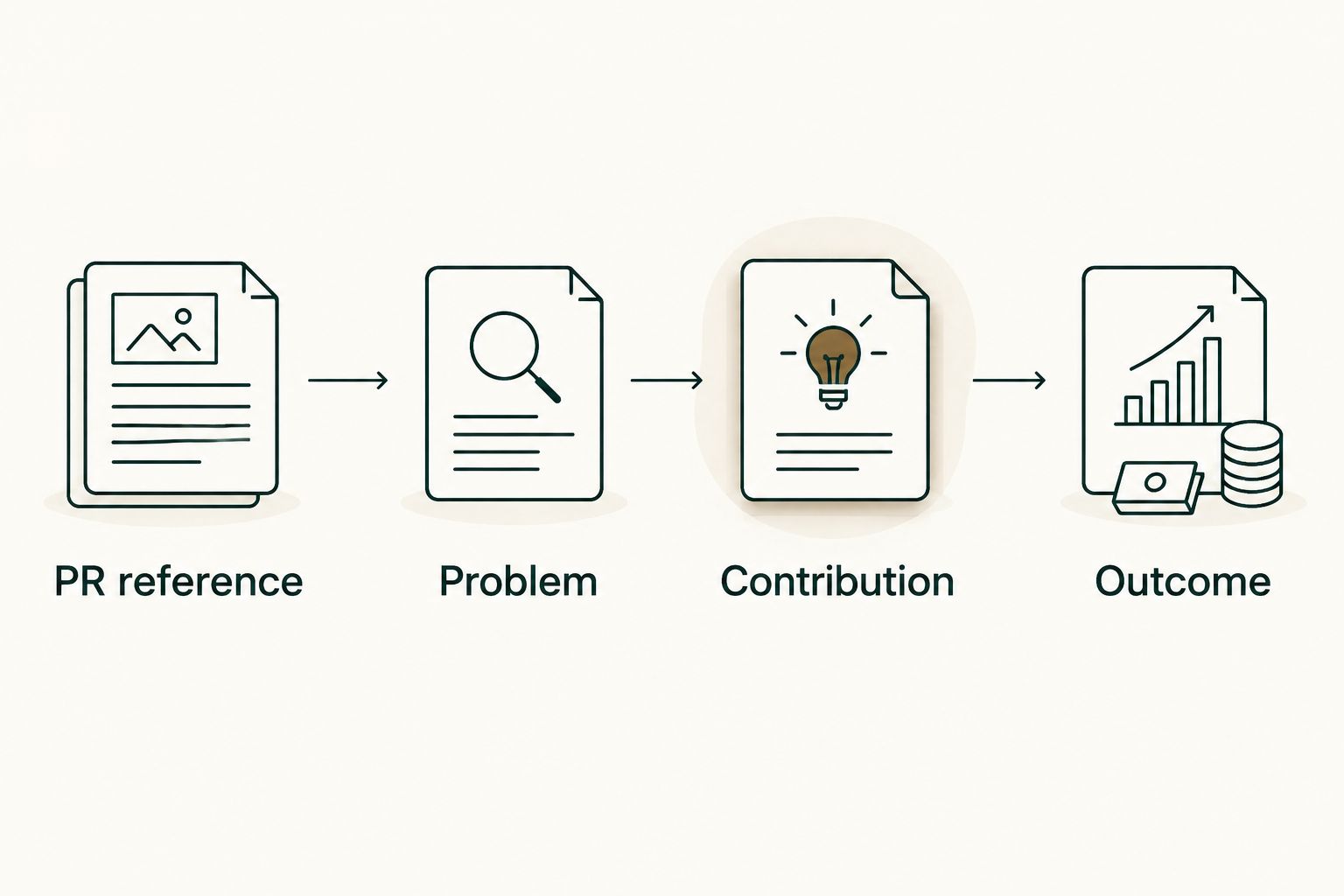
- PR reference: Record the repository and enough identifying information to reopen the pull request. Keep private references in a private document.
- Problem: Describe what needed to change. Use the PR description or linked issue as the starting point, then verify the wording.
- Contribution: State what you personally implemented, investigated, reviewed, or coordinated. Distinguish your part from the team's result.
- Outcome: Record the observed result and its evidence. If you cannot verify an outcome, describe the delivered change without claiming a downstream effect.
Expected result: Every candidate accomplishment has a source, an explanation of your role, and a claim that matches the evidence.
The ledger follows a simple sequence: PR reference, Problem, Contribution, Outcome. Do not skip directly from a PR title to an impact statement.
Write precise evidence notes
A hypothetical note might say that you changed an error-handling path, added regression coverage, and documented the expected behavior. That is a delivery statement. It becomes an outcome statement only when you have evidence that the change addressed the reported problem.
Do not add a performance percentage because the work involved optimization. Do not claim reduced incidents because the PR concerned reliability. Record the measurement, incident record, or other evidence first; otherwise leave that claim out.
A brag document for software engineers gives these notes a home between review cycles. Keep the record factual enough that you can reuse it without reconstructing the entire project.
Annual recap draft
Group delivery into themes
- Read the monthly ledger and group related changes by problem or project. Several PRs can support one accomplishment; one large PR can contain several distinct contributions.
- Choose themes that reflect the work, such as reliability, maintenance, developer tooling, or user-facing changes. Omit themes that your evidence does not support.
- Draft each accomplishment in this order: problem, personal contribution, delivered change, verified result. Add the PR references beneath it for an internal review.
- Add non-PR contributions in a separate section. Include design work, review work, documentation, and coordination only when you can describe what you actually did.
- Check every sentence against the ledger. Remove unsupported outcomes, unclear ownership, and claims outside the reporting period.
Expected result: Your 2026 recap explains the work in a few coherent themes rather than presenting a month-by-month dump of PR titles.
Separate the review from the job-search version
For an internal performance review, retain the evidence references and explain how the work related to the team's objectives. Use the objectives you were actually given, not objectives inferred from repository names.
For a job search, describe the engineering problem and your role without disclosing private code, customer details, or confidential plans. A private PR link is not a substitute for a clear explanation, and permission to access a repository is not permission to publish its contents.
Personal delivery history, not a productivity score. A tally helps you find work; the recap explains what that work meant.
Variant: update the recap when another PR merges
You do not need to wait until the annual review to start this workflow. After a PR merges, add it to the current month's ledger while you still remember the decisions behind it.
- Open the merged PR and record its reference and merge month.
- Write a short note describing your contribution and the delivered change.
- Mark the outcome as unverified when supporting evidence is not yet available. Keep that status out of any sentence claiming impact.
- Revisit the note when an observed result becomes available, then update the relevant theme in your recap.
Expected result: Your next 2026 review starts from maintained evidence rather than a fresh reconstruction of repository history.
This is a manual update routine, not an automatic GitHub integration. Use a reminder or an existing review habit to keep the ledger current; do not assume a tool will write or update the document for you.
Troubleshooting
Private organization PRs are missing
Check that you can open the repository with the same GitHub account. Signing in alone does not connect private organization repositories. Confirm the organization's access requirements before treating absent results as an absence of work.
A known PR falls outside the search results
Check its merge date and author. A PR opened inside the review period but merged outside it does not match the merge-date window. Reviewed work also does not match your author: filter unless you authored the PR.
The same work appears repeatedly
Compare PR references before combining monthly notes. A PR can appear in both an organization search and a repository search. Keep one ledger entry per PR, then group related PRs under a shared accomplishment.
PR titles do not explain the contribution
Open the description and relevant discussion. Rewrite shorthand into a factual account of the problem and your role. If the evidence still does not establish an outcome, keep the statement about delivery.
The recap reads like a count report
Remove the tally from the opening and lead with the work's themes. Keep counts only when they help explain scope, and never present a merged-PR total as proof of quality, complexity, or productivity.
Customize your workflow
Keep one private evidence record, then change the selection and wording for each audience. An internal review needs ownership and supporting references; a job-search narrative needs understandable work examples without confidential details.
For repeated searches, Pulltally supplies the merged-PR browsing and summary layer. Your ledger supplies the context and verified outcomes. Keeping those roles separate prevents a convenient tally from becoming an unsupported evaluation.
FAQ
How do I turn GitHub PRs into an annual work recap?
Find merged PRs within your reporting period, record your contribution and supporting evidence, then group the work into themes. Write outcomes only when you can verify them; PR titles and counts are not sufficient evidence.
Is Pulltally better than GitHub search for a performance review?
Pulltally fits repeated browsing and summarizing of merged PRs by month, organization, or personal repository. GitHub search fits an occasional filtered lookup; either method still requires your context and outcome evidence.
Does signing in connect my private organization repositories?
No, signing in alone does not connect private organization repositories. Confirm the organization's access requirements before expecting private PRs to appear.
Can read-only access change my GitHub pull requests?
Read-only access does not grant permission to change pull requests. The access described here is for reading pull request metadata to browse and summarize merged history.
Should I count PRs opened or PRs merged during 2026?
Use merge dates when the recap's scope is merged delivery during 2026. Track unfinished or unmerged work separately so readers can distinguish delivered changes from work still in progress.
How do I include PR reviews and mentoring in my recap?
Keep reviews and mentoring in a separate contribution section because an authored-PR search does not capture them. Describe your role and use appropriate evidence instead of assigning those activities an invented PR count.
Can I use private GitHub work in a job-search recap?
Describe your contribution without sharing confidential repository contents or details. Follow your organization's disclosure rules and remove private references from the version you share externally.
One last thing
Save the explanation you wish the PR title contained. The most useful ledger entry is not another copied title; it is a clear sentence about the problem, your role, and what the evidence establishes. Write it while the work is fresh, and your annual recap becomes an editing task rather than an investigation.