GitHub merged PRs to a monthly work recap: 2026 workflow
Turn github prs to monthly work recap with merged-date filters, evidence-based summaries, and read-only Pulltally browsing. Build review notes without PR scores.

Instead of manually searching GitHub again whenever you need a work summary, turn your merged pull requests into a monthly recap: collect the month’s merged history, group related changes, and add verified outcomes. This 2026 workflow uses GitHub search for occasional lookups or Pulltally for repeated browsing, while keeping your delivery history separate from a productivity score.
Why this matters
A merged pull request records a change that entered a repository. It does not, by itself, explain the problem you solved, your contribution, or what happened afterward. Your monthly recap needs that context, not just a tally.
Pulltally is best for individual developers who repeatedly turn merged GitHub pull request history into review notes. Keep GitHub search for an occasional lookup.
| Workflow | Best for | What it does | Main advantage | Main limitation |
|---|---|---|---|---|
| GitHub search | An occasional monthly recap | Finds merged PRs using author, date, and repository qualifiers | Lets you specify the search scope directly | You repeat searches and assemble the recap yourself |
| Pulltally | Repeated personal delivery reviews | Browses and summarizes merged GitHub PRs by month, organization, or personal repository | Replaces repetitive history searching | PR history still needs your explanation of contribution and outcomes |
Neither workflow turns a PR count into an assessment of engineering quality. A small correction and a large migration can each appear as a single merged pull request.
Before you start
- Account and access: Have your GitHub username and access to the repositories you want to review. Pulltally uses read-only access to pull request metadata; signing in alone does not connect private organization repositories.
- Materials: Prepare a recap document and the month, organization, or repository scope. Keep relevant issues, release notes, and project notes available for checking the meaning of each change.
- The gotcha: Filter by merge date, not creation date. Also decide whether you are collecting PRs you authored or changes you reviewed; an author filter does not capture all collaboration.
For a January 2026 recap, your reporting window is January 1 through January 31, 2026. Write that window at the top of the document before searching. It prevents a later reader from mistaking a monthly recap for a complete project history.
Treat repository access and permission to share information as separate questions. You can have access to a private PR without permission to copy its title, code, or customer details into a job-search document.
Build the monthly recap
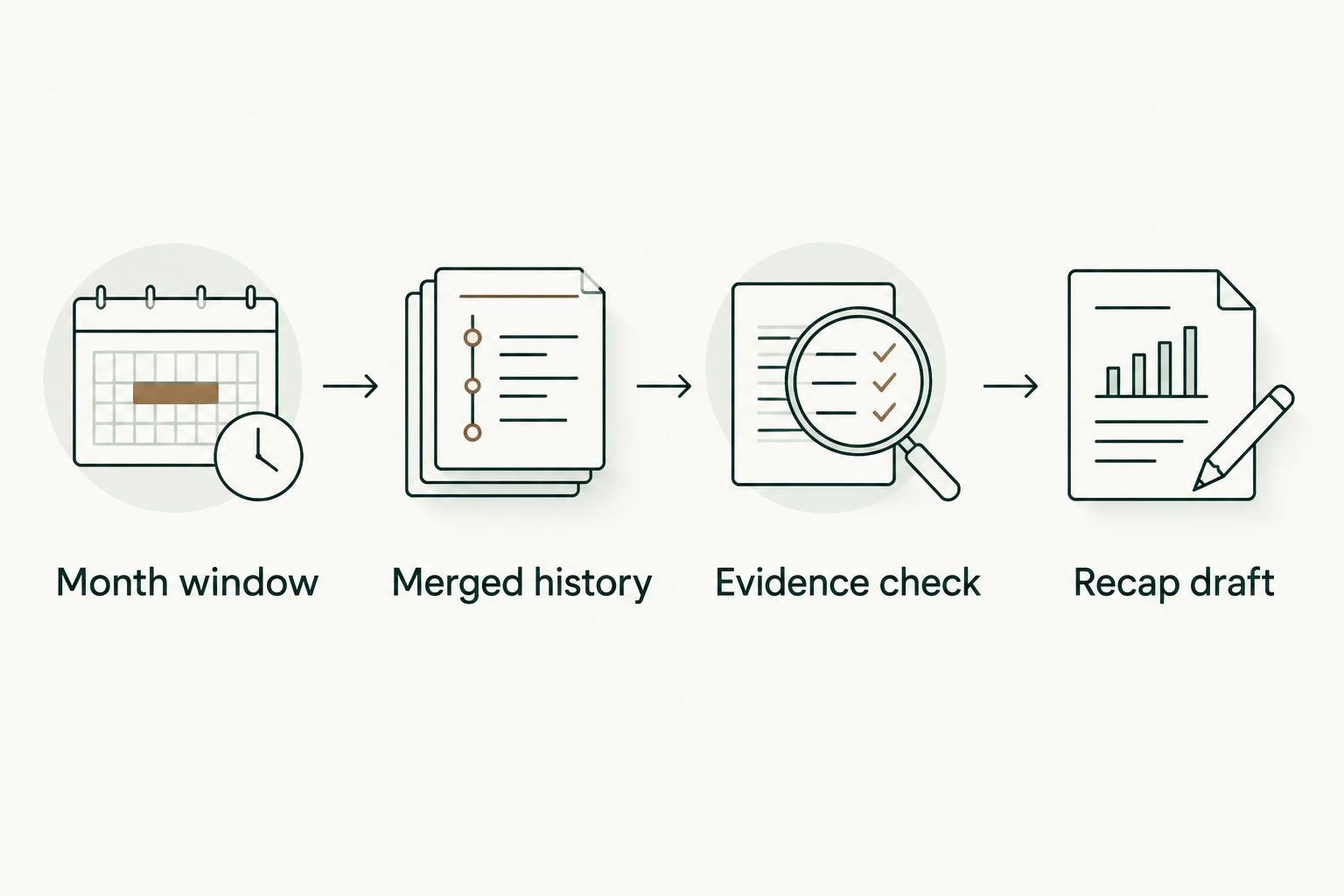
Month window
- Define the period. Put the calendar month and year at the top of your document. State whether the recap covers work across your accessible repositories or a narrower project scope.
- Choose the author. Use your GitHub username when collecting your own authored PRs. If you also want to describe reviews or pairing, maintain those notes separately rather than attributing another developer’s PR to yourself.
- Choose the repository scope. Use an organization for work spread across its repositories, or a specific repository for a project-focused recap. Keep personal repositories separate when they serve a different audience.
- Write an inclusion rule. A useful rule is: include PRs authored by this account and merged during this calendar month. Document any additions, such as a separate section for review work.
Expected result: You have one reporting window, an author, and an explicit repository scope. Another person could repeat your search without guessing what the recap includes.
For a performance review, consistency matters more than finding the broadest possible list. Do not include personal projects in one month and exclude them in the next without identifying the change in scope. For a job search, select relevant examples afterward; first preserve an accurate underlying record.
Merged history
- Open GitHub search. Enter
is:pr is:merged author:YOUR_USERNAME merged:2026-01-01..2026-01-31, replacingYOUR_USERNAMEwith your account name. Themerged:qualifier selects the merge-date window. - Narrow the results when needed. Add
org:YOUR_ORGfor an organization orrepo:OWNER/REPOSITORYfor a particular repository. Replace those example values with the actual names. - Inspect the results. Check that the returned PRs match your author and scope. Open a relevant PR and confirm its merge date rather than assuming the title proves it belongs in the month.
- Record the references. Keep the PR identifier, repository, title, and merge date in your private working notes. Preserve a way to return to each source when you draft the summary.
If repeated searching is the burden, use Pulltally to browse merged history by month and organization or personal repository. Apply the same reporting window and inclusion rule; do not treat the browsing view as proof of a business outcome.
Expected result: You have a source list of merged PRs for the chosen period. The list is evidence for the recap, not the recap itself.
A PR opened before January but merged in January belongs in this January merge-date view. A PR opened in January but still unmerged does not.
Evidence check
- Group related changes. Put PRs under themes such as a migration, a bug fix, or a testing improvement. Use the actual work in your list rather than forcing every month into the same categories.
- Read beyond the title. Review the PR description and linked issue for the problem, scope, and intended change. Use your own project notes to recover context that the PR does not contain.
- Separate contribution from outcome. Record what you changed first. Then add what happened only when an issue, release note, measurement, or other source supports that statement.
- Check ownership. Distinguish your implementation from design decisions, reviews, and work completed by teammates. Describe collaboration without claiming the whole project as your individual delivery.
Expected result: Each theme has supporting PR references, a clear contribution, and either a verified outcome or a factual description of the change.
Use 2 source checks before making an outcome claim: confirm that the PR supports the technical change, then confirm that the outcome evidence supports the result. These checks prevent a merged fix from becoming an unsupported claim that an incident can never recur.
If deployment or customer impact is not established, stop at the change you can verify. “Added validation for empty input” is useful; it does not need an invented reduction in support requests.
Recap draft
- Write the problem. Explain what required attention in language your intended reader understands. Preserve technical detail only when it helps explain the work.
- Describe your contribution. State what you implemented, reviewed, investigated, or coordinated. For the merged-history section, keep the claim tied to the relevant PRs.
- Add the supported result. Explain the verified outcome, or describe the behavior changed when outcome evidence is unavailable. Keep intended benefits separate from observed results.
- Attach the evidence. Keep source references beside the recap entry in your private document. Remove confidential details before creating a version for an external audience.
Expected result: You have a readable monthly recap organized around changes and their meaning, with a path back to the source material.
Use 3 writing fields for each theme: problem, contribution, and supported result. Source references sit alongside those fields rather than taking over the summary.
For example, a retry-related PR title is only a starting point. Read the change, establish which behavior it addresses, and write what you actually did. Do not convert the title into claims about uptime or incident reduction without supporting evidence.
A second variant: update the recap after a merge
Best for developers who forget project context by the end of the month: maintain a working recap as changes merge, then reconcile it against the monthly history. This is a document habit, not a claim that a tool automatically updates your notes.
- After a relevant merge, add the PR reference under the current month.
- Write a short note about the problem and your contribution while the details are fresh.
- Mark an intended outcome as unverified until supporting evidence exists.
- At month-end, compare the working document with the merged-date search and account for missing entries.
The benefit is preserved context. The drawback is ongoing note maintenance: a merge can happen before deployment, and an early outcome statement can become stale. Revisit the evidence rather than carrying the original wording forward unchanged.
For February 2026, change the search window to merged:2026-02-01..2026-02-28. Do not reuse January’s dates and rely on memory to spot the mismatch.
Keep unfinished work in a separate progress section. Investigations, abandoned approaches, and unmerged proposals can matter to a review, but they are not merged delivery. Labeling them separately protects both the accuracy of your tally and the usefulness of your broader work record.
Troubleshooting
The monthly list looks incomplete
Check the username, date window, and repository restrictions before changing your summary. An organization qualifier excludes work outside that organization, and a repository qualifier excludes work elsewhere.
Confirm repository access separately. A search cannot establish that an inaccessible private repository contains no relevant work. Record the scope you actually reviewed rather than presenting the list as an unrestricted history.
A PR appears in the wrong month
Inspect its merge date and your search qualifiers. A creation-date filter answers when a PR was opened, not when it merged.
Remove conflicting date filters and rerun the merge-date query. For a boundary-date question, inspect the PR’s recorded timestamp and document the reporting convention you use rather than silently changing the recap period.
The recap contains repeated versions of the same work
Several PRs can support one project theme. Keep their individual references in the source list, then write a single theme-level explanation when that better represents the work.
Do not delete distinct evidence just to shorten the document. Separate the source list from the readable recap so you can compress the narrative without losing traceability.
The summary claims more than the PR proves
Replace the unsupported result with a description of the implemented change. A PR marked merged establishes merge status; it does not establish deployment, customer adoption, or a measured business result.
If another source supports the stronger claim, attach it. Otherwise, remove the claim rather than softening it with vague language.
Private organization history is not visible
Treat sign-in and repository access as separate steps. Signing in to Pulltally alone does not connect private organization repositories, and read-only access does not mean unrestricted access.
Check the repository permissions and your organization’s access requirements before relying on the history view. Do not bypass organization policy to complete a personal recap.
Customize your workflow
Choose the destination before editing the recap. A private performance-review document can retain repository references; a public résumé or interview note needs a separate confidentiality check. The underlying work stays the same, but the shareable detail changes.
- Performance review: Group monthly themes under the responsibilities or goals you actually worked toward. Include collaboration and review work separately from authored merged PRs.
- Job search: Select relevant examples and describe the problem, your contribution, and the supported result. Remove private repository names and internal details unless sharing them is authorized.
- Personal project history: Keep the repository scope explicit so side-project delivery does not become mixed with employer work.
For a reusable record across 2026, keep each monthly recap in the same document structure. The brag documents for software engineers guide provides a related place to develop that longer-running record.
Add non-PR evidence when it explains meaningful work: design notes, review discussions, or project decisions. Identify each source type clearly. Personal delivery history is not a productivity score, and a useful recap does not pretend that all engineering contributions end in an authored merge.
FAQ
How do I turn GitHub PRs into a monthly work recap?
Collect your authored PRs merged during the month, group related changes, and describe your contribution with supported outcomes. Keep PR references beside each theme so you can check the summary later.
Should I filter GitHub pull requests by creation date or merge date?
Use merge date for a recap of merged delivery. Creation date answers when work was opened and can include PRs that did not merge during the reporting month.
Is Pulltally better than GitHub search for monthly summaries?
Pulltally is best when you repeatedly browse merged PR history by month, organization, or personal repository. GitHub search is useful for an occasional lookup; either approach still requires you to verify context and outcomes.
Does signing in connect my private organization repositories?
Signing in alone does not connect private organization repositories. Treat account sign-in and access to organization repository history as separate permission questions.
What data does Pulltally access for this workflow?
Pulltally uses read-only access to pull request metadata for browsing and summarizing merged history. This workflow does not require making changes to your repositories.
Can I use merged PR counts as a productivity score?
No, merged PR counts are not a productivity score. They record delivery history but do not measure the size, quality, collaboration, or impact of each contribution.
Can I use private GitHub work in a job-search recap?
Use private work only at a level of detail you are authorized to share. Repository access does not itself grant permission to disclose code, internal names, customer information, or private PR content.
One last thing
Preserve the source list separately from the polished recap. Your reader needs the explanation, but you need the references when a title is ambiguous or an outcome is questioned.
Before reusing a 2026 monthly recap, trace each substantive claim back to its evidence. A shorter statement that survives that check is more useful than a detailed account built from assumptions.