GitHub merged PRs to LinkedIn work highlights: 2026 workflow
Turn github prs to linkedin work highlights with verified evidence, not PR counts. Follow a practical workflow for drafting, checking permissions, and publishing.

Instead of manually reopening GitHub pull requests whenever you update LinkedIn, build a monthly record of merged work, group it into delivery themes, and publish only verified, shareable highlights. This GitHub-to-LinkedIn workflow keeps the evidence private until you have checked your contribution, the outcome, and permission to discuss it.
Why this matters
A pull request records a change. A LinkedIn highlight explains your contribution to a piece of work that another person can understand. Copying PR titles between those places skips the explanation and can expose internal details.
Pulltally is best for individual developers who repeatedly browse merged GitHub pull requests for work summaries. Use Pulltally to browse and summarize merged history by month, organization, or personal repository when repeated GitHub searching becomes the tedious part. Keep the writing and disclosure decisions separate.
For your 2026 job search or performance review, treat this as a personal evidence workflow, not an automatic publishing integration. The final highlight needs your judgment. Personal delivery history, not a productivity score.
Before you start
- Access and scope: Have your GitHub username, access to the relevant repositories, and a defined review period. Start with 1 calendar month rather than an undefined history search.
- A private working document: Keep PR references, contribution notes, and proposed public wording together. Have your LinkedIn account ready only when the wording is approved for publication.
- The permission gotcha: Being allowed to view a private repository does not mean you can discuss its contents publicly. Pulltally uses read-only access to pull request metadata; signing in alone does not connect private organization repositories.
Check employer, client, and project disclosure rules before gathering examples for public use. A private PR URL, internal project name, or customer identifier belongs in the working document unless you have permission to publish it.
Choose the evidence method
These methods handle different parts of the workflow. You do not need another reporting tool for a single lookup, and no browsing tool replaces your explanation of what changed.
| Method | Best for | What it does | Advantage | Limitation |
|---|---|---|---|---|
| GitHub search | Occasional merged-PR lookups | Finds pull requests using author, state, date, and repository qualifiers | Lets you inspect the original record directly | You must repeat searches and assemble your own summary |
| Pulltally | Repeated monthly history review | Browses and summarizes merged PRs by month, organization, or personal repository | Replaces repetitive searching across delivery history | PR metadata does not establish business impact or publication permission |
| Private working document | Drafting and checking public highlights | Holds evidence references, context, and proposed wording | Separates private evidence from public copy | Requires manual maintenance and review |
Use GitHub search for a one-off lookup; use a recurring history view when you repeat the same search work. In either case, keep a private document for the context that a title and merge date leave out.
Evidence scope
Set the review window
- Choose a calendar month for your first pass. For example, use January 2026 as the evidence window, even if you draft the LinkedIn update later.
- Decide whether you are reviewing one repository, an organization, or personal projects. Write that scope above your notes so you do not accidentally combine unrelated work.
- Identify the author account whose work you want to review. Use your own GitHub username, not a team account or a colleague's username.
- Decide what the record should include: pull requests you authored and that were merged during the window. Record review work separately rather than treating it as authored delivery.
Expected result: You have a clear author, repository scope, and merge-date window. Anyone checking the notes can tell which work belongs in the summary.
The date basis matters. A PR opened before your review period but merged during it belongs in a merged-work view. An open PR with substantial discussion does not belong in that same tally, although you can describe it separately as work in progress.
Run the GitHub search
- Open GitHub's Search or jump to... field.
- Enter a query such as
is:pr is:merged author:YOUR_USERNAME merged:2026-01-01..2026-01-31. ReplaceYOUR_USERNAMEwith your actual account name. - Add
repo:OWNER/REPOSITORYto narrow the results to one repository, ororg:ORGANIZATIONfor organization scope. Replace those uppercase values with the actual names. - Open the matching PRs and confirm authorship, merge status, and relevance before adding them to your notes.
Expected result: The results contain authored, merged pull requests within the chosen date range and repository scope.
Do not assume an empty result means you delivered nothing. Check the username, qualifiers, and access first. Also keep contributions outside authored PRs out of this search's claim: design discussions, reviews, incident work, and mentoring need their own evidence.
Evidence record
Build a private delivery record
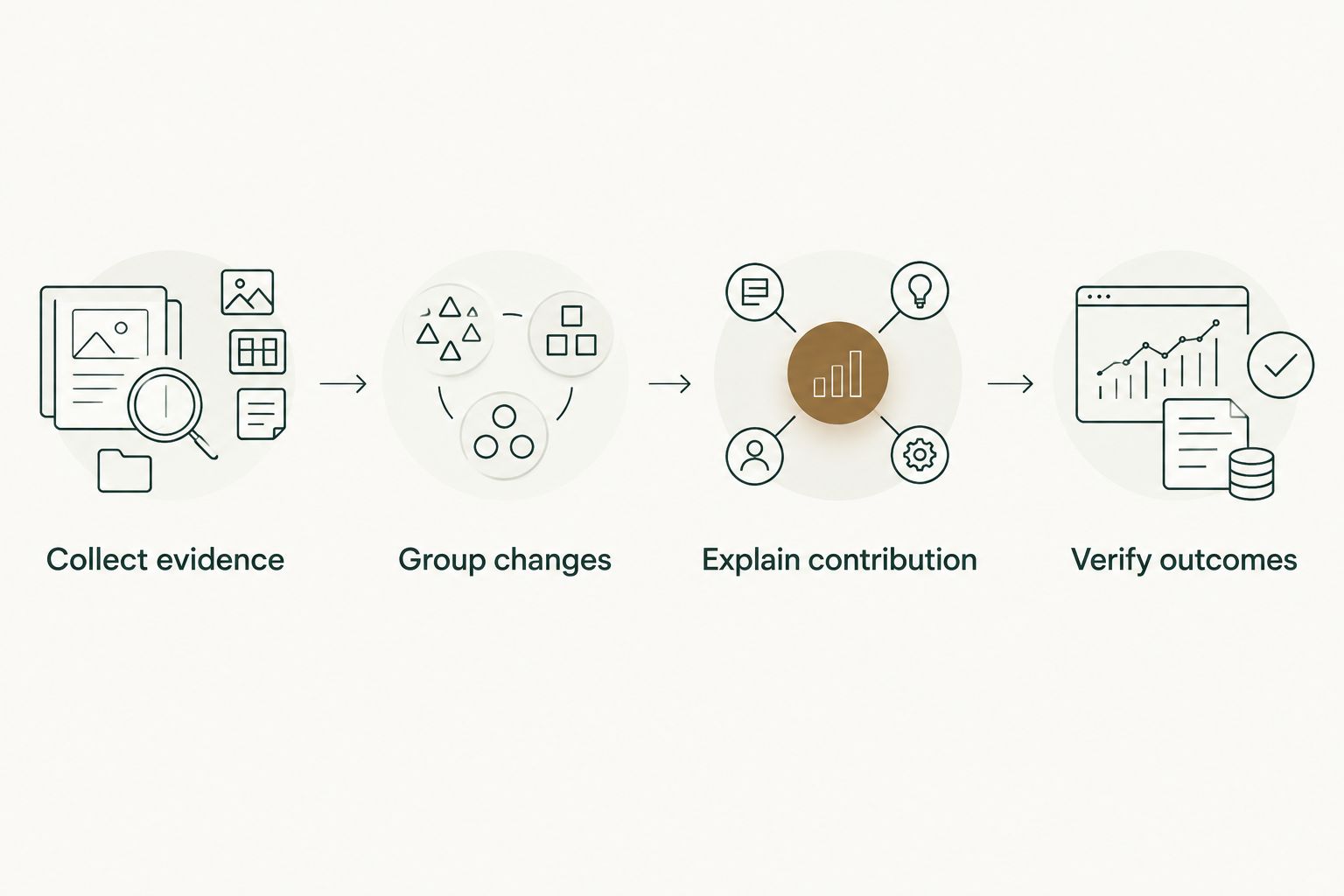
- Collect evidence. Save each relevant PR reference with its title and merge date. Keep private references private; they are there to support your memory, not to become public links.
- Group changes. Combine related PRs under a delivery theme such as reliability work, developer tooling, or an interface change. Do not turn every small PR into a separate accomplishment.
- Explain contribution. Write what you personally implemented, investigated, or coordinated. Distinguish your part from the team's larger delivery.
- Verify outcomes. Record what the evidence actually supports. A merged fix supports a statement about shipping a fix; it does not, by itself, prove faster customer workflows or fewer support requests.
Expected result: Each delivery theme has supporting PR references, a clear personal contribution, and an outcome you can defend.
Keep notes short enough to maintain. A useful entry answers what changed, what you did, why it mattered, and what remains uncertain. If the PR explains implementation but not impact, say so in the private record rather than filling the gap with an impressive-sounding result.
For example, a hypothetical PR that adds input validation can support a statement about implementing validation. It cannot support a claim about reduced incidents without additional evidence. The distinction is small in wording and large in credibility.
Separate evidence from interpretation
Use a simple evidence record with these fields:
- Theme: The piece of work a reader can understand without knowing repository conventions.
- References: The PRs and other records that support the contribution.
- Your role: The work you personally performed, including collaboration where relevant.
- Verified result: What changed, without an unsupported performance or business claim.
- Public wording: A draft stripped of confidential details.
The public wording is not a shortened copy of the evidence fields. It is a separate explanation for a different audience. Keep that separation visible in your document so an internal title does not slip into a public update during editing.
Highlight draft
Turn the record into readable work highlights
- Choose a theme with a clear contribution and a verified result. Leave out entries that depend on confidential context to make sense.
- Draft the highlight in this order: context, personal action, result. Describe the problem briefly, then spend the sentence on what you did.
- Replace internal shorthand with ordinary technical language. Explain the relevant behavior instead of copying ticket codes, codenames, or unexplained repository names.
- Check every result against the evidence record. Remove numerical improvements, customer effects, and ownership claims that the record does not establish.
- Credit collaboration where it changes the meaning. Use wording that distinguishes your implementation from a team-wide initiative.
Expected result: You have a concise draft that explains a contribution without relying on private PR titles or inflated impact.
A useful highlight answers a hiring reader's practical question: what kind of work did this developer do? Describe debugging, implementation, testing, migration, or coordination when those activities match the evidence. A tally of merged PRs does not answer that question on its own.
Avoid turning a 2026 monthly record into a statement about your overall performance. The record has a defined scope. It says which authored PRs merged during that period, not how difficult they were or how your contribution compares with another developer's.
Run the disclosure check
- Remove private repository links, customer names, security details, and internal identifiers unless publication is explicitly permitted.
- Check whether even a generalized description reveals an unannounced feature or sensitive system behavior. Removing a name does not automatically make a description safe.
- Read the draft without the supporting PRs open. Confirm that the public wording still makes sense and does not imply evidence the reader cannot see.
- Follow the relevant approval process when the work belongs to an employer or client. Keep the highlight private until that check is complete.
Expected result: The highlight stands alone and contains only information you are permitted to share.
Publication record
Publish deliberately, then keep the evidence
- Decide whether the highlight belongs in a LinkedIn post or in the description of a relevant role. Use a post for a dated work update; use the role description for a contribution that helps explain that experience.
- Transfer only the approved public wording. Do not copy the full evidence record into LinkedIn.
- Preview the wording for names, links, and unsupported claims. Check that the contribution still reads accurately outside the original project context.
- Publish through your normal LinkedIn publishing flow, then save the publication date beside the private draft.
Expected result: Your public highlight has a matching private evidence record, and you can revisit the reasoning behind it later.
This workflow does not require automatic posting. Keep publication manual because access to delivery metadata is not permission to publish it. That boundary also gives you a final chance to catch a detail that was harmless in private notes but inappropriate in public.
Variant: Refresh highlights across several months
For a job search, a single month's record can leave related work scattered. Review a 3-month window after you have collected monthly notes, then group the entries by contribution rather than by merge date.
- Gather the monthly records for the chosen period, such as January through March 2026.
- Combine entries that belong to the same delivery theme. Preserve their underlying PR references instead of replacing the evidence with a broad summary.
- Identify what the combined record supports that one month alone did not explain, such as your contribution across several stages of a change.
- Rewrite the highlight around that contribution. Do not add PR counts together and present the total as proof of impact.
- Repeat the disclosure check before updating public wording.
Expected result: Your highlights describe sustained work without overstating ownership or treating merge volume as performance.
This variant suits a role-description refresh or interview preparation. Its limitation is extra review work: a longer window gives you more evidence to inspect, not automatic permission to make broader claims.
Troubleshooting
GitHub search returns no matching PRs
Check the exact username and repository qualifier, then widen the merge-date range. Confirm that the signed-in account can access the repository. Private organization access is a separate permission issue; signing in alone does not connect those repositories.
The monthly record includes the wrong work
Inspect authorship and merge dates rather than relying on when you remember working on the change. Separate authored PRs from reviewed PRs. If a theme spans several months, keep the monthly evidence intact and combine it only in the longer-window draft.
The highlight sounds like a list of ticket titles
Group the changes around a problem or delivery theme. Explain your action in ordinary language, then name the verified result. Remove identifiers that require the reader to know your internal tracking system.
You cannot prove the claimed impact
Replace the impact claim with the supported delivery fact. Shipping a change and proving its effect are different tasks. Keep any unverified outcome as a private question to investigate, not as public copy.
The best example is confidential
Keep it in your private record if your organization's rules allow that use. Publish another example or a permitted general description instead. Do not reveal sensitive behavior merely to make the highlight more concrete.
Customize your workflow
Keep one monthly evidence habit and reuse the record for different purposes. LinkedIn needs shareable context; a self-review can use more internal detail within the organization's rules. Neither needs to turn PR counts into a score.
For your next 2026 review cycle, expand the private record to include supported contributions outside authored PRs. Keep those evidence types distinct. The guide to generating self-review summaries from GitHub PRs covers the adjacent review workflow.
FAQ
How do I turn GitHub PRs into LinkedIn work highlights?
Find your merged PRs, group related changes, explain your personal contribution, and verify the result before drafting public wording. Remove confidential details and check permission before publishing.
Is Pulltally better than GitHub search for this workflow?
Pulltally fits repeated monthly history browsing; GitHub search fits an occasional lookup. Both provide evidence for your writing, not proof of business impact or permission to publish.
Does signing in connect my private organization repositories?
Signing in alone does not connect private organization repositories. Repository access is a separate permission consideration, and access to a PR does not authorize public disclosure.
What data does Pulltally access?
Pulltally uses read-only access to pull request metadata to support browsing and summarizing merged GitHub PR history. Read-only access does not authorize publication of private information.
Can I automatically post merged PR summaries to LinkedIn?
This workflow keeps LinkedIn publication manual. Review the contribution, supporting evidence, and disclosure permission before transferring the approved wording into LinkedIn.
Should I include my merged PR count in a LinkedIn highlight?
A merged PR count describes activity within a defined scope, not productivity or impact. Explain the contribution and verified result instead of using the count as a performance claim.
What if a merged PR has no measurable business result?
Describe the supported technical change without inventing a business result. You can explain what you implemented and why the change was needed when those facts are documented and shareable.
One last thing
Before publishing, remove the PR title from your draft and read the highlight again. If the contribution stops making sense, you are still relying on internal context rather than explaining the work. Fix that sentence before adding more evidence or more adjectives.