Can I filter merged pull requests by repository in Pull Tally?
Filter merged pull requests by personal repository in Pull Tally. Build review notes from delivery history, compare GitHub search, and understand read-only access.

Yes—Pull Tally lets you browse and summarize your merged GitHub pull requests by personal repository, as well as by month or organization. Use the personal-repository view when you need delivery history for a particular personal project rather than an organization-wide summary. Signing in alone does not connect private organization repositories, and access to pull request metadata is read-only.
Why this matters
A repository-specific history answers a narrower question than an overall pull request tally: what did you merge into this project? That distinction matters when you prepare a performance review, update a brag document, or choose a project to discuss in an interview. You need relevant examples, not an undifferentiated list of everything you touched.
Pull Tally supports browsing and summarizing merged GitHub pull requests by month, organization, or personal repository. Pull Tally is best for individual developers replacing repetitive searches through their merged GitHub pull request history. For an occasional lookup, GitHub search remains a useful alternative.
Keep the purpose narrow. Personal delivery history helps you find evidence and explain your work; it is not a productivity score. A pull request count does not establish the difficulty, quality, or business outcome of the changes behind it.
Can I filter merged pull requests by repository in Pull Tally?
Yes—for personal repositories. The repository view gives you a project-specific way to browse your merged pull request history. Month and organization are additional ways to organize that history; they answer different questions and should not be treated as interchangeable scopes.
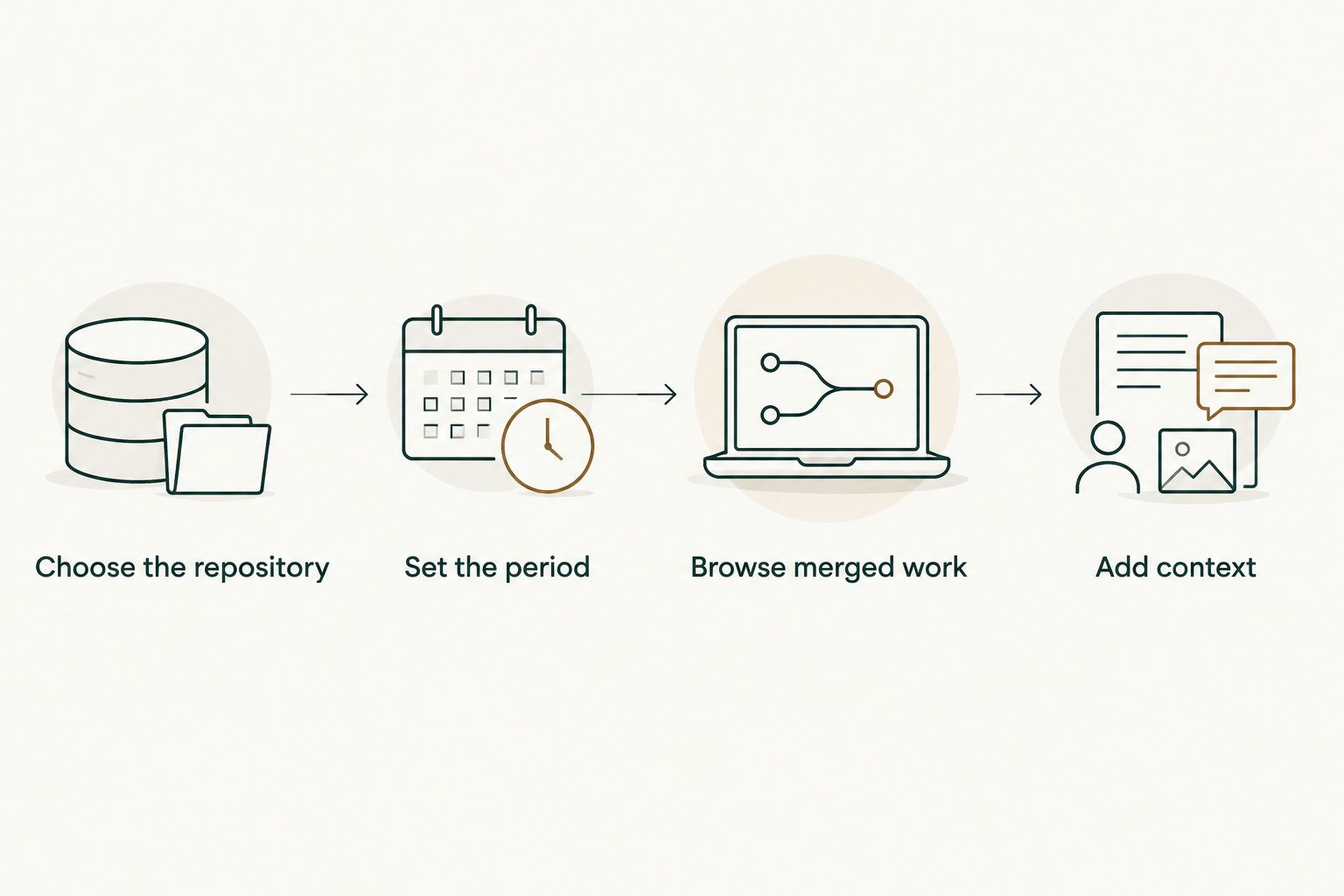
Use the workflow below to turn a repository-specific history into useful review notes. These are task steps, not names of interface controls: choose the project, establish the period, browse the merged work, and write down the relevant context.
Choose the repository
Start with the personal repository that contains the work you want to describe. If you are preparing for an interview about a particular project, keep that project's delivery history separate from unrelated experiments or contributions. The repository provides the boundary for your evidence.
For organization work, use the organization context rather than treating a personal-repository view as a complete record of employment. Keep repository ownership and access permissions separate in your thinking. Signing in is not the same action as connecting private organization repositories.
Set the period
Decide which period your notes need to cover before you interpret a tally. A January 2026 project recap and an entire performance-review period are different tasks. Write the period at the top of your notes so the reader knows what the history represents.
Calendar months also differ in length: January 2026 has 31 days, February 2026 has 28 days, and April 2026 has 30 days. Those boundaries matter when you reproduce a monthly lookup in GitHub search. They are not an adjustment formula for judging developer performance.
Browse merged work
Read the merged pull requests relevant to the repository and period. Use the history to locate changes you remember, then return to the underlying pull request when you need technical context. A title is a useful starting point, not necessarily a complete description of the work.
Separate the delivered change from the surrounding activity. An open proposal, an abandoned approach, and a merged change tell different stories. When the task is to summarize merged work, keep that inclusion rule explicit rather than quietly mixing all pull request states together.
Add context
For each example you retain, explain the problem, your contribution, and the result you can substantiate. Keep the underlying pull request reference with your private notes. That gives you a way to check the details later without making a repository tally carry the entire explanation.
Do not add an outcome just because the change merged. If your evidence establishes an implementation but not a measured improvement, describe the implementation. The useful review statement is the one you can defend, not the one with the strongest adjective.
A finished note should preserve both scope and meaning. For example, identify the project and review period, then describe the change in your own words. Keep confidential implementation details out of any version you intend to share outside the organization.
Repository browsing or GitHub search: which should you use?
Choose the method that matches how often you need the history. Repeated monthly preparation calls for a browsing and summarizing workflow; a single question about one repository can be handled with GitHub search. Neither method turns merged pull requests into an assessment of your performance.
| Option | Best for | Useful capability | Limitation |
|---|---|---|---|
| Pull Tally | Individual developers revisiting personal delivery history | Browse and summarize merged pull requests by month, organization, or personal repository | A merged-history summary still needs context before it becomes a review narrative |
| GitHub search | An occasional repository-specific lookup | Combine repository, author, merged-state, and date qualifiers | You must construct the search and write the summary yourself |
Use GitHub search for a one-off lookup; use a dedicated history workflow when repeating that lookup becomes the task. The distinction is repetition, not whether one option produces a more impressive count.
How to reproduce a repository lookup in GitHub
GitHub pull request search supports qualifiers for repository, author, merge status, and merge date. Combine is:pr, is:merged, repo:OWNER/REPOSITORY, and author:USERNAME, replacing the example owner, repository, and username with the actual values. Add date qualifiers when the question concerns a particular month.
For January 2026, use merged:>=2026-01-01 and merged:<2026-02-01. The first qualifier includes merges on or after the start of January; the second excludes merges from February onward. Keep the merge date as the boundary when you are describing merged delivery history rather than when work began.
Check the author restriction before drawing conclusions. A repository search without an author qualifier answers a question about the repository's merged pull requests, not specifically your authored pull requests. Likewise, a search without a repository restriction can include relevant work from elsewhere and still fail to answer the project-specific question.
Your search is only as useful as its scope. Save the search terms alongside your notes if you expect to repeat the lookup. That makes it easier to reproduce the same question next month instead of changing the boundaries without noticing.
Why repository-level summaries vary
Repository-level history changes when you change what belongs in the summary. Before comparing two summaries or explaining a difference, inspect their boundaries. A different scope is not evidence of a change in your effectiveness.
- Repository scope: A personal project's history is narrower than history spanning an organization. State which project or organization your notes cover.
- Month: A monthly summary groups work by a calendar period. Keep the period visible when using it in a review or interview preparation document.
- Merged status: A merged pull request belongs in a merged-history summary; an open or unmerged closed pull request does not.
- Author scope: Your authored pull request history and a repository's total pull request history answer different questions.
- Access: Signing in alone does not connect private organization repositories. Treat authentication and private-organization connection as separate matters.
For a 2026 review, use consistent boundaries throughout the document. If one section concerns a personal repository and another concerns organization work, label them separately. Do not combine them into a single total and expect the reader to infer what it represents.
Can I use repository history in a performance review?
Yes—repository history helps you locate merged changes to discuss in a performance review. Use it as an evidence index, then explain the work in terms the reviewer can understand. A list of pull request titles is not yet a self-review.
Begin with the review's actual questions. If it asks about a project, select examples from that project; if it asks about collaboration, explain the collaboration rather than substituting a merge count. Repository filtering helps remove unrelated work, but relevance still depends on the question you are answering.
Write a short account of each selected change: what needed attention, what you contributed, and what happened next. Where the result is not documented, keep the statement limited to the change itself. This preserves the distinction between evidence and interpretation.
Can I use personal repository history for a job search?
Yes—personal repository history can help you prepare concrete project examples for a job search. Browse the merged changes to refresh your memory before writing a project description or rehearsing an interview answer. Select work you can explain, not merely work with a memorable title.
Keep the audience in mind. An interviewer needs enough context to understand your decisions, while a résumé needs a concise description of the contribution. Neither needs an exhaustive monthly tally unless that tally directly answers a relevant question.
Review every detail before sharing it externally. Read-only access describes how a tool accesses data; it does not grant permission to disclose private code, internal discussions, customer information, or organization-specific details. Keep the shareable account separate from your private evidence notes.
Does signing in connect private organization repositories?
No—signing in alone does not connect private organization repositories. Authentication and connecting private organization repositories are separate matters. Do not treat a successful sign-in as confirmation that private organization work is part of your history.
Pull Tally uses read-only access to pull request metadata for its history-browsing and summarizing workflow. That access serves the task of locating and organizing merged work. It is not permission to modify repository content.
Read-only access and confidentiality answer different questions. The former concerns what the tool can do with its access; the latter concerns what you can share with someone else. Check organization rules before putting private work into a document intended for recruiters or other external readers.
FAQ
Can I filter merged pull requests by repository in Pull Tally?
Yes—Pull Tally supports browsing and summarizing merged GitHub pull requests by personal repository. Month and organization are additional ways to organize your delivery history.
Is repository filtering useful for a performance review?
Yes—repository filtering helps you find merged work relevant to a particular project. Add the problem, your contribution, and a supported result before using that history as a review narrative.
Should I use GitHub search for a single repository lookup?
Yes—GitHub search is suitable for an occasional repository-specific lookup. Combine repository, author, merged-state, and merge-date qualifiers to keep the question precise.
Does signing in automatically connect my private organization repositories?
No—signing in alone does not connect private organization repositories. Treat signing in and connecting private organization repositories as separate matters.
Can the tool change my repository through its metadata access?
No—the stated access to pull request metadata is read-only. Read-only access does not authorize changes to repository content.
Does a merged pull request tally measure my productivity?
No—a merged pull request tally is personal delivery history, not a productivity score. It does not establish the difficulty, quality, or business outcome of the work.
Can I share private pull request details in a job application?
Only share private pull request details when you are authorized to disclose them. Read-only access does not override confidentiality obligations or organization rules.
One last thing
Choose the question before you choose the tally. For a 2026 review, write down the repository, period, and purpose of the summary before browsing the history. Those boundaries keep a useful project recap from turning into an unexplained count.
Then keep two versions of your notes: a private evidence record with the underlying references, and a shareable narrative containing only authorized details. The history helps you remember what merged. Your explanation tells the reader why that work belongs in the conversation.