Can Pull Tally track pull requests from private repositories?
Can Pull Tally track pull requests from private repositories? Sign-in alone does not connect private organizations. Check access before tallying merged PRs.

Signing in to Pull Tally alone does not connect private organization repositories, so sign-in is not enough to track their pull requests. Access to pull request metadata is read-only. Before relying on a private-repository tally, confirm that the relevant repository is connected and that its merged pull requests appear in the period you are reviewing.
Can Pull Tally track pull requests from private repositories?
Signing in alone does not connect private organization repositories. Account sign-in and access to a particular private repository are separate questions. Verify the repository and the results, rather than assuming that a successful sign-in covers all your GitHub work.
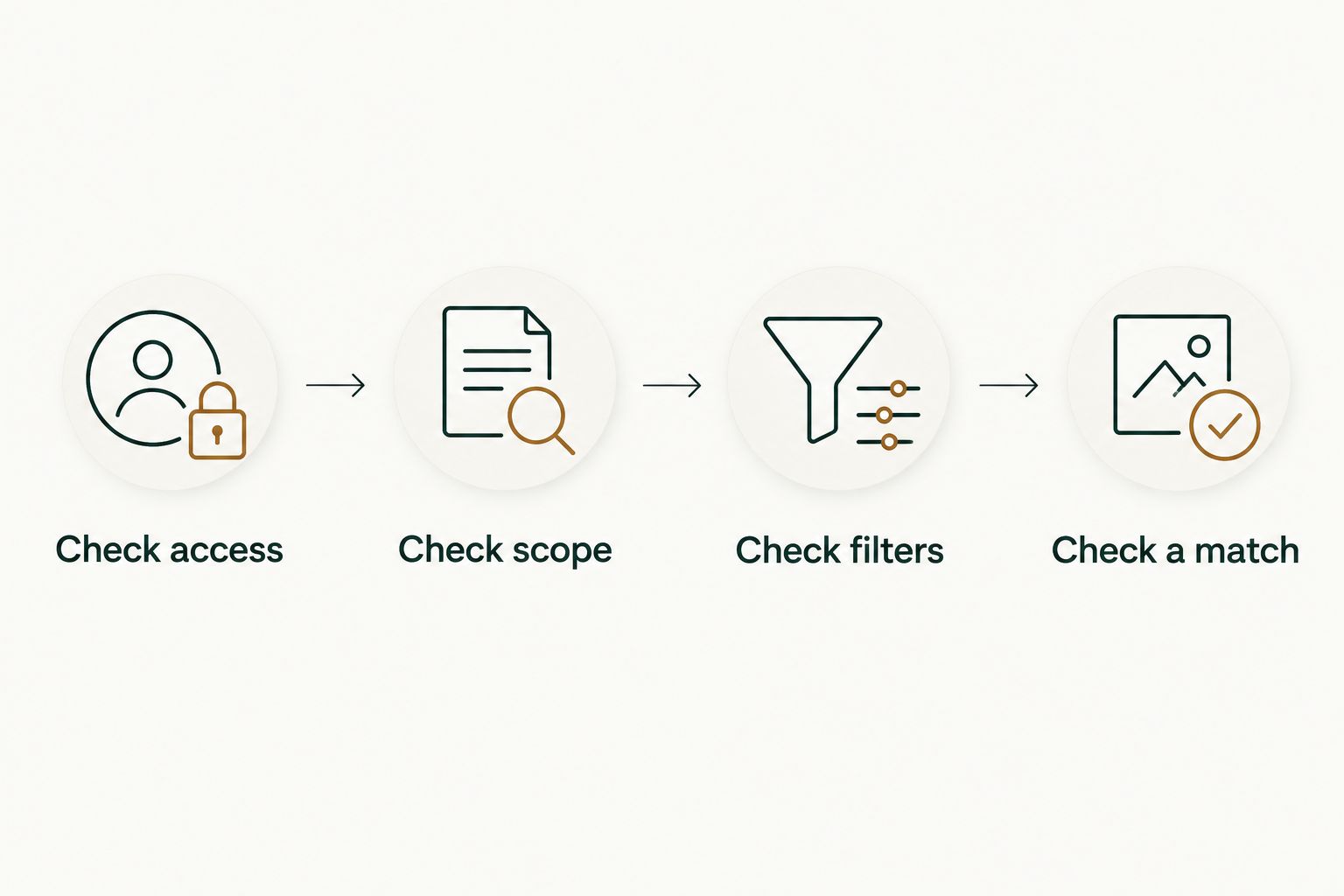
Pull Tally is best for individual developers who repeatedly browse and summarize their merged GitHub pull request history. Use this sequence before relying on that history for a review or job search:
- Check access. Identify the private repository whose work you need to review. Confirm that you can view the relevant pull requests in GitHub under your own account.
- Check scope. Establish whether you are reviewing an organization repository or a personal repository. Do not treat account sign-in as confirmation that a private organization repository is connected.
- Check filters. Match the month and organization or personal repository to the work you want to retrieve. A monthly summary answers a narrower question than your entire GitHub history.
- Check a match. Find a merged pull request you already know belongs in that period. Verify that the result includes it before using the tally as your review evidence.
This check answers a practical question: does the history you are looking at include the work you intend to describe? It is more useful than assuming that an empty result proves there was no work.
Why this matters
Private-repository work often contains the evidence you need for a performance review: a fix you shipped, a migration you completed, or a change you helped bring to merge. Your task is to recover that history without confusing access, completeness, and permission to share it.
For a 2026 review, start with the period your reviewer expects. Then identify the repositories that contain your work. A correct count for the wrong repository is still the wrong evidence.
Keep three questions separate:
- Can you view the pull request in GitHub?
- Does the history you are reviewing include that repository and period?
- Are you allowed to share the details with the intended reader?
A tool connection answers neither the completeness question nor the disclosure question by itself. Private work belongs in your personal delivery history only with the right scope and handling.
What read-only pull request metadata access means
Pull Tally accesses pull request metadata on a read-only basis to support browsing and summarizing merged pull request history. Read-only describes the access mode; it does not mean that signing in automatically connects private organization repositories.
For your workflow, the distinction is straightforward. You want to inspect past work, not change repository contents. Browsing merged history should help you find evidence for a narrative you write, rather than act as a mechanism for modifying that work.
Do not expand the phrase read-only into promises it does not contain. It does not, by itself, specify every metadata field, storage duration, deletion process, or organization approval requirement. Those are separate questions to resolve before connecting confidential work.
Ask concrete permission questions:
- What pull request metadata will be accessed?
- Which repositories will that access cover?
- Is the access appropriate for your organization's rules?
- What information is retained, and how is it removed?
These questions are especially useful when preparing a job search. You need a reliable record of your contribution, but you do not need to transfer confidential implementation details into a personal document.
Read-only access is a permission boundary, not a blanket privacy guarantee. Keep the access decision separate from the decision about what to copy or share.
Why your merged pull request tally varies
A merged pull request tally depends on the scope you are examining. Before comparing summaries, check these factors:
- Repository access: GitHub search operates within the repositories your account can access. A private repository is not equivalent to a public search result.
- Organization connection: Signing in alone does not connect private organization repositories. Do not use sign-in success as evidence of repository coverage.
- Month: A monthly summary excludes merged work outside that month. Check the merge period, not just the period when you started the work.
- Organization filter: Reviewing one organization is different from reviewing work across organizations. Keep that boundary explicit in your notes.
- Personal repository filter: A personal repository is a distinct scope from an organization repository. Include it deliberately when it belongs in your review.
For example, a change started in January 2026 and merged in February belongs in a February merged-history lookup. That does not mean the January effort disappeared; it means the lookup measures merge events rather than the full timeline of effort.
Compare like with like. Preserve the period and repository scope alongside any tally you use.
How do I check private pull requests with GitHub search?
GitHub search is useful for an occasional lookup or a cross-check of a known pull request. Sign in with the account that has access to the repository, then restrict the search to your authorship, merged status, repository, and merge dates.
For January 2026, a repository-specific search can use:
is:pr is:merged author:YOUR_USERNAME repo:OWNER/REPOSITORY merged:2026-01-01..2026-01-31
Replace the uppercase placeholders with your GitHub username and the repository owner and name. This is search syntax, not a connection step: it does not grant access to a repository you cannot already view.
The qualifiers answer distinct questions:
is:prrestricts results to pull requests rather than issues.is:mergedrestricts results to merged pull requests.author:identifies pull requests opened by the specified account.repo:limits the search to the named repository.merged:limits results by merge date.
January has 31 days. February 2026 has 28 days, so its corresponding date filter is merged:2026-02-01..2026-02-28. April has 30 days, giving you merged:2026-04-01..2026-04-30 for that month.
These calendar boundaries matter when you repeat a monthly search. Reusing the previous month's ending date is not a reliable way to define the next period.
Authorship is another boundary. An author-filtered search does not capture every review, discussion, or other contribution you made. Use it to recover authored merged pull requests, not to claim a complete record of your engineering contribution.
Should I use GitHub search or a monthly history tool?
Use GitHub search for an occasional check; use Pull Tally for repeated merged pull request browsing and summaries. The choice depends on the work you repeat, not on whether you need a more impressive-looking number.
| Approach | Best for | Useful capability | Limitation |
|---|---|---|---|
| GitHub search | An occasional lookup or a known-PR cross-check | Explicit author, repository, merged-status, and date qualifiers | You must repeat searches and assemble your own review notes |
| Pull Tally | Individual developers repeatedly reviewing merged PR history | Browsing and summarizing by month, organization, or personal repository | Signing in alone does not connect private organization repositories; a merged tally is not a productivity score |
Manual search is a sensible choice when you only need to find one change. A recurring review workflow creates a different task: revisiting periods and repository scopes to reconstruct what you delivered.
Neither approach replaces your explanation of the work. A merge record helps you find an artifact; you still need to explain what problem the artifact addressed, what you contributed, and what evidence supports the result.
Do not choose a workflow solely because it produces a larger tally. Choose the one that lets you recover the relevant work with clear scope and less repetitive searching.
How to turn private merged history into a performance review
Start your 2026 performance review with the review period, not a total. Write down the included organizations and repositories so you can explain what the history covers.
Next, group relevant merged pull requests into themes. Examples include fixing a recurring failure, simplifying a maintenance task, or completing part of a migration. These are ways to organize your own work, not outcomes to claim without evidence.
For each theme, record:
- Problem: What needed to change?
- Contribution: What did you personally implement or help deliver?
- Evidence: Which merged pull requests support the statement?
- Outcome: What result can you substantiate from an approved source?
Keep the contribution specific. If you implemented one component of a larger project, say so. If a pull request contains work from several people, do not turn its existence into a claim that you delivered the entire project alone.
Use the tally as an index into the work, not the conclusion of the review. A count does not tell your reviewer whether a change was difficult, useful, or closely aligned with team priorities.
For an internal review, repository references can help an authorized reviewer inspect the evidence. Follow your organization's handling rules, and avoid copying more detail than the review needs.
Personal delivery history, not a productivity score. That framing keeps your review focused on supported contributions rather than ranking people by merge totals.
How to use private work in a job search
An external job-search document needs a different level of detail from an internal review. A recruiter or interviewer does not gain permission to see private repository material because you contributed to it.
Use private history to jog your memory, then write an account of your contribution that follows your employer's confidentiality rules. Describe the problem and your role without copying private pull request titles, customer identifiers, internal links, or implementation details that you are not authorized to disclose.
Do not transfer a private PR description wholesale into a résumé. A description written for coworkers can contain context that does not belong outside the organization.
When preparing a 2026 job search, keep two documents separate: an approved internal evidence record and an externally shareable account of your work. The second should stand on its own without requiring access to the first.
Permission to view private work is not permission to publish it. If you are unsure whether a detail is shareable, resolve that question before using it in an application or interview.
Does an empty monthly result mean I merged nothing?
An empty monthly result does not establish that you merged nothing. First check whether the result covers the relevant repository, organization, and merge period.
Find a known merged pull request in GitHub and compare its repository and merge date with the scope you selected. If the known example is absent, investigate the scope and connection rather than treating the empty tally as a statement about your work.
This check also protects your review notes from a quieter error: describing a partial history as your complete history. Label the scope whenever completeness matters.
Does read-only access make private pull requests public?
Read-only access describes what an application can do with accessed data; it is not the same as changing a repository's visibility. Private-repository access and public disclosure are separate issues.
For a review workflow, ask both what the application accesses and what you intend to share. Do not infer storage, retention, or disclosure rules from the words read-only alone.
FAQ
Can signing in to Pull Tally connect my private organization repositories?
Signing in alone does not connect private organization repositories. Confirm the relevant repository connection and check a known merged pull request before relying on its history.
Is the pull request metadata access read-only?
Yes, access to pull request metadata is read-only. Read-only describes the access mode; repository scope and data-handling questions still need separate consideration.
Can I check my private merged pull requests with GitHub search?
Yes, GitHub search can find merged pull requests in private repositories your signed-in account can access. Use author, repository, merged-status, and merge-date qualifiers to define the scope.
Should I search by the date I opened or merged a pull request?
Use the merge date when reconstructing merged pull request history. A pull request opened in one month and merged in another belongs to the latter month's merged-history search.
Does a merged pull request count measure my productivity?
No, a merged pull request count is delivery history, not a productivity score. Explain the problem, your contribution, and supported outcomes alongside the evidence.
Can I put private pull request details in my résumé?
Include only details you are authorized to share. Access to a private repository does not grant permission to disclose its contents to recruiters or interviewers.
What's the quickest way to check whether my monthly history is complete?
Start by checking a known merged pull request against the selected repository and month. That verifies a specific match; also review the other repositories and periods that belong in your account of the work.
One last thing
Check the merge date before deciding which month a contribution belongs to. A pull request can spend time in development and review before it becomes part of merged history.
For your next review, preserve both facts when they matter: when you worked on the change and when it merged. That gives you a more accurate account than forcing every contribution into a single monthly count, while keeping the tally's meaning precise.