Is tracking merged pull requests useful for performance reviews?
Is tracking merged pull requests useful for performance reviews? Yes—as evidence, not a score. Find your history, explain impact, and handle private PRs safely.

Yes—tracking merged pull requests is useful for performance reviews because it gives you a searchable record of completed changes to support your self-review. Use that history to recover evidence, not to score productivity: a merged PR count does not explain a change’s impact, your contribution, or work completed outside GitHub.
Is tracking merged pull requests useful for performance reviews?
Merged pull requests are useful evidence of delivered changes, but they are not a complete performance assessment. Start with the history, then explain what each relevant change accomplished and what you personally contributed.
Choose a retrieval method that matches your task. An occasional lookup needs less setup than reconstructing delivery across multiple repositories for your 2026 review.
| Method | Best for | What it contributes | What it does not establish |
|---|---|---|---|
| GitHub search | An occasional review-period lookup | Authored, merged PRs filtered by date and repository | Business impact or work outside the matching PRs |
| Pulltally | Repeated browsing across months, organizations, or personal repositories | A browsable, summarized history of your merged GitHub PRs | A productivity score or proof of an outcome |
| A brag document | Keeping context while work is fresh | Notes about decisions, collaboration, and results | A verified merge history unless you retain references |
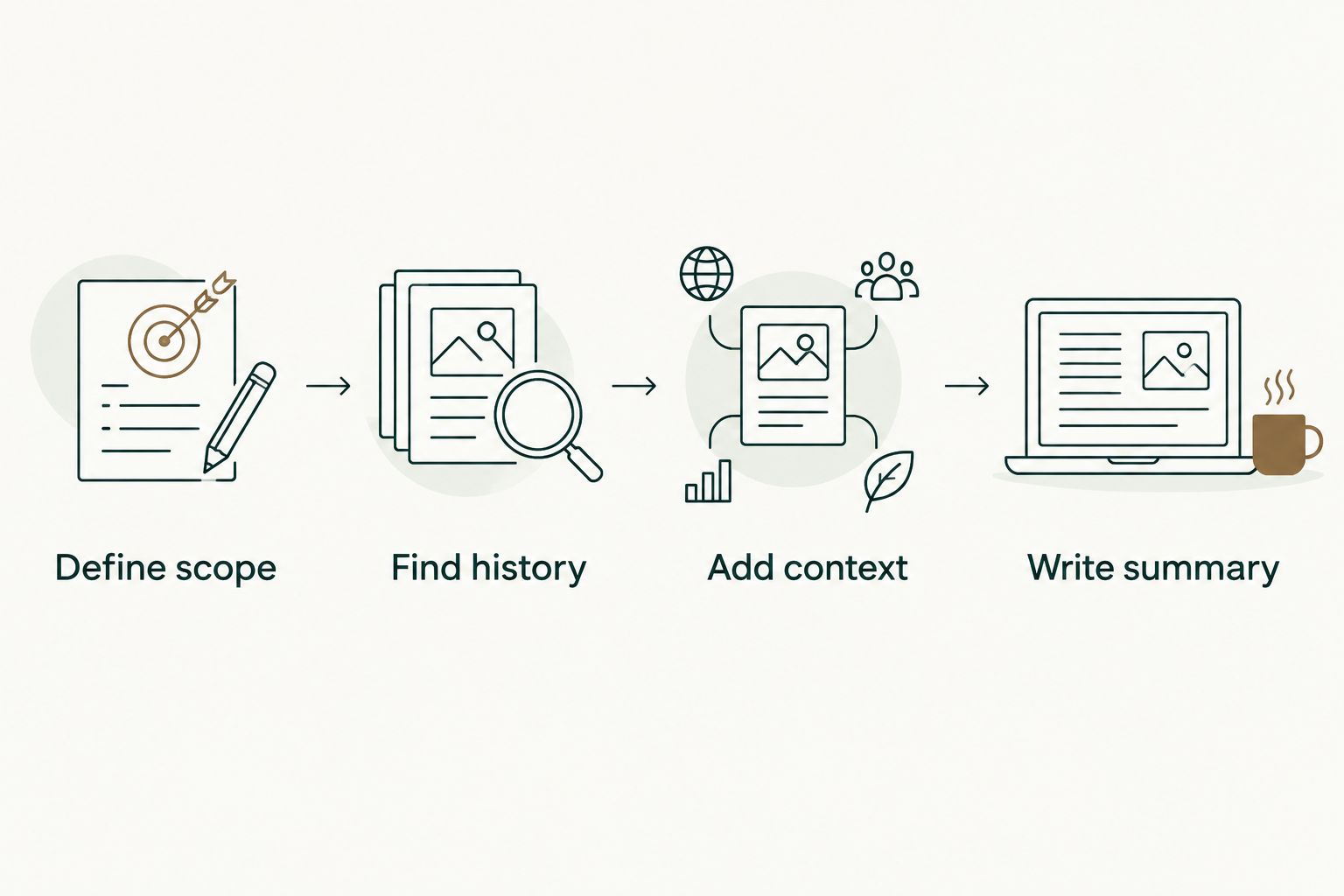
To turn that history into a useful review:
- Define scope. Use the review’s dates and identify the repositories relevant to your role.
- Find history. Retrieve your merged PRs and separate authored changes from other contributions.
- Add context. Record the problem, your responsibility, and the evidence behind each outcome.
- Write summary. Group related changes into accomplishments rather than copying a list of PR titles.
The table describes different jobs, not competing measures of developer quality. Search retrieves records; monthly browsing helps you revisit them; a document preserves the context you need to explain them.
Why this matters
A performance review asks you to explain your work, not reproduce your GitHub activity. Merged PR history helps you recover changes you would otherwise need to remember or search for individually. It also gives you references you can revisit before making a claim.
The important distinction is between a completed change and an demonstrated outcome. A merged change establishes that code entered the repository’s target branch. It does not, by itself, establish deployment, adoption, reliability improvement, or customer benefit.
For your 2026 self-review, use PR history as the evidence index. Keep the explanation elsewhere: what changed, why it mattered, what you owned, and how you know the result.
Recover work without turning the review into a changelog
Suppose you worked on an API migration. Your history contains preparatory refactors, compatibility fixes, documentation updates, and removal of the old implementation. Listing each title makes the reader reconstruct the project themselves.
Group those changes under the migration instead. Explain your role in planning or implementing the transition, identify the constraints you handled, and attach the relevant references. Describe the outcome only as far as your evidence supports it.
That approach also protects smaller contributions from disappearing. A narrowly scoped bug fix can deserve review space when the problem and its consequences are clear; its PR size is not the deciding factor.
How do you find merged PRs for your review period?
Use GitHub’s pull request search qualifiers to distinguish merged changes from open or merely closed PRs. For an authenticated search of your own authored PRs, a review-period query can look like this:
is:pr is:merged author:@me merged:2026-01-01..2026-03-31
The example covers January through March 2026. Replace the dates with your actual review window; do not use the calendar year simply because it is convenient.
Add repo:OWNER/REPOSITORY to focus on a repository, or org:ORGANIZATION to focus on an organization. These are search qualifiers, not requests for additional access: your results remain subject to the repositories your GitHub account can access.
Use the merge date for delivery history
Filter on the merge date when your question is what merged during the review period. Filtering only on when a PR was created answers a different question and can leave out work opened before the period but merged within it.
Keep the boundary explicit in your notes. A change merged after the review window belongs outside that window’s merged tally, even if much of the implementation happened earlier. You can still describe the earlier work separately when it is relevant to your review.
Separate authorship from collaboration
An authored-PR search is useful for finding changes you submitted. It is not a complete record of code reviews, pairing, incident response, design discussions, or work that another developer committed.
Keep those contributions in a separate evidence list. Explain your involvement and retain an appropriate reference rather than stretching the meaning of an authored PR count. Do not treat a missing authored PR as evidence that no contribution occurred.
How do you turn merged PRs into review evidence?
Start with a project or problem, then select the PRs that help explain it. You do not need to give every merged change equal space. The goal is a review that a reader can understand without opening every reference.
For each selected accomplishment, capture:
- Problem: What needed to change, and why?
- Contribution: Which implementation, decision, investigation, or coordination did you own?
- Evidence: Which PRs or other records support the description?
- Outcome: What happened, and which source confirms it?
- Limits: What remains unresolved or cannot yet be demonstrated?
A plain structure works: describe the problem, state your contribution, explain the supported outcome, then attach the references. Keep ownership precise. If you implemented part of a team project, name that part rather than presenting the entire result as yours.
Describe the change before claiming the result
A PR that changes a query does not automatically prove a performance improvement. The PR can support the implementation claim; a measurement or other appropriate record supports the outcome claim.
The same distinction applies to reliability, adoption, and customer experience. If you have evidence of the change but not the downstream result, write the change accurately. A factual implementation statement is stronger than an unsupported impact claim.
For a 2026 review, keep observations and expectations separate. Work intended to improve something is not the same as work shown to have improved it.
Preserve context while it is still available
A merged PR title is a useful retrieval cue, but it is not a substitute for your notes. Record the trade-off you made, the constraint you worked around, or the part of the project you handled while that context is still clear.
A brag document for software engineers gives those notes a place alongside PR references. Keep it practical: project, contribution, evidence, outcome. Avoid making the document another feed of unexplained activity.
For a job search, use the same evidence discipline with a different disclosure boundary. Retain a non-confidential description of your contribution and respect employer restrictions on sharing private code, links, or business information.
Why the usefulness of merged PR tracking varies
Merged history is more informative when it matches the work you need to explain. Its usefulness varies with these factors:
- Review scope: A precise date range and repository scope make the history relevant to the assessment.
- PR boundaries: A project split into small changes produces a different tally from a project delivered in a large change.
- Contribution type: Authored PRs capture submitted changes, not every review, investigation, or design contribution.
- Available context: Descriptive records help you explain the work; ambiguous titles require more reconstruction.
- Outcome evidence: A merge record supports delivery history, while outcome claims need their own evidence.
- Repository access: You can only retrieve private history within the access available to you.
These factors explain why a count is useful for finding work but weak as a standalone judgment. Changing how work is divided into PRs changes the count without necessarily changing the contribution.
When is monthly PR browsing useful?
Monthly browsing is useful when you repeatedly reconstruct work across a longer review period or across repositories. It gives you a consistent way to inspect the history, select relevant changes, and identify projects that need more context.
Pulltally is best for individual developers replacing repetitive manual GitHub PR searches. It lets you browse and summarize merged GitHub pull requests by month, organization, or personal repository. That is a retrieval task, not a judgment about your performance.
The limitation remains important: the history does not write the reasoning for you. You still need to explain ownership, distinguish implementation from results, and add work outside merged PRs. If you only need an occasional lookup, GitHub search remains a useful option.
Understand permissions before connecting history
Pulltally uses read-only access to pull request metadata so you can browse and summarize delivery history. Signing in alone does not connect private organization repositories. Treat signing in and connecting private organization history as separate decisions.
Before connecting work-related history, follow your organization’s rules for third-party tools. Read-only access describes what the tool can do; it does not remove your responsibility to decide whether sharing that metadata is permitted.
For your 2026 review, inspect only the history relevant to the task. Access and disclosure are separate questions: being able to view a private PR does not mean its contents belong in an external résumé or interview document.
Should I include my merged PR count in my self-review?
Include a merged PR count only when it adds useful scope to an accomplishment or answers an explicit review question. State the period and repository scope, then explain the work behind the tally.
Do not present the count as proof of impact. The reader still needs to know what changed, what you owned, and why it mattered.
Can merged PR history help me prepare for interviews?
Merged PR history helps you recover projects and implementation details for interview preparation. Use it to identify examples of technical decisions, collaboration, debugging, and trade-offs.
Convert private references into permitted, non-confidential descriptions. The interview story should explain your reasoning and contribution without exposing restricted information.
What should I track besides merged pull requests?
Track contributions that an authored merged-PR search does not capture, including code reviews, design work, incident response, mentoring, and coordination. Attach suitable evidence where you can, and describe your role precisely.
Keep those records alongside delivery history rather than forcing them into a PR tally. A review should represent your work, not just the subset that fits a search query.
FAQ
Is tracking merged pull requests useful for performance reviews?
Yes—merged PR history helps you recover completed changes and support your self-review with references. Use it as an evidence index, not a productivity score or a substitute for explaining outcomes.
What's the best way to find my merged GitHub PRs for a review?
Use GitHub search with is:pr, is:merged, your author filter, and the review’s merge-date range for an occasional lookup. Add a repository or organization qualifier when you need a narrower scope.
Does a higher merged PR count mean better performance?
No—a higher merged PR count does not establish better performance. PR boundaries, contribution type, and project scope affect the tally, while impact needs separate evidence.
Can I use a merged PR as proof that a feature reached customers?
No—a merged PR alone does not prove that a feature reached customers. Use an appropriate release, deployment, or outcome record to support that claim.
Does Pulltally change my repositories or connect private organizations when I sign in?
Pulltally uses read-only access to pull request metadata, and signing in alone does not connect private organization repositories. Follow your organization’s rules before connecting work-related history.
Should I include code reviews and mentoring in my self-review?
Yes—include relevant code reviews, mentoring, and other contributions outside authored merged PRs. Describe your involvement and attach appropriate evidence rather than treating the authored tally as a complete record.
Can I share private PR links during a job search?
Share private PR links only when your organization permits that disclosure. Otherwise, prepare a non-confidential description of the problem, your contribution, and the supported outcome.
One last thing
Do not write your review in merge order. Chronology helps you find the work; grouping by accomplishment helps another person understand it. Start with the contribution you need to explain, then use the relevant history as support.
Before submitting your 2026 self-review, read each accomplishment without opening its PR links. If the statement still explains the problem, your role, and the supported result, the links are doing their proper job: backing the story rather than carrying it.