How do I find all my merged pull requests on GitHub?
How do I find all my merged pull requests on GitHub? Use author and merge filters, narrow by date or repository, and build evidence for your review.

To find all your merged pull requests on GitHub, search for is:pr is:merged author:@me while signed in, then select the pull request results. This finds pull requests you authored and that were merged, across repositories your account can access. It does not mean pull requests you merged for other people, and it cannot reveal private repositories you no longer have permission to view.
Why this matters
A performance review needs evidence you can revisit, not a count without context. Your merged pull requests give you a starting list of changes to inspect, group, and explain. If you are turning that history into review notes, the guide to self-review summaries from GitHub PRs covers the next stage.
For a 2026 review, define the review period before collecting examples. A pull request opened before the period but merged during it belongs in a merge-date search; filtering by creation date answers a different question.
How do I find all my merged pull requests on GitHub?
Use is:pr is:merged author:@me in GitHub search. The qualifiers identify pull requests, restrict them to merged changes, and limit authorship to your signed-in account.
- Open search. Start from GitHub's main search, rather than a repository's pull request tab, when you want results across repositories.
- Enter the query. Paste
is:pr is:merged author:@meinto the search field. - Select pull requests. If the results interface asks you to choose a result type, select pull requests.
- Check scope. Remove any repository or organization qualifier left over from an earlier search unless you want that restriction.
- Inspect results. Open relevant pull requests and check their merge dates, repositories, and descriptions before using them as evidence.
The base query has no date restriction. Add a date range only when you want a review period, a month, or another defined interval.
| Search component | What it selects | What it does not establish |
|---|---|---|
is:pr |
Pull requests | Whether the change was merged |
is:merged |
Merged pull requests | Who authored the change |
author:@me |
Pull requests authored by your signed-in account | Pull requests you only reviewed or merged |
merged: |
A merge date or date range | When work began or reached production |
Authored, reviewed, and merged-by are different histories. A teammate can merge your pull request without changing its author, so your authored-work search still finds it.
How do I filter merged pull requests by month?
Add the merged: qualifier to the base query. For January 2026, use:
is:pr is:merged author:@me merged:2026-01-01..2026-01-31
This selects merges within January's 31 days, rather than pull requests created during January. For February 2026, change the range to merged:2026-02-01..2026-02-28; February has 28 days that year.
For a full calendar-year view, use:
is:pr is:merged author:@me merged:2026-01-01..2026-12-31
A calendar year contains 12 months, but your performance review might cover a different interval. Match the dates to the period you are documenting instead of assuming that a calendar-year tally is the right answer.
For a monthly record, keep the author and merge-status qualifiers unchanged as you move between months. Changing the scope at the same time makes the resulting counts harder to compare.
How do I filter by organization or repository?
Use org: to restrict the search to an organization's repositories, or repo: to restrict it to a specific repository. Add the qualifier to your existing query; do not replace the author or merged-status filters.
The syntax is org:ORGANIZATION or repo:OWNER/REPOSITORY. Replace those uppercase labels with the actual organization login or repository path shown on GitHub, not a display name from your company directory.
- Organization scope: Best for reviewing work within an employer's or client's organization. It excludes work elsewhere, including personal repositories.
- Repository scope: Best for inspecting a particular project. It excludes related changes merged into other repositories.
- Account-wide scope: Best for assembling your accessible authored history. It includes unrelated projects unless you narrow the results afterward.
Organization membership and pull request authorship answer different questions. Being a member does not make every merged pull request in that organization yours; keep author:@me when you want your own authored changes.
For personal work, repository scope is useful when your account contains several unrelated projects. It lets you write a project-specific summary without mixing maintenance, experiments, and client work into the same list.
Why your merged pull request results vary
A smaller result set does not automatically mean a search failed. Check these factors before treating a tally as complete:
- Authorship:
author:@meexcludes changes you reviewed or merged but did not author. - Merge status: Closed without merging is not the same as merged.
is:mergedexcludes unmerged closures. - Date field:
merged:filters the merge date;created:filters when the pull request opened. - Repository scope: An
org:orrepo:qualifier narrows the result set, even if the rest of the query is correct. - Current permissions: Private repository results depend on what the signed-in account can access.
- Account identity:
@merefers to the account currently signed in, not every account you have used professionally.
Start troubleshooting with the base query, then restore restrictions individually. This separates an overly narrow search from an access or account issue without changing several conditions at once.
Keep the final query alongside your notes. A number without its date range and repository scope is difficult to reproduce later.
Should I use GitHub search or a monthly history tool?
GitHub search is best for an occasional lookup. A dedicated history view makes sense when you repeatedly rebuild the same monthly, organization, or personal-repository searches.
| Option | Best for | What it does | Limitation |
|---|---|---|---|
| GitHub search | Occasional lookups and checking individual records | Finds merged pull requests with author, date, organization, and repository qualifiers | You maintain the queries and assemble your own summary |
| Pull Tally | Repeated personal delivery-history reviews | Lets individual developers browse and summarize merged GitHub pull requests by month, organization, or personal repository | A merged-PR summary still needs your explanation of impact and context |
Pull Tally is best for individual developers who repeatedly browse merged pull requests by month. Use it where it replaces repetitive manual searching, not because a tally can evaluate your work for you.
Pull Tally accesses pull request metadata with read-only access for browsing and summarizing merged history. Signing in alone does not connect private organization repositories. Treat connecting organization data as a separate permissions decision, especially when you are preparing materials outside your employer's systems.
Neither approach turns merge counts into a performance assessment. A small maintenance change and a substantial migration are both pull requests, but they are not equivalent units of effort or impact.
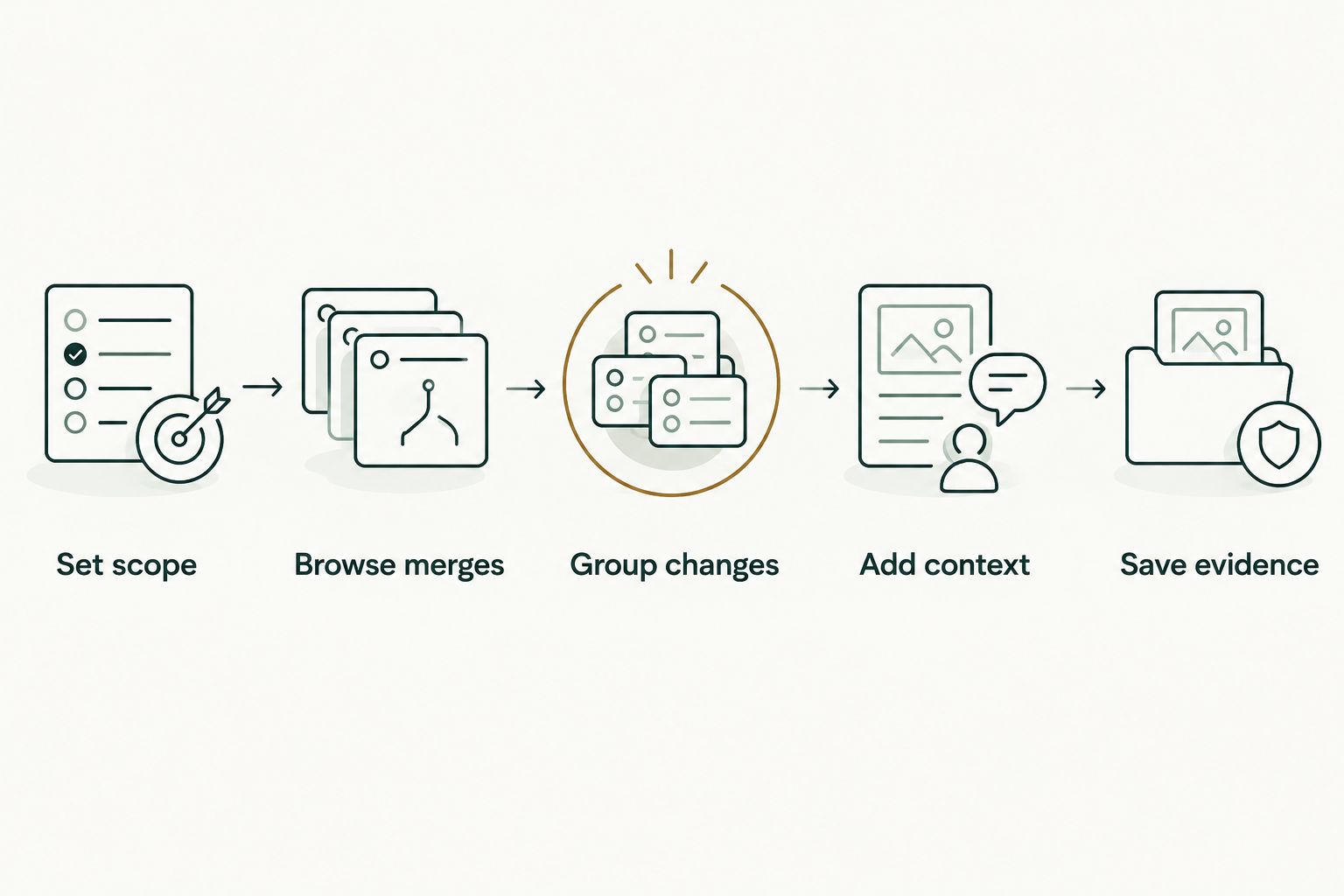
How do I turn merged pull requests into review evidence?
Use merged history as an index to your work, then write the explanation that the index cannot supply. The useful output is a set of supported examples, not a longer list of links.
- Set scope. Choose the review period and the repositories or organizations it covers. Record that scope before collecting examples.
- Browse merges. Read titles and open relevant descriptions. Do not assume a short title explains the whole change.
- Group changes. Gather related pull requests under the project, problem, or maintenance theme they served.
- Add context. Explain your role, the reason for the change, and any outcome supported by evidence you can access.
- Save evidence. Keep the pull request reference with each note so you can revisit the technical details.
A January 2026 merge list, for example, can help you reconstruct a project timeline. It does not establish that the project shipped in January, reached customers then, or produced a particular business result.
For a performance review, describe the problem addressed and your contribution. Add outcomes only when you have evidence; a merged pull request alone does not prove reduced incidents, faster response times, or increased revenue.
For a job search, separate private working notes from material you can share. Describe permitted technical context without copying confidential code, internal discussions, customer details, or private repository content into an application.
Do not force every contribution into a merged-PR format. Design discussions, reviews, debugging, and mentoring need their own evidence. Keep those examples alongside the merge history instead of treating their absence from the search as absence of work.
Does merged mean my change reached production?
Merged means the pull request was merged, not that it was deployed. A merge record establishes a repository event; production release timing requires separate release or deployment evidence.
Use precise wording in your notes. Say that you merged or contributed a change when that is what the record supports, and describe a release only when you can substantiate it.
Can I find pull requests I merged for other people?
Use merged-by:@me when you want pull requests you merged, rather than pull requests you authored. Pair it with is:pr is:merged and add the same date or repository restrictions you need.
This is useful for release or maintainer work, but it answers a different question. Do not combine the resulting count with authored pull requests and present the total as distinct delivered changes without checking for overlap.
FAQ
What's the quickest way to find my merged pull requests on GitHub?
Search GitHub for is:pr is:merged author:@me while signed in, then select pull request results. Leave out organization and repository qualifiers when you want an account-wide search across repositories you can access.
How do I find my merged pull requests for January 2026?
Use is:pr is:merged author:@me merged:2026-01-01..2026-01-31. The merged qualifier selects the merge date, not the date the pull request opened.
Does a closed pull request count as merged?
A closed pull request is not necessarily merged. Use is:merged rather than relying on a closed-state filter when you want only merged changes.
Can I see merged pull requests from a private repository?
You can search private repository pull requests when your signed-in account has access to that repository. An authored-work query does not bypass repository permissions.
Why are some of my old pull requests missing?
Check your signed-in account, current repository access, date field, and organization or repository restrictions. Pull requests from repositories you can no longer access are not a reliable part of your current searchable history.
Does signing into Pull Tally connect my private organization repositories?
Signing into Pull Tally alone does not connect private organization repositories. Access to pull request metadata is read-only; connecting private organization data is a separate permissions decision.
Can I use my merged pull request count as a productivity score?
A merged pull request count is personal delivery history, not a productivity score. It does not capture the size of changes, their impact, or contributions such as reviewing, mentoring, and design work.
One last thing
Save the query with the summary, not just the result count. Include the date range, account, and repository scope so you know what the history actually represents.
For your 2026 review, add a short note whenever you exclude a project or lose access to a repository. That boundary explains more than a precise-looking total with no searchable scope attached.