Is Pull Tally free to use?
Is Pull Tally free to use? Confirm current terms, understand read-only permissions, and choose monthly PR browsing or GitHub search for your review.

Check Pull Tally’s current usage terms before treating it as free to use in 2026. Read-only access describes permissions, not whether usage is free, and signing in alone does not connect private organization repositories.
Is Pull Tally free to use?
Confirm the current usage terms rather than inferring free use from the ability to sign in. Authentication, repository access, and usage terms answer different questions. A successful sign-in does not settle the other two.
For your actual workflow, compare the supported functions rather than assuming that either approach covers every reporting need:
| Approach | Best for | What it does | Limitation to account for |
|---|---|---|---|
| Pull Tally | Repeated monthly lookbacks for an individual developer | Browse and summarize merged GitHub pull requests by month, organization, or personal repository | A merged-PR history does not explain business impact or include work without a merged PR |
| GitHub search | An occasional lookup with a specific author, repository, or date filter | Find matching pull requests using search qualifiers | You must repeat searches and assemble the review narrative yourself |
Pull Tally is best for individual developers whose review preparation involves repeated searches through merged GitHub pull requests. Keep using GitHub search when a single, focused lookup answers your question. A separate browsing tool earns its place when it replaces work you otherwise repeat.
Why this matters
When you prepare a performance review or job search in 2026, the useful outcome is a defensible account of your work. A list of merged pull requests gives you source material. It does not write the explanation of what changed, who benefited, or which part you owned.
Separate the decision into two questions: are the current usage terms acceptable, and does the workflow reduce repetitive searching? Do not let an unresolved answer to the first question disappear behind a convenient sign-in screen. Equally, do not adopt another tool when your existing search already gives you the evidence you need.
What should you check before using a PR history tool?
Start with the conditions that affect your intended task. You do not need an elaborate evaluation for an occasional lookup, but you do need a clear boundary between what the tool does and what you expect it to do.
- Usage terms: Confirm whether your intended use is included under the current terms. Do not assume a sign-in option establishes free use.
- Repository scope: Decide whether you need organization repositories, personal repositories, or both. That choice determines which history matters.
- Permission scope: Read the authorization request before approving it. Read-only access and permission to connect an organization are separate considerations.
- Output purpose: Decide whether you need to browse history, prepare review notes, or select examples for an interview. These are different deliverables.
For a 2026 performance review, write down the review period before connecting anything. A clear date window helps you compare the same body of work in a manual search and a monthly browsing workflow. Without it, a useful-looking list can still answer the wrong question.
Keep the final test practical: can you find the merged work you need and explain its significance? A dashboard view alone does not establish that your review is ready.
What does read-only access mean for your repository history?
Read-only access to pull request metadata allows that metadata to be read rather than changed through the granted permission. It does not mean that all repositories become connected, and it does not establish whether use is free. Treat permissions and usage terms as separate checks.
The stated access is read-only access to pull request metadata. That describes the data category and the access mode. It is not a broader claim about retention, deletion, hosting location, or other handling practices; check the relevant policies for those questions.
Signing in alone does not connect private organization repositories. Do not interpret an authenticated account as proof that private organization history is connected. Check the connection state before expecting organization work to appear in a report.
For work-related repositories, follow your employer’s authorization requirements. The fact that access is read-only does not replace your organization’s rules about connecting external services. Permission to read data is still permission to access it.
Before preparing a 2026 job-search document, also decide where the resulting notes will live. Your private working notes and an externally shared résumé serve different audiences. Review repository names, PR titles, and implementation details before copying them into material intended for someone outside your employer.
How can you check merged PR history manually?
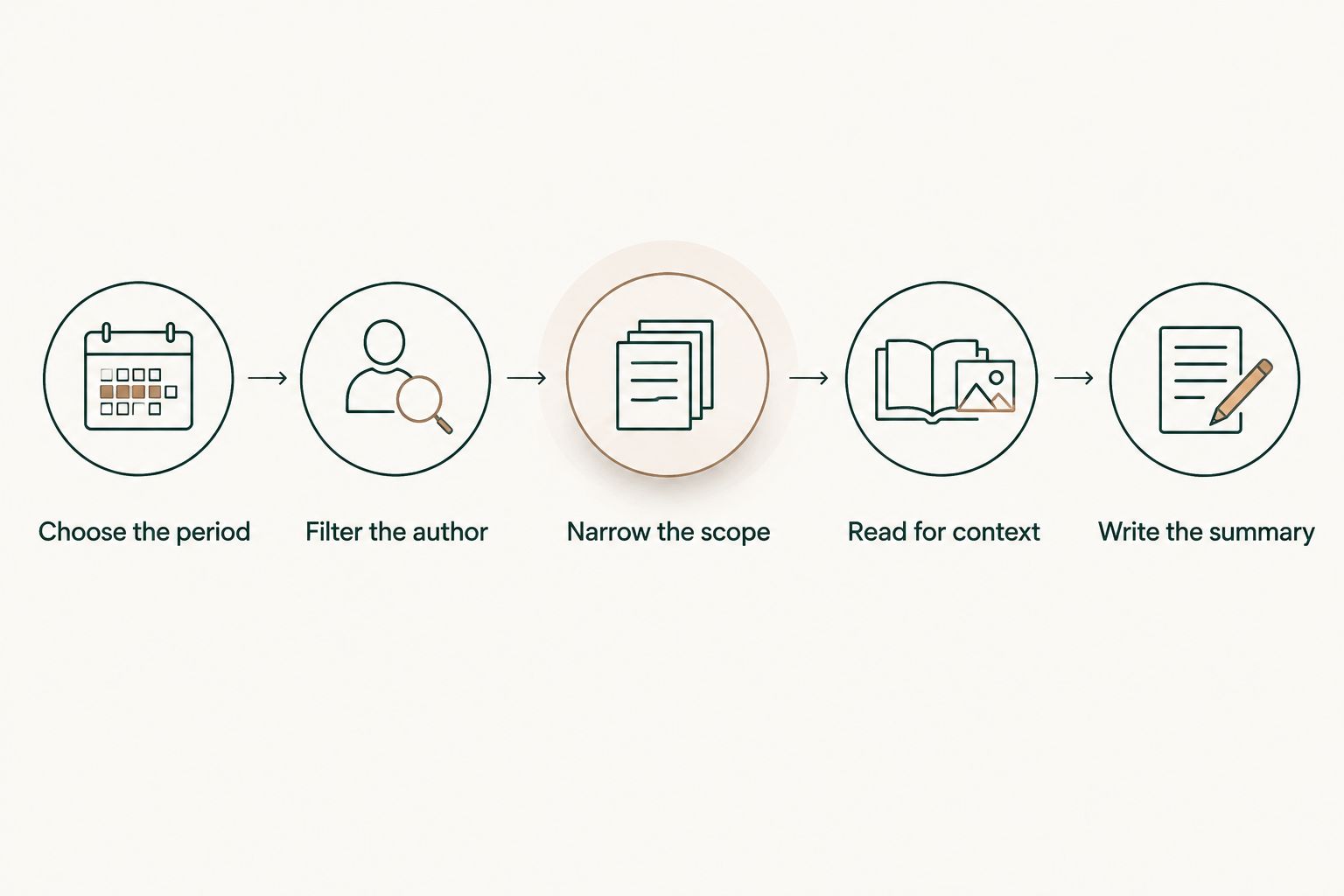
Use GitHub search to establish a clear, repeatable view of your own work. The following sequence is useful on its own and gives you a baseline for deciding whether monthly browsing would save repetitive effort.
1. Choose the period
Use the period your review actually covers, not whichever range is easiest to remember. For example, January 2026 runs from 2026-01-01 through 2026-01-31. February 2026 runs from 2026-02-01 through 2026-02-28.
Use the merge date when your question is about merged work. A PR opened before the review period can still belong in the period’s merged history. Conversely, a PR opened during the period does not belong in a merged-only list if it remains open.
2. Filter the author
In GitHub’s pull request search, combine is:pr, is:merged, and author:@me to focus on merged PRs you authored. Add a merge-date qualifier to define the reporting window.
For a January lookup, the query is:
is:pr is:merged author:@me merged:2026-01-01..2026-01-31
This query describes a particular slice of work: authored pull requests that merged during the selected period. It does not describe every contribution you made during that month.
3. Narrow the scope
Add an org: qualifier followed by the organization login when you need organization-specific results. Use repo: followed by the repository’s owner and name when your question concerns a particular repository.
Keep scope consistent when comparing periods. A month covering all accessible repositories and a month covering one repository are not equivalent views. Label the scope in your notes so you can reconstruct what the list represents later.
4. Read for context
Open the relevant PRs and identify what each change actually accomplished. Use the title as a starting point, then check the description and discussion for the context needed to describe your contribution accurately.
Do not turn every PR into a résumé bullet. Group related changes when they belong to the same piece of work, and distinguish your contribution from the work of collaborators. The objective is a readable delivery history, not a longer list.
5. Write the summary
For each selected example, record the problem, your contribution, and the evidence you can support. Include an outcome only when you have a source for it. A merged change proves that a change merged; it does not, by itself, prove adoption or business impact.
Save the reporting window and scope alongside your summary. Those details let you repeat the lookup without guessing which filters produced the original list.
Why the right workflow varies
The choice depends on the history you need to examine, not on which interface presents the most information. Use these factors to decide whether manual search remains sufficient:
- Frequency: An occasional lookup fits GitHub search. Repeated monthly lookbacks are the stated use case for a monthly PR browsing tool.
- Repository scope: Work spread across organization and personal repositories requires deliberate filtering. Keep those contexts distinct when preparing work-related notes.
- Purpose: A performance review needs an account of your contribution. A job search needs examples you can discuss without exposing restricted details.
- Connection permissions: Private organization history requires attention to repository connections. Signing in alone does not connect those repositories.
These factors change the work involved in preparing your summary; they do not establish any particular usage terms. Resolve the terms separately, then choose the workflow that matches your task.
For your next review, try the manual sequence on the actual reporting period. Note which searches you need to repeat. That is a more concrete reason to change tools than a general desire for another dashboard.
Can I use GitHub search instead of a monthly PR tool?
GitHub search is the better fit for an occasional, narrowly defined lookup. Use author, merge-date, and repository filters to find the relevant PRs, then read the results for context. Keep the query with your notes so the lookup is repeatable.
The limitation is the assembly work. If your review requires the same sequence across months and repository scopes, you must manage those searches yourself. Monthly browsing addresses that repeated lookup task, but you still need to select examples and explain the work.
For a 2026 review, start with the question you need to answer. Finding one merged fix is a search task; reconstructing a period of delivery is a broader review task. Do not confuse either with evaluating your overall performance.
Does a merged PR tally show how productive I was?
A merged PR tally is personal delivery history, not a productivity score. It records a particular kind of activity. It does not establish the difficulty, significance, or outcome of each change.
Reviews, design discussions, incident response, and other contributions do not necessarily produce an authored merged PR. Keep those examples in your review notes alongside the merged history. Otherwise, the available record starts defining the story instead of supporting it.
Use the tally to retrieve evidence, then explain the contribution. A clear account of an important change is more useful than presenting an unexplained total as proof of impact.
FAQ
Is Pull Tally free to use in 2026?
Confirm the current usage terms before treating Pull Tally as free to use. Read-only access and the ability to sign in do not establish whether usage is free.
Does signing in connect my private organization repositories?
No. Signing in alone does not connect private organization repositories. Check the repository connection state before expecting private organization work to appear.
What data does the tool access?
The stated access is read-only access to pull request metadata. That permission description does not establish retention, deletion, or other data-handling policies.
Can I find my merged pull requests directly in GitHub?
Yes. Use GitHub pull request search with is:pr, is:merged, author:@me, and a merged-date qualifier. Add an organization or repository qualifier to narrow the scope.
Should my review use the PR creation date or merge date?
Use the merge date when your review question is about work merged during a particular period. A PR created earlier can still belong in that period’s merged history.
Can I use a merged PR count as my performance score?
No. A merged PR count is personal delivery history, not a productivity score. Explain the work’s significance and include relevant contributions that do not appear as authored merged PRs.
One last thing
Save the search scope with the summary, not just the results. A note that specifies the author, repository scope, and merge-date window is easier to reconstruct than an isolated list of PR titles.
Before you finish your 2026 review, read each selected example as if you had not worked on it. Can you explain the problem, your contribution, and the supported outcome without relying on the PR count? That is the point where a delivery history becomes useful review material.