GitHub org activity to a team status update: 2026 workflow
Turn github org activity to team status update notes with scoped merged-PR searches. Build an evidence-backed recap, check permissions, and confirm release status.

Instead of manually searching every repository before a team update, collect merged pull requests for a defined organization and reporting window, then turn the relevant changes into a short status note. This github org activity to team status update workflow uses GitHub search for the evidence and Pull Tally when repeated browsing of your own merged history becomes the manual bottleneck.
Why this matters
A team update needs an explanation of what changed, not a copy of the organization’s activity feed. Pull request titles supply starting points; descriptions and linked issues supply context. You still need to distinguish completed implementation from released functionality and work that remains open.
For a 2026 performance review or job search, the same evidence can support a personal delivery history. It cannot establish how much value you created from a count alone. Personal delivery history, not a productivity score.
Use this workflow when you need a repeatable account of your own contribution to a team’s work. If you are writing on behalf of the whole team, widen the evidence collection and ask contributors to confirm the summary rather than treating your personal history as the organization’s complete record.
Before you start
- Access and identity: Sign in to GitHub with an account that can read the relevant repositories. Have the organization name and your GitHub username ready; repository visibility determines what your search can return.
- Reporting materials: Choose a reporting window, audience, and destination for the update. A 7-day window suits a weekly note; a 1-month window suits a monthly recap. These are suggested scopes, not required settings.
- Permission gotcha: Signing in alone does not connect private organization repositories. Pull Tally uses read-only access to pull request metadata; confirm the relevant access before expecting private work to appear, and follow your organization’s approval requirements.
Decide whether the note covers your work or the entire team before searching. An author filter answers the first question. Removing that filter changes the scope; it does not make you qualified to describe every contributor’s intent.
Collection scope
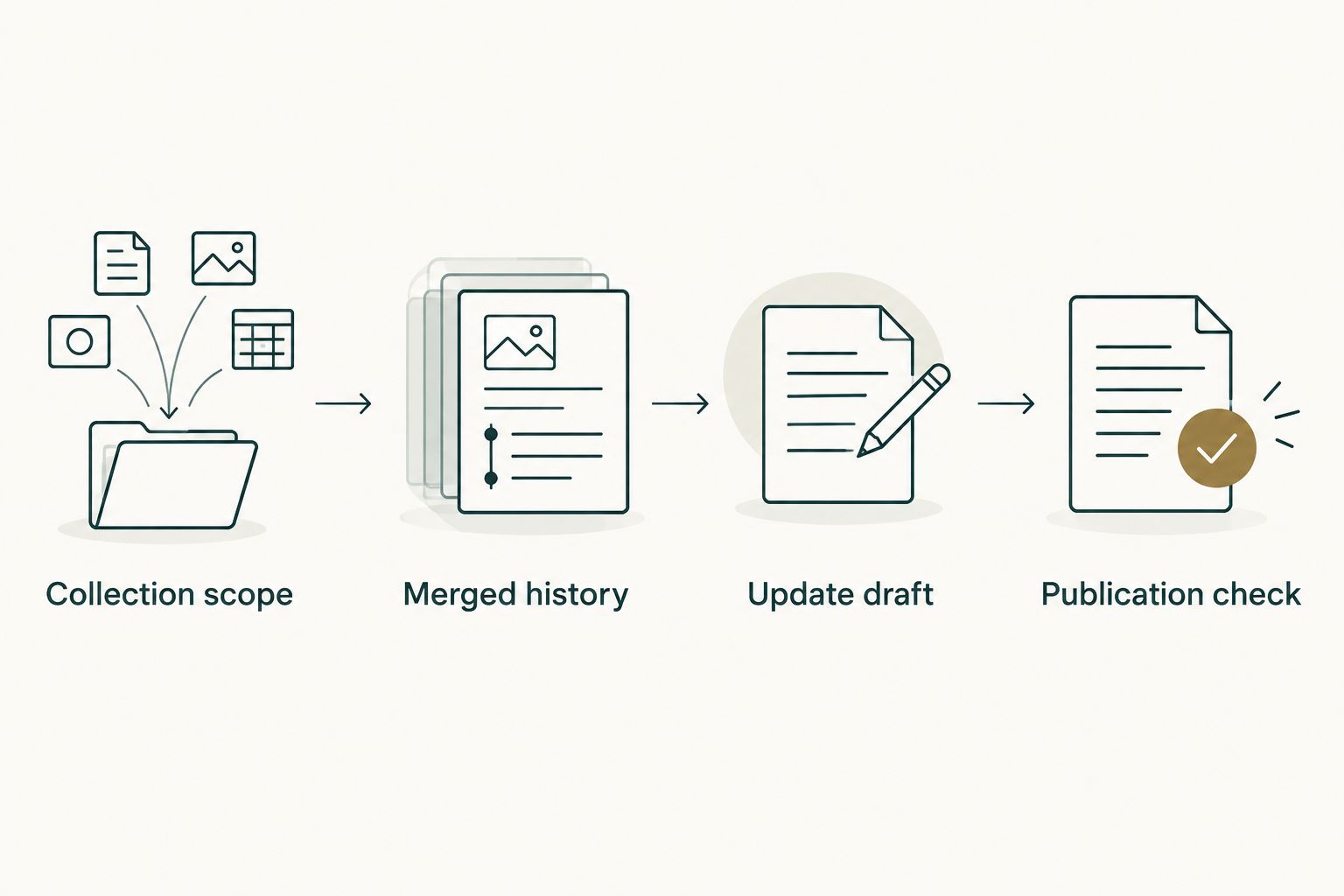
- Write a scope line above your working notes: organization, author scope, reporting dates, and intended audience. Keep this line with the draft so another reader can tell what the evidence covers.
- Choose a merged-date window rather than a creation-date window. A pull request opened earlier and merged during the reporting period belongs in the merged-work summary.
- Decide which repositories belong in the update. An organization-wide search is useful for finding work across repositories, but a repository filter is better when the update concerns a particular project.
- Separate personal evidence from team evidence. Label your own merged work as your contribution; label an organization-wide collection as shared work requiring contributor review.
For a June 2026 monthly recap, your scope line could read: personal merged pull requests in the selected organization, June 1 through June 30, for an internal team update. That line prevents a polished summary from quietly claiming more coverage than the search provides.
Expected result: You have a defined question, reporting window, and audience before collecting any pull requests. Every later sentence can be checked against that scope.
Merged history
GitHub search: best for an occasional lookup
- Use GitHub’s search field to enter a pull request query. Replace
ORGwith the organization’s actual name andUSERNAMEwith your GitHub username:
is:pr is:merged org:ORG author:USERNAME merged:2026-06-01..2026-06-30
- For a single repository, open its Pull requests tab and enter the corresponding filters in the pull request search field:
is:pr is:merged author:USERNAME merged:2026-06-01..2026-06-30
- Open the relevant results. Read the description and linked issue before treating a title as an accurate status statement.
- Record each relevant pull request’s title, repository, merge date, and link in your private working notes. Add a short explanation of the change and mark anything that needs confirmation.
- Check the results for repository moves, renamed projects, or work outside the intended scope. Exclude unrelated entries explicitly rather than silently changing the search window.
GitHub’s org: qualifier limits the organization, author: limits the author, and merged: limits the merge dates. The is:pr is:merged filters exclude issues and pull requests that have not merged.
For a 7-day example in 2026, change the date range to merged:2026-06-01..2026-06-07. Keep the other filters unchanged when comparing adjacent reporting windows. Otherwise, a difference in the results can reflect a changed scope rather than changed work.
Pull Tally: best for repeated personal recaps
Use Pull Tally to browse and summarize your own merged GitHub pull requests by month, organization, or personal repository. Its role here is evidence collection for an individual developer, not automatic publication of a team-wide report.
Read-only access to pull request metadata supports that browsing without granting write access through that permission. It does not remove confidentiality obligations: titles and metadata can still reveal internal projects or customer information.
| Option | Best for | Useful part | Limitation |
|---|---|---|---|
| GitHub search | Occasional lookups and explicit query control | You can define organization, author, repository, and merge-date scope | You still collect context and write the update manually |
| Pull Tally | Repeated personal merged-PR recaps | You can browse personal history by month, organization, or personal repository | Personal merged history is not a complete team report or evidence of deployment |
Expected result: You have a traceable collection of relevant merged pull requests, with enough context to explain each change. You have not yet turned those records into claims about outcomes.
Update draft
- Group the collected pull requests by workstream or outcome, not simply by repository. A related implementation, test change, and follow-up fix can belong under the same topic.
- Write a plain statement of what changed. Use verbs such as added, corrected, removed, or refactored when the pull request supports them.
- Add the reason for the change only when the description, issue, or another approved source establishes it. Do not convert an implementation detail into a customer result without evidence.
- State release status separately. If deployment is unconfirmed, say that the change merged and that release status still needs confirmation.
- Add the next action, unresolved decision, or request for help. Keep unfinished work distinct from the merged-work section.
Aim for 3 sentences per workstream: the completed change, its supported context, and the next step. This is an editing constraint, not a measure of delivery quality. A complicated change deserves more explanation when readers need it.
Use this reusable draft format:
Scope: organization, author scope, reporting window

Completed: describe the merged change in plain language.
Context: explain the reason supported by the PR or linked issue.
Release status: confirmed status, or confirmation still needed.
Next: name the follow-up action or unresolved decision.
Evidence: include the relevant PR references in the approved destination.
For example, a title about retry handling is not enough to claim that incidents decreased. Read the change, explain the retry behavior that merged, and reserve the incident claim for evidence that actually measures it.
Expected result: A teammate can understand what changed without opening every pull request. The references remain available for anyone who needs implementation detail.
Publication check
- Compare each completed-work statement with its pull request evidence. Remove statements that describe plans, open work, or unconfirmed deployment as finished outcomes.
- Check attribution. Your authored pull requests support a record of your contributions, but do not erase reviewers, pairing partners, or shared design work.
- Check the destination’s audience. Keep private repository details in approved internal channels; write a separate, sanitized version for external career materials.
- Ask the relevant contributor or release owner to confirm statements outside your direct knowledge. A broader team update needs broader verification.
- Publish the note with its reporting window visible. Save the scope and evidence privately so you can reconstruct the summary later.
For a 2026 job-search document, remove confidential names, internal links, and sensitive implementation details before reuse. Describe the permitted contribution in terms an outside reader can understand, without disclosing the private evidence behind it.
Expected result: The published update has a clear scope, accurate attribution, and evidence appropriate for its audience. It does not confuse merged code with shipped functionality.
Refresh the update when more work merges
A rolling update is a useful second workflow when your team discusses progress before the reporting window closes. Keep the same draft open and refresh the evidence before each scheduled update rather than rebuilding the note from memory.
- Collect: Rerun the same search or revisit the same personal history scope. Add newly merged work to the evidence notes.
- Reconcile: Fold related follow-up changes into the existing workstream. Do not add a separate achievement merely because another pull request merged.
- Confirm: Recheck release status and unresolved decisions. A previously unconfirmed deployment needs new evidence, not an automatic wording change.
- Publish: Send the revised summary through the team’s approved channel after reviewing it.
This is a repeatable editorial workflow, not a claim of automatic synchronization. Keep a brief record of when you checked the evidence so an older draft does not appear current merely because its reporting dates remain unchanged.
Troubleshooting
A known pull request is missing
Open the pull request directly and check its repository, author, merged state, and merge date. A pull request created during the window but merged afterward will not match a merged-date query. Correct the mismatched filter rather than broadening everything at once.
Private organization work does not appear
First confirm that the GitHub account can access the repository. Then check whether the relevant organization access has been connected and approved under its requirements. Signing in alone does not connect private organization repositories; do not interpret an incomplete view as proof that no work merged.
The update claims more than the evidence shows
Replace outcome language with the specific implementation fact. Separate merged, deployed, and observed results. If nobody has confirmed release status, leave it explicitly unconfirmed instead of assuming that merging completed the release.
The report counts follow-ups as separate achievements
Group related pull requests under one workstream and explain the follow-up’s role. Keep the underlying references for traceability. A count describes the records in the collection, not the significance of the work.
A private link reaches an external draft
Remove the link and review the surrounding title, repository name, and description for confidential details. Rewrite the passage using information approved for external sharing. Read-only access protects against writes; it does not authorize redistribution.
Customize your workflow
Keep a monthly personal recap alongside the team note if you prepare performance reviews. Preserve the evidence privately, then add approved context about collaboration, decisions, and results as that context becomes available.
For broader team reporting, collect organization-wide evidence separately and request contributor input. Removing author:USERNAME from the GitHub query broadens the search, but it does not add review activity, unfinished work, or knowledge of release outcomes to a merged-PR summary.
In 2026, choose the smallest reporting scope that answers the actual question. Your own merged history suits a contribution recap; an organization-wide status update requires additional context and shared review.
FAQ
How do I turn GitHub organization activity into a team status update?
Collect merged pull requests for a defined organization and date window, group related changes, and write a short evidence-backed summary. Separate your personal contributions from team-wide work, and confirm deployment before describing a change as released.
What is Pull Tally best for in this workflow?
Pull Tally is best for individual developers repeatedly browsing and summarizing their own merged GitHub pull requests. It supports personal history by month, organization, or personal repository; that history is not a complete organization-wide report.
Does signing in connect my private organization repositories?
No. Signing in alone does not connect private organization repositories. Confirm the relevant access and follow your organization’s approval requirements before expecting private work to appear.
Can Pull Tally change my repositories?
The stated access is read-only access to pull request metadata, not write access. Metadata can still contain confidential information, so review the audience before sharing a summary.
Should I filter pull requests by creation date or merge date?
Use merge date when the update describes work merged during the reporting window. Creation date answers a different question and can include work that remains open or merged outside the period.
Does a merged pull request mean the change is deployed?
No. A merged pull request records integration into its target branch. Confirm deployment separately before saying that a feature or fix is available to users.
Can I use this workflow for a 2026 performance review?
Yes, use the collected pull requests as evidence for your personal delivery history. Add supported context about decisions, collaboration, and results, and keep confidential details out of external job-search materials.
One last thing
Keep a separate place for work that never became your authored pull request. Reviews, design discussions, debugging assistance, and coordination can matter to a team update even when an author-filtered merged search cannot show them. Record those contributions with appropriate evidence rather than forcing them into a pull request tally.