Can Pull Tally summarize pull requests by month?
Can Pull Tally summarize pull requests by month? Yes. Browse merged GitHub PRs for review evidence, understand repository scope, and check read-only access.

Yes, Pull Tally can summarize your merged GitHub pull requests by month, with organization and personal repository filters to narrow the history. The summary covers merged pull requests, not every kind of engineering contribution, and signing in alone does not connect private organization repositories.
Can Pull Tally summarize pull requests by month?
Yes. The supported scope is your merged GitHub pull requests, grouped by month and narrowed by organization or personal repository. You can use that history to find work you shipped during a review period without treating the number of merges as a performance rating.
Pull Tally is best for individual developers who need to revisit monthly merged pull request history for performance reviews or job searches. It fits the repeated task of finding the same delivery history across different months. An occasional question about a single repository can stay a GitHub search.
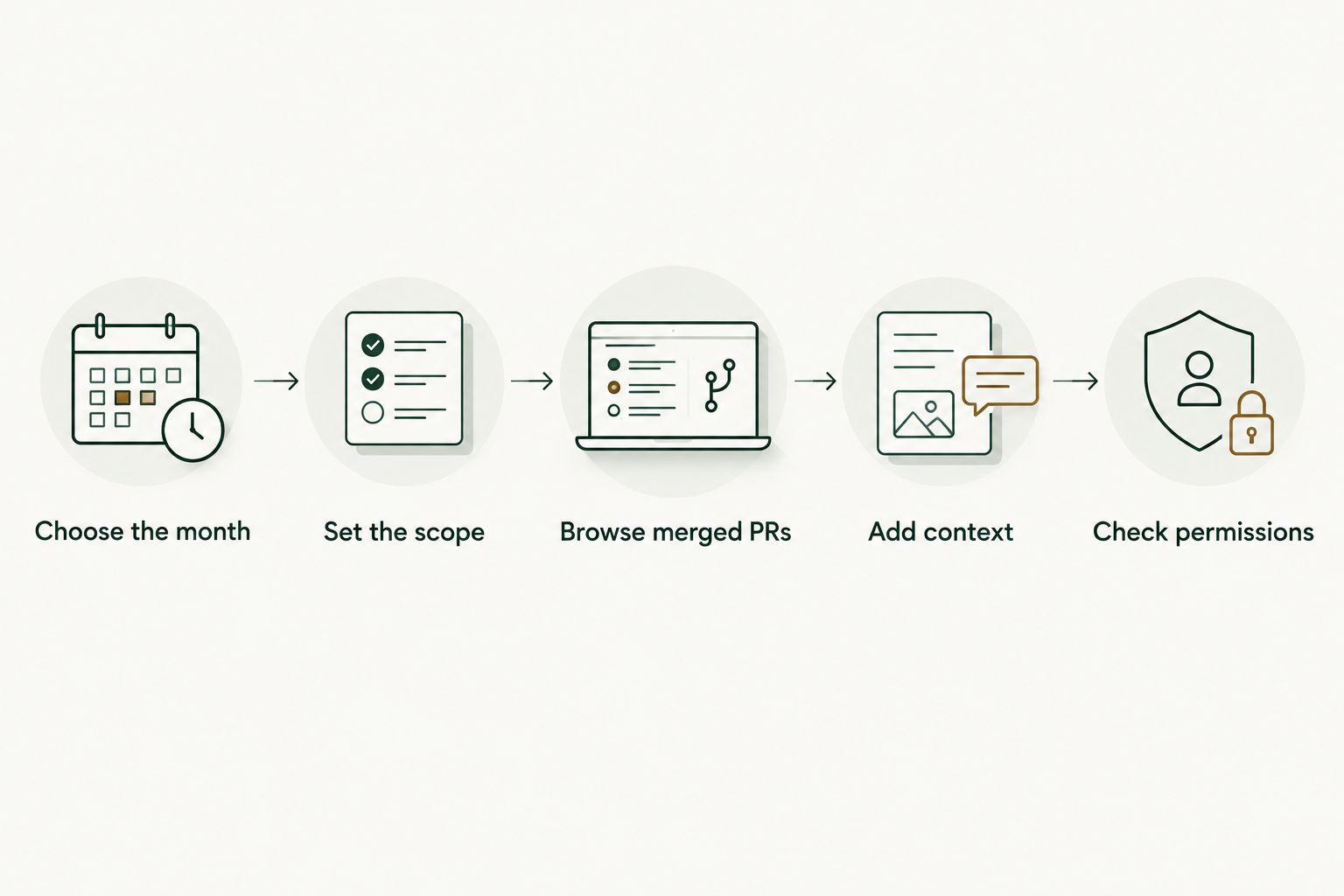
Use this sequence to turn a monthly tally into useful review evidence:
- Choose the month. Start with the calendar month you need to describe. For a January 2026 review note, keep January separate from work merged in February.
- Set the scope. Decide whether you want an organization’s work or a personal repository’s history. Keep that choice consistent when comparing months.
- Browse merged PRs. Read the underlying pull requests rather than stopping at the tally. A title helps you find work; it does not explain the result by itself.
- Add context. Write down what changed, your contribution, and the evidence you can share. Leave out results you cannot verify.
- Check permissions. Confirm the repository scope before assuming private work belongs in the history. Signing in alone does not connect private organization repositories.
That sequence separates finding evidence from interpreting evidence. The monthly summary answers what merged within a defined scope; your review notes explain why the work mattered.
Why this matters
A performance review often starts with a broad prompt: describe your contributions during the review period. Searching GitHub from memory turns that into a recall exercise. A monthly history gives you a defined place to start, especially when the work spans an organization and personal repositories.
For a 2026 review, separate the search task from the writing task. First establish which merged pull requests belong to the period. Then choose the work that supports your review narrative, rather than treating every merge as equally important.
Personal delivery history, not a productivity score. A small fix, a large implementation, and a follow-up change can each appear as a merged pull request. Their presence in the same tally does not make their effort, significance, or results equivalent.
The same distinction matters during a job search. Repository history can help you remember a project, but an interview answer needs your role, the technical decision, and the outcome you can substantiate. A count alone does not supply those details.
Monthly history versus an occasional GitHub search
Choose the method based on the task you need to repeat. A saved monthly view is useful when you regularly revisit delivery history. GitHub search is useful when you have a specific date range and repository question.
| Method | Best for | What it helps you do | Limitation |
|---|---|---|---|
| Pull Tally | Individual developers revisiting monthly history | Browse and summarize merged PRs by month, organization, or personal repository | Merged PR history is not a complete record of engineering contributions |
| GitHub search | An occasional lookup with a defined scope | Find merged PRs using author, merge-date, organization, and repository qualifiers | You must specify the scope and dates, then interpret the results yourself |
For example, a native GitHub search for your merged pull requests in January 2026 can use:
is:pr is:merged author:@me merged:2026-01-01..2026-01-31
January 2026 has 31 days. The merge-date qualifier selects the calendar period; the author qualifier limits results to pull requests you authored. Neither qualifier explains what the changes achieved.
To restrict the search to a repository, add repo:OWNER/REPOSITORY, replacing the capitalized terms with the actual owner and repository names. To restrict it to an organization, use org:ORGANIZATION with the actual organization name. These qualifiers narrow the search; they do not grant repository access.
Keep GitHub search when it answers the question without repeated reconstruction. Use a monthly browsing workflow when you keep rebuilding date ranges and scope filters to recover the same history. Neither method removes the need to read the underlying work.
Why monthly pull request summaries vary
A tally changes when its scope changes. Before interpreting a difference between months, check these factors:
- Merged status. A merged-only summary excludes pull requests that remain open or were closed without merging. Do not compare it directly with an all-status PR list.
- Calendar month. A change opened during one month and merged during another belongs to the merge period in a merged-PR search. Use the same date basis throughout your review.
- Organization scope. An organization filter narrows the history. Compare the same organization scope before describing a monthly change.
- Personal repository scope. A personal repository view answers a narrower question than a view covering different repositories. State which scope you used.
- Repository access. Private organization repositories do not connect through signing in alone. Check the connected scope before assuming private work is represented.
These factors explain what the summary includes. They do not explain why someone delivered more or less work, and they do not establish an engineering performance ranking.
A useful note beside any tally states the month, repository scope, and merged-only status. That makes the evidence readable later without requiring you to reconstruct the filters from memory.
How do I use monthly PR history for a performance review?
Start with the review period, then browse each month for evidence of your contribution. If your review covers January through March 2026, you are examining 3 calendar months. Keep the same repository scope across that period before drawing comparisons.
Next, group related work into a contribution rather than copying a list of pull request titles. An initial change and its follow-up fixes can belong to the same project narrative. The purpose is to explain the work, not to make the list longer.
For each contribution, record:
- The change: what the merged work added, corrected, or removed.
- Your role: the part you personally designed, implemented, reviewed, or coordinated.
- The evidence: the relevant pull requests and any approved supporting material.
- The result: an outcome you can verify, without inventing a metric.
For example, write a note about a change to validation behavior only after reading what the PR actually changed. Do not turn a title about error handling into a claim about fewer support tickets unless you have evidence for that result.
Keep other contributions alongside the PR history. Design discussions, reviews of other people’s work, mentoring, and incident response require their own evidence. A merged-PR summary should support your review document, not define its entire contents.
How do I use monthly PR history during a job search?
Use monthly history to recover specific examples you can discuss accurately. Start with a project you remember, find the relevant merged work, and check what you personally contributed before drafting a resume bullet or interview story.
A useful interview note explains the problem, your decision, and the result. The pull request is supporting evidence for that account. It is not a substitute for explaining a trade-off or distinguishing your work from the team’s work.
Keep private repository details out of public application materials unless you have permission to share them. A repository being visible to you does not make its code, pull request text, or internal discussions public.
You can describe a contribution at an appropriate level without copying confidential material. Explain the kind of problem and your role, and use only outcomes you are allowed to disclose. Avoid quoting internal PR content merely because it helped you remember the project.
Does signing in connect my private organization repositories?
No. Signing in alone does not connect private organization repositories. Pull Tally uses read-only access to pull request metadata for browsing and summarizing delivery history; that access is not permission to modify repository code.
Treat authentication and repository scope as separate questions. Authentication identifies you. Repository permissions determine which private resources a tool can access, so check the requested scope before connecting private work.
Read-only access also does not mean the information is public. Pull request metadata can contain internal project context. Follow your organization’s rules for connecting services and handling repository information, even when the requested access does not allow changes.
For performance-review preparation, confirm the intended organization scope before interpreting the history. An absent private repository is a reason to check access, not evidence that you made no contributions there.
How do I check a monthly summary before using it?
Check the date basis, scope, and individual records before copying a tally into a review. A summary is only meaningful when you can explain what it includes and excludes.
For February 2026, use the actual calendar boundaries rather than reusing January’s end date. February 2026 has 28 days. A GitHub comparison search can use merged:2026-02-01..2026-02-28 alongside the same author and repository qualifiers you used for the original question.
Then inspect the work behind the count. Check that the selected PRs are merged, belong to the intended repository scope, and support the contribution you plan to describe. Do not compare a filtered personal repository list with a broader organization list as though they cover the same work.
If two views disagree, resolve the scope question before interpreting the difference. Check whether one view includes another month, another repository, or pull requests that are not merged. A discrepancy is a prompt to inspect the records, not a reason to assume a performance change.
FAQ
Can Pull Tally summarize pull requests by month?
Yes. Pull Tally lets individual software developers browse and summarize their merged GitHub pull requests by month, organization, or personal repository. The history is personal delivery evidence, not a productivity score.
Does a monthly summary include open pull requests?
A merged pull request summary does not include open pull requests as merged work. Track ongoing work separately when preparing a performance review.
Can I filter my history by organization or personal repository?
Yes. Organization and personal repository filters let you narrow the merged pull request history. Keep the scope consistent when comparing months.
Does signing in connect private organization repositories?
No. Signing in alone does not connect private organization repositories. Check repository permissions separately before assuming private work is included.
Can read-only access change my repository code?
No. Read-only access to pull request metadata does not permit repository code changes. The metadata supports browsing and summarizing merged pull request history.
Can I find monthly merged PRs directly in GitHub?
Yes. Use GitHub search with is:pr, is:merged, an author qualifier, and a merged-date range. Add an organization or repository qualifier when you need a narrower scope.
Is my merged pull request count a productivity score?
No. A merged pull request count records activity within a defined scope, not the significance or impact of the work. Explain the contribution behind the merges.
Can I include private pull request details in a job application?
Only include details you have permission to disclose. Use private history to recall your contribution, then write an account that respects your organization's confidentiality rules.
One last thing
Write the contribution note while the work is still easy to explain. A monthly history preserves a route back to merged work, but it does not preserve every reason behind a decision.
Before closing your review preparation, choose a meaningful contribution and add its context beside the evidence. State the problem, your role, and the result you can verify. That note is more useful in a future interview than a larger tally with no explanation.