Pull request tracking for software consultancies: complete 2026 guide
Pull request tracking for software consultancies: document delivery, not productivity. Find merged GitHub PRs, separate client work, and build review evidence.

Software consultancy pull request tracking is the practice of organizing merged code changes by developer, client, repository, and reporting period to document delivery. This guide explains pull request tracking for software consultancies in 2026 from the individual developer’s perspective: reconstruct your work, separate client histories, and turn merge records into evidence without treating them as productivity scores.
Why pull request tracking matters for software consultancies
Consultancy developers need to describe their contribution without confusing a client’s repository history with a personal achievement record. A merged pull request supplies a traceable reference. It does not establish who designed the solution, whether the change reached production, or how much work happened outside the repository.
Your reporting task also changes with the audience. A client update needs delivery context; a performance review needs your contribution; a job application needs a confidentiality-safe account of the problem you solved. The same merged change can support each document, but it should not produce identical wording in all of them.
For a 2026 review, start with the reporting period and retrieve the merged work that belongs inside it. The guide to self-review summaries from GitHub PRs covers the related task of turning that history into review material.
A merge record is evidence of a code change, not proof of business impact. Add outcomes only when you have an authorized source that supports them. This distinction keeps your delivery history useful without turning it into an inflated performance claim.
Build a repeatable tracking workflow
Use the following sequence when you prepare a client update, an internal review, or a personal work history. Start with GitHub search and a document or spreadsheet; add a tool only where repeated browsing creates unnecessary work.
Define scope
Write down whose work you are tracking, which repositories belong to the engagement, and what dates the report covers. For personal delivery history, select pull requests you authored rather than treating every merge in a client repository as your contribution.
A calendar month and a review period answer different questions. For example, January 2026 covers 1 month, while January through March 2026 covers 3 months. These are reporting choices, not performance benchmarks. Keep the chosen boundary consistent across your search, notes, and final summary.
Define whether the report covers merged work only. Open pull requests, review comments, design discussions, and incident response belong in separate evidence categories rather than being silently mixed into a merged tally.
- Record the start date and end date before searching.
- List the organizations and repositories included in the engagement.
- Separate authored changes from reviewed or supported changes.
- State that a merged-work tally excludes unmerged contributions.
Search GitHub
Use GitHub’s pull request search to retrieve your authored, merged changes. An illustrative January query is is:pr is:merged author:YOUR_USERNAME merged:2026-01-01..2026-01-31; replace YOUR_USERNAME with your GitHub username. Add repo:OWNER/REPOSITORY when you need to restrict the result to a particular repository.
The merge-date filter matters. A pull request opened before the reporting period can still belong in the report if it merged during that period. Filtering only by creation date answers a different question and leaves gaps in a merged-delivery history.
Inspect the results before copying them into your notes. Check repository names, merge dates, and authorship rather than assuming the query matches your intended scope. Private results depend on the account’s access; a missing result is not proof that the work never existed.
- Filter for pull requests rather than issues.
- Use merge dates for a merged-delivery report.
- Add repository restrictions for client-specific searches.
- Save the query text alongside the reporting scope.
Browse monthly history
For an occasional lookup, stay with GitHub search. Repeating the same searches across months and organizations is where Pull Tally fits: it lets individual software developers browse and summarize merged GitHub pull requests by month, organization, or personal repository.
Pull Tally is best for individual developers who need a browsable monthly history of merged GitHub pull requests. Its role here is personal delivery history, not a consultancy-wide performance score or a substitute for client reporting context.
Pull Tally’s GitHub pull request tracking uses read-only access to pull request metadata. Signing in alone does not connect private organization repositories. Treat organization access as a separate permission decision, and follow the client’s policy before connecting repositories that contain client work.
- Use GitHub search when a single lookup answers the question.
- Browse by month when reconstructing a review period.
- Separate organization work from personal repository work.
- Confirm authorization before connecting private client repositories.
Separate clients
Organize the retrieved history by engagement before writing conclusions. A repository name is a useful starting point, but it is not always the full engagement boundary: one client can have several repositories, and a shared internal repository can support multiple projects.
For each merged change, record the client or engagement only when you can establish that relationship. If a change spans several projects, describe its shared scope rather than counting it as an independent delivery for every client.
Keep a distinction between the working record and the shareable summary. Your working record can include authorized repository references; your external job-search version should omit private links, customer identifiers, internal architecture details, and other information you are not permitted to disclose.
- Group repositories under the correct engagement.
- Mark shared work without multiplying its delivery count.
- Keep internal repository references in authorized working notes.
- Prepare separate client-facing and job-search versions.
Add delivery context
Read the pull request title and description, then describe what you actually contributed. A title such as “fix validation” is a retrieval clue, not a finished performance-review bullet. Explain the affected behavior, your responsibility, and the evidence supporting the result.
Use a compact record with a change reference, contribution, and supported outcome. If you do not have an outcome source, stop at the implementation fact. “Added validation for the import workflow” is stronger than an unsupported claim that the change reduced support tickets.
Also distinguish merge status from release status. A merged pull request does not establish that a change was deployed, enabled for users, or accepted by the client. Use release or acceptance records when the report needs those claims.
- Describe the behavior changed in plain language.
- Separate your contribution from the team’s overall result.
- Add outcome evidence only when it is available and authorized.
- Label implementation, deployment, and acceptance as distinct events.
Draft audience summaries
Turn the working history into a short account tailored to the reader. For a client update, group changes around the requested work. For a performance review, explain your ownership and collaboration. For a job search, describe the technical problem without exposing client-confidential material.
Do not paste the entire pull request list into the main narrative. Keep the detailed references as supporting evidence and select changes that explain the work accurately. A large tally can obscure the contribution just as easily as a small tally can omit important work.
For your 2026 performance review, separate merged implementation evidence from activities such as incident response, design review, and mentoring. Those activities deserve their own evidence; they should not disappear because they lack an authored merge.
- Group related changes under a clear delivery theme.
- Explain your role using verbs such as implemented, reviewed, or investigated.
- Keep source references in an authorized supporting record.
- Remove confidential details from external summaries.
Check evidence
Before sharing, revisit the source records and confirm that the summary matches them. Check dates, authorship, engagement boundaries, and permission to disclose. Also check that the report does not imply hours worked or business results from a merge count alone.
Use a recommended 15-minute review pass to find unsupported wording before sending the report. This is a workflow suggestion, not a claim about how long every report takes. Resolve factual questions first; polishing the prose cannot repair an incorrect contribution claim.
Preserve the search scope with the finished document so you can reproduce the next report. A repeatable boundary makes comparisons understandable, while changing repositories or contribution types between periods makes raw tallies difficult to interpret.
- Recheck merge dates and repository scope.
- Confirm that each contribution claim names your actual role.
- Remove unsupported impact, effort, or billing claims.
- Verify that the audience is authorized to see the included evidence.
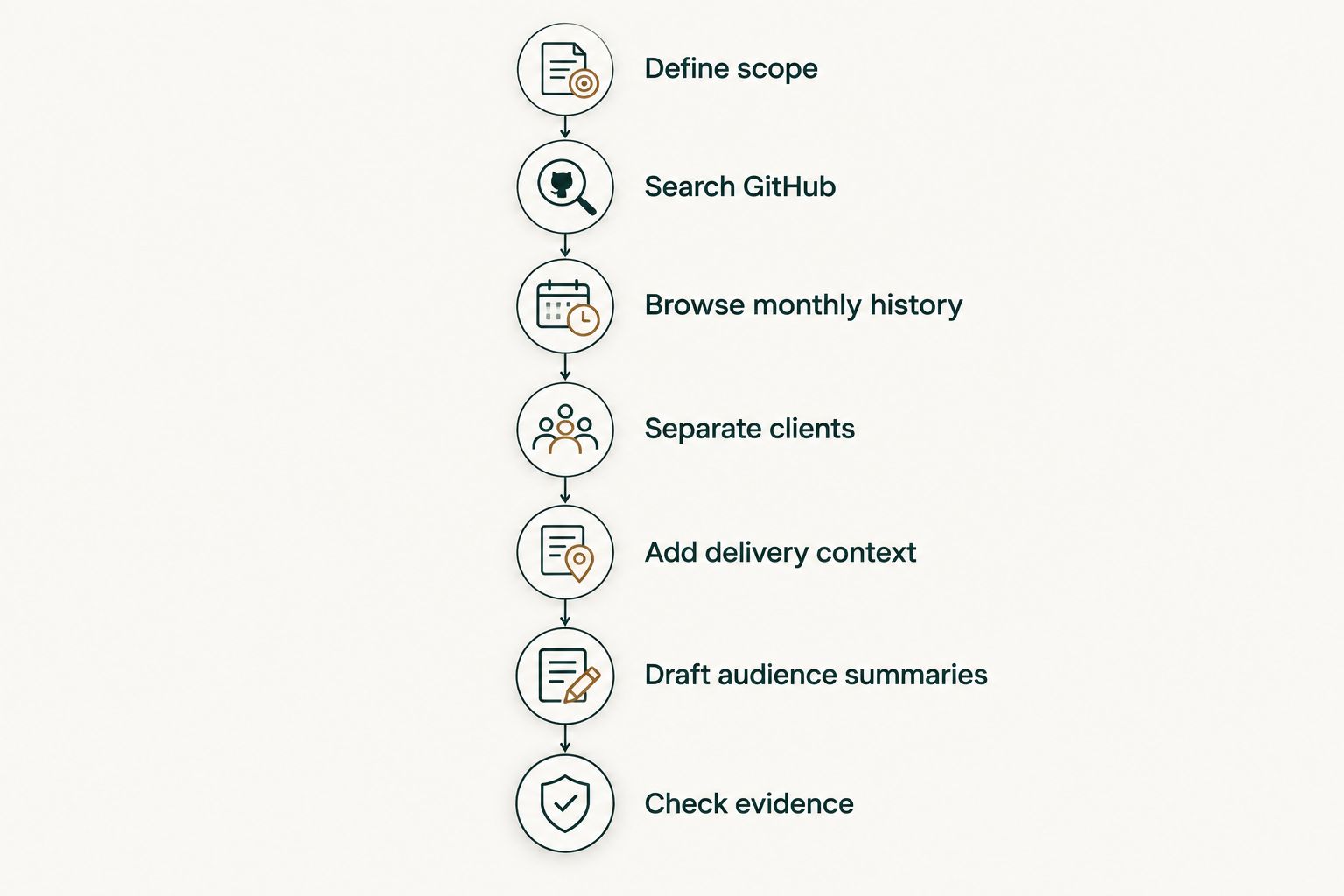
The workflow moves from retrieval to interpretation: Define scope, Search GitHub, Browse monthly history, Separate clients, Add delivery context, Draft audience summaries, and Check evidence. Keep the source history separate from the narrative so another reader can distinguish recorded changes from your explanation.
Compare tracking options for consultancy developers
Choose the method that answers your reporting question. Pull Tally’s GitHub pull request tracking supports browsing personal merged history; a spreadsheet supports annotations; a time record answers a different question entirely. None replaces the need to explain contribution and protect client information.
| Option | Best for | Useful capability | Key limitation |
|---|---|---|---|
| GitHub search | Occasional merged-PR lookups | Filters pull requests by author, repository, and merge date | Repeated reporting requires repeated searches and manual organization |
| Pull Tally | Individual developers revisiting monthly merged history | Browses and summarizes merged PRs by month, organization, or personal repository | Merged metadata alone does not establish client impact or billable time |
| Manual document or spreadsheet | Annotated delivery records | Keeps contribution notes and authorized evidence together | You must maintain the entries and reconcile them with source records |
| Separate time record | Documenting recorded work time | Tracks time entries independently of code merges | Time entries do not explain what a pull request changed |
Choose by the question, not by the largest dashboard. If you need to find a merged change, search is sufficient. If you repeatedly reconstruct monthly history, use a browsing tool. If you need to explain the work, retain a written evidence record regardless of the retrieval method.
Common mistakes consultancy developers make
Treating merges as billable hours
A pull request has a merge event, not an invoiceable duration. Research, meetings, review, and troubleshooting do not map cleanly to merged counts. Use authorized time records for billing and pull request history for code-delivery evidence.
Ranking developers by raw counts
Pull requests differ in scope, and developers take different responsibilities. Splitting one change into several pull requests changes the tally without establishing more value. Keep the record descriptive: personal delivery history, not a productivity score.
Mixing clients in one shared report
A personal record can span engagements; a client-facing report should not expose another client’s work. Filter the relevant scope before drafting, then check titles and descriptions for confidential details. Removing links alone does not make the text safe to share.
Calling merged work delivered without checking release status
Merged code and a released feature are separate events. If the summary says users received the change, support that statement with release evidence. Otherwise, describe the merged implementation and leave deployment claims out.
Ignoring contributions without authored merges
A merged-PR history is a narrow evidence source. It does not capture every review, design decision, investigation, or collaboration. Add those contributions from their own records rather than forcing them into the tally or omitting them from your review.
FAQ
What is pull request tracking for software consultancies?
Pull request tracking for software consultancies organizes code-change history by developer, engagement, repository, and reporting period. For an individual developer, merged PRs provide references for client updates and reviews, but they do not establish business impact or hours worked.
What is the best way to track my consultancy pull requests?
Use GitHub search for occasional lookups and Pull Tally for repeated browsing of your merged history by month, organization, or personal repository. Keep contribution notes separately so the record explains your work rather than only listing merges.
Does Pull Tally change my GitHub repositories?
Pull Tally uses read-only access to pull request metadata. That access supports browsing and summarizing merged pull request history rather than writing repository changes.
Does signing in connect my private client repositories?
Signing in alone does not connect private organization repositories. Treat private organization access as a separate permission decision and follow the client's authorization requirements.
Can I use merged pull requests to calculate billable hours?
No, merged pull request counts do not establish billable hours. Keep billing tied to authorized time records and use pull request history as evidence of code changes.
Should I filter by creation date or merge date for a monthly report?
Use merge date when the report covers work merged during a calendar month. A pull request created before the month still belongs in the report if it merged within the reporting period.
Can I share client pull requests when applying for jobs?
Share only information you are authorized to disclose. Describe your contribution without private repository links, client identifiers, or confidential implementation details, and check titles as well as descriptions before sharing.
One last thing
Before your next 2026 review, inspect a pull request with an uninformative title. If you cannot explain your contribution from the record, add a permitted note to your personal working history while the context is still fresh. The useful habit is preserving meaning, not increasing the count.