Can GitHub pull request data replace manual time tracking?
Can GitHub pull request data replace manual time tracking? Not for hours. Learn when merged PR history supports reviews and when you still need time records.

GitHub pull request data can replace manual reconstruction of what you merged, but it cannot replace time tracking when you need hours worked or billable time. For a 2026 performance review or job search, use merged pull requests as delivery evidence; opening and merge timestamps do not record how long you spent working.
Can GitHub pull request data replace manual time tracking?
No for measuring time; yes for reconstructing merged work. The distinction is the question each record answers: a time entry describes time spent, while a merged pull request records a change that entered a repository.
| Approach | Best for | What it gives you | What it leaves out |
|---|---|---|---|
| GitHub pull request search | An occasional lookup | Matching pull requests within your search scope | A record of working hours and work outside pull requests |
| Manual time tracking | Recording hours against work | Time entries you record and categorize | Linked delivery evidence unless you add it |
| Pulltally | Individual developers browsing merged PR history | Merged GitHub pull requests grouped by month, organization, or personal repository | A measurement of hours worked |
| Time records plus PR references | Connecting recorded time to delivered changes | Hours alongside relevant delivery evidence | Automatic proof that every recorded hour belongs to a particular change |
Choose the record that supports the decision you need to make. A review needs an explanation of your contribution; an invoice that requires hours needs a time record.
Why this matters
A request to track work often hides different needs. Your manager might want examples for a review, a prospective employer might want a project story, and a client might require an account of billable hours. Those needs do not call for the same evidence.
For your 2026 review, rebuilding a list of merged changes from memory is repetitive work that repository history can replace. Reconstructing hours from that same list is a different task, and the timestamps do not provide the answer.
The useful boundary is simple: use repository records to establish what merged, and time records to establish the hours you recorded. Add your explanation of why the work mattered rather than treating either record as a complete account of your contribution.
What pull request timestamps actually tell you
A pull request's creation and merge timestamps mark events in its lifecycle. The interval between them is elapsed time, not a timesheet.
A change can wait for review while you work on another task. You can also investigate a problem before opening a pull request, discuss an approach outside GitHub, or return to the same change across separate work sessions. Subtracting timestamps does not separate those activities.
Merged work is narrower than all work
A merged-only history gives you a useful boundary for reviewing completed repository changes. It does not include every draft, abandoned approach, unresolved proposal, or task that never became a pull request.
That boundary is useful when you want to answer, “What did I merge during this period?” It becomes misleading when you use it to answer, “What did I spend all my time doing?”
Authorship is narrower than contribution
Your authored pull requests are evidence of changes you submitted, not a complete record of everyone you helped. Reviews, pairing, debugging discussions, and design feedback can contribute to delivery without producing a merged pull request under your name.
For a performance review, keep those contributions alongside your merged work. Do not drop them just because they are harder to count.
Merge dates are not work-session dates
A change merged during January 2026 belongs in a January merge summary. That does not establish that all the effort happened during January.
Use the merge date consistently when describing delivery history. Use actual time entries when a report asks when you performed the work.
Why the usefulness of PR data varies
Pull request history becomes more or less useful depending on what you are trying to document and how your work reaches a repository.
- Reporting purpose: A delivery summary needs examples of merged changes; an hours-based invoice needs recorded time.
- Repository scope: Organization work and personal repositories belong to different contexts. Keep that distinction visible.
- Merge timing: Work and merge dates do not necessarily fall within the same reporting period.
- Collaboration: Authored PRs leave out contributions made through other people's changes.
- Work outside GitHub: Planning, support, investigation, and meetings need their own context.
- PR boundaries: A change can be split across several pull requests or bundled into a larger one. Counts alone do not describe its significance.
These factors explain why a clean merged-history report still needs interpretation. Better filtering improves the relevance of the records; it does not turn those records into a measure of effort.
How to replace manual work reconstruction without inventing hours
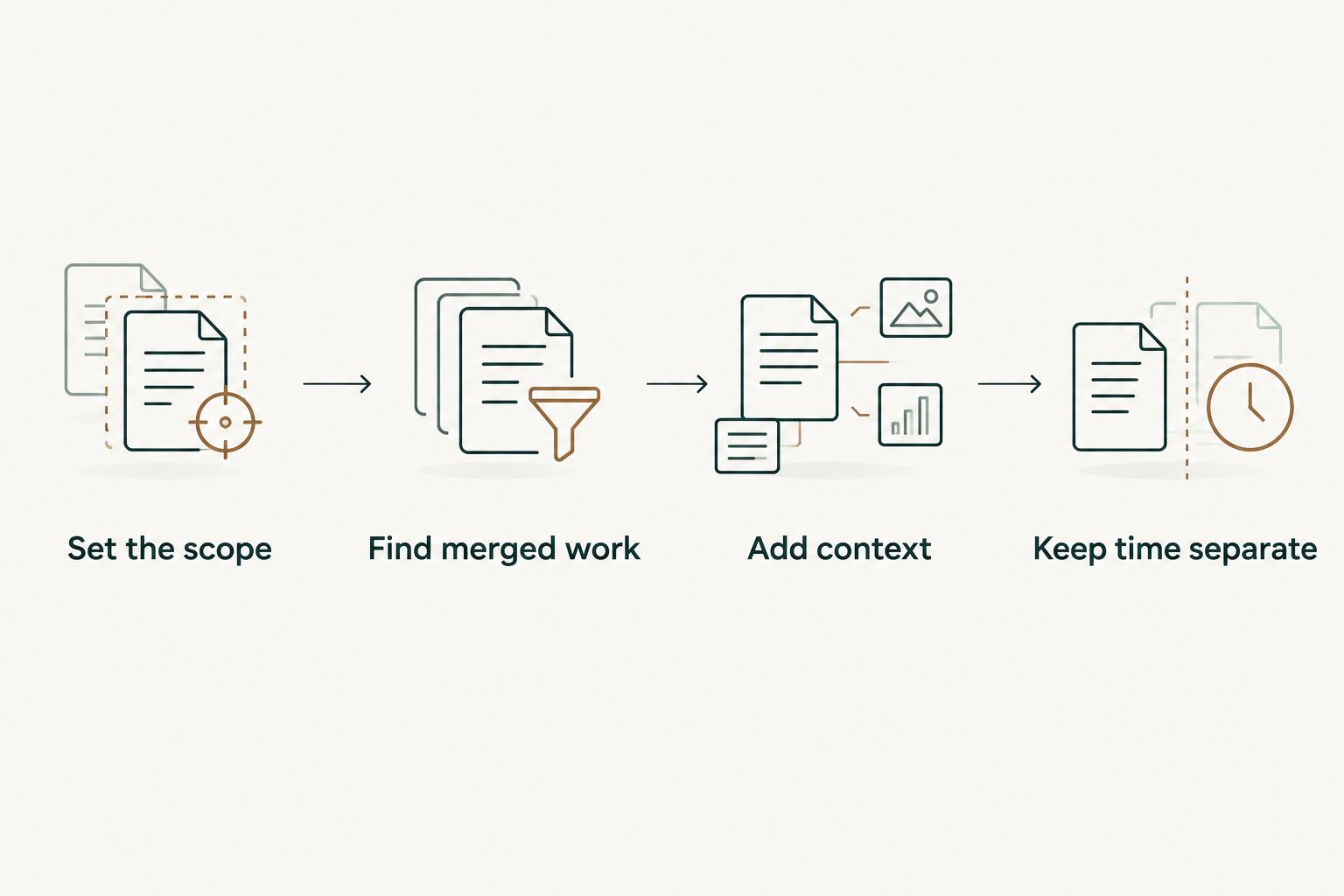
Use this process when you are preparing a self-review, updating your work notes, or collecting examples for an interview. The goal is a traceable account of delivery, not a reconstructed timesheet.
- Set the scope. Write down the reporting period, repositories, and whether you are reviewing authored work or broader contributions. For a January 2026 summary, distinguish changes merged in January from work that merely started then.
- Find merged work. Search your merged pull requests within that scope. For an occasional lookup, GitHub search is enough; repeated monthly reconstruction is where a merged-history browser becomes relevant.
- Add context. Read the selected changes and explain the problem, your contribution, and the result supported by the record. Add review, planning, and investigation work separately.
- Keep time separate. Attach existing time entries when the task requires hours. If you did not record time, do not manufacture it from PR dates or counts.
The order matters. Set your scope before collecting examples so that a personal project does not accidentally become evidence for an employer review, or a late merge gets described as work performed entirely within the reporting month.
Make the summary readable without opening every PR
A useful summary tells the reader what changed and why it mattered. Keep the pull request reference as supporting evidence, not as a substitute for an explanation.
For example, describe whether a change addressed a bug, changed behavior, or supported another piece of work. Then state your role. Only include an outcome when the PR or another reliable record supports it; merging a change alone does not prove a business result.
If you need help shaping that evidence into review notes, the guide to generating self-review summaries from GitHub PRs addresses that next step.
Record uncertainty instead of filling it in
Sometimes the history establishes that a change merged but not why a particular decision was made. Return to the discussion or your own notes rather than writing a confident explanation from the title alone.
The same rule applies to missing time. A review can acknowledge the contribution without attaching hours; an hours-based report needs a separate, defensible record.
Where a merged-history tool fits
Pulltally is best for individual developers who need merged GitHub PR history for performance reviews or job searches. It lets you browse and summarize merged pull requests by month, organization, or personal repository, replacing repeated searching when those are the views you need.
That is a narrower job than tracking working time. Keep the distinction visible when you use a monthly tally: it describes merged work within the selected scope, not utilization, effort, or a productivity score.
The limitation also helps you decide whether you need a tool at all. If you only need to find a particular change, use GitHub search. If you repeatedly rebuild monthly delivery notes, a grouped history addresses that repetition.
What access does that require?
The access is read-only and covers pull request metadata used to browse and summarize your merged history. Signing in alone does not connect private organization repositories.
Treat organization access and publication permission as separate questions. Being able to view a work repository does not make its contents appropriate for a public portfolio, interview document, or external service; follow your organization's rules before sharing details.
Can I use pull request history to bill clients?
Not as a substitute for hours when your agreement requires hours. A merged PR can support a description of delivered work, but it does not establish how much billable time you spent.
For freelance work in 2026, keep the evidence aligned with the agreement. Link time entries to relevant tasks or changes when useful, and distinguish billable development from other categories according to the client's requirements.
For milestone-based work, a PR can help document delivery. Whether it satisfies a milestone depends on the agreed acceptance criteria, not simply on the fact that code merged.
Is pull request history enough for a performance review?
Pull request history is a starting point, not the whole review. It provides concrete examples of merged work, but you still need to explain ownership, collaboration, decisions, and outcomes.
For a 2026 self-review, choose examples that support the responsibilities you are discussing rather than presenting an unfiltered count. A small fix that resolved a recurring problem deserves context; the number of PRs alone does not explain that value.
Keep a separate note for mentoring, reviews, incident response, and proposals that did not merge. That prevents the convenience of a merged-work list from narrowing your account of the job.
FAQ
Can GitHub pull request data replace manual time tracking completely?
No. GitHub pull request data can replace manual reconstruction of merged work, but it does not measure hours worked or billable time. Keep time records when the reporting requirement calls for hours.
Can I calculate working hours from PR opening and merge dates?
No. The interval between opening and merging a pull request is elapsed lifecycle time, not recorded working time. It includes waiting and excludes work performed before the PR opened.
What's the best way to use merged PRs in my performance review?
Use merged PRs as evidence for specific contributions, then explain your role and the supported outcome. Add collaboration and work outside pull requests so the review does not become a count of authored changes.
Does Pulltally measure developer productivity?
Pulltally provides personal delivery history, not a productivity score. Its merged GitHub pull request summaries help individual developers browse work by month, organization, or personal repository; they do not establish effort or hours.
Does signing in connect my private organization repositories?
Signing in alone does not connect private organization repositories. Access is read-only and covers pull request metadata used for browsing and summarizing merged history.
Should I keep tracking time if I already have a monthly PR summary?
Yes, if your client, employer, or reporting process requires hours. A monthly PR summary supports a delivery narrative, while time records answer a different question about recorded time.
Can I use private work PRs in a job search?
Follow your organization's confidentiality and sharing rules before using private work PRs in a job search. Describe your contribution without exposing code, internal discussions, or restricted details when those cannot be shared.
One last thing
Before you turn your next monthly PR list into a report, write the question the report must answer at the top. “What merged?” and “How many hours did I work?” need different evidence.
For your next 2026 review, keep the merged-work list and the explanation together. Replace repetitive searching, not missing time records. That preserves the useful detail in your GitHub history without asking it to prove something it never recorded.