Is it safe to connect GitHub to a third-party PR tracking tool?
Is it safe to connect GitHub to a third party PR tracking tool? Check read-only access, repository scope, employer approval, and revocation before connecting.

Connecting GitHub to a third-party PR tracking tool is safe only when the requested access fits the task, you understand which repositories it covers, and your employer permits the connection. Read-only access prevents authorized changes, but it still lets the tool read the data covered by its permissions. For a personal review, approve only the access needed to browse your merged pull requests; reject unrelated write permissions or unnecessary private-repository access.
Why this matters
Preparing a performance review in 2026 often starts with a simple question: what did you merge during the review period? Repeating searches across repositories takes attention away from explaining the work. A tracking tool helps with that repetition, but convenience does not establish whether the requested access is appropriate.
Pulltally is a PR tracking tool for individual developers who need to browse and summarize merged pull requests by month, organization, or personal repository. The decision is not whether every developer should connect a tool. It is whether the connection solves your particular reporting task without crossing a permission boundary you should preserve.
Is it safe to connect GitHub to a third-party PR tracking tool?
Approve a connection only after checking its permissions, repository coverage, and organizational approval requirements. A tool's purpose and its authorization request are separate facts. A product described as a reporting tool still needs its actual permissions reviewed.
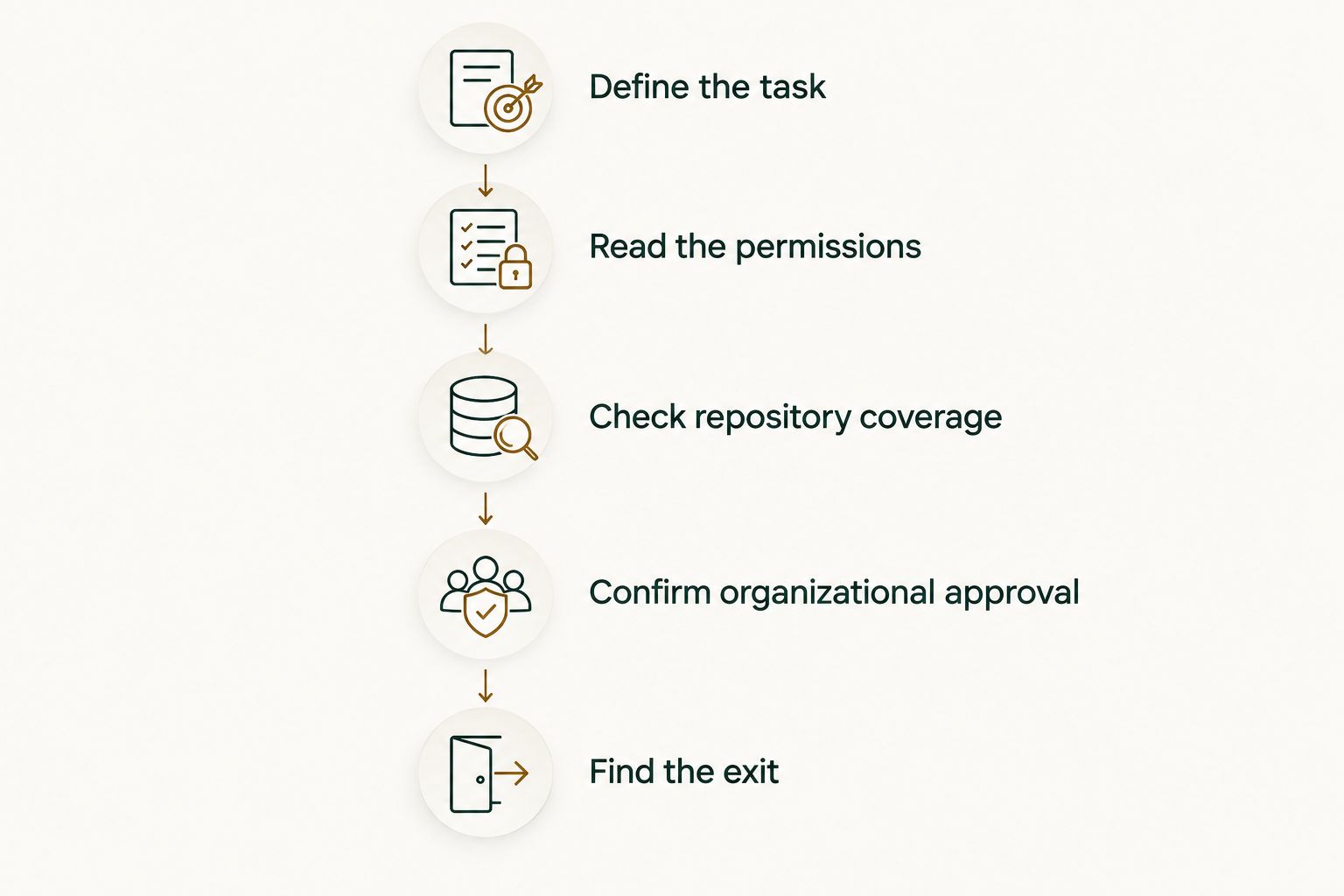
Use these 5 checks before authorizing a connection in 2026. Apply them to the authorization screen and the tool's published documentation, not just its homepage description.
- Define the task. Decide whether you need a monthly tally, a review-period history, or a list from a particular repository. If one GitHub search answers the question, an additional connection is unnecessary. Write down the smallest scope that would solve the task before inspecting permissions.
- Read the permissions. Distinguish read access from write access, and identify the resources each permission covers. A workflow for browsing merged PRs does not require permission to merge changes on your behalf. Do not approve unrelated permissions just because the authorization screen groups them with useful ones.
- Check repository coverage. Confirm whether the connection covers public repositories, personal private repositories, organization repositories, or a selected subset. Access to one repository is not equivalent to access across an organization. Use repository selection when the connection method provides it, and exclude repositories unrelated to your review.
- Confirm organizational approval. Check your employer's rules before connecting company repositories. GitHub authorization is a technical permission; it is not a substitute for employer approval. If an organization owner must approve an installation or access request, complete that process rather than trying another credential route.
- Find the exit. Locate the relevant GitHub settings for revoking authorization, removing an installation, or revoking a token. Separately check the tool's account-deletion and data-retention information. Removing future access and deleting information already collected are different actions.
These checks create a clear decision: proceed with the necessary, permitted access, or keep the lookup inside GitHub. Do not resolve an unclear permission request by assuming the tool probably does not use everything it requests.
Which lookup method fits your task?
Choose the method that matches the work you actually need to repeat. An occasional search and an ongoing personal delivery history are different jobs; neither needs to become a team-ranking exercise.
| Method | Best for | Useful capability | Limitation or trade-off |
|---|---|---|---|
| GitHub search | An occasional lookup | Find merged PRs using author, repository, organization, and date filters | You repeat searches and organize the results yourself |
| Pulltally | Individual developers preparing reviews or job searches | Browse and summarize merged PRs by month, organization, or personal repository | Read-only metadata access still requires a permission and confidentiality check |
Pulltally is best for individual developers who need a merged-PR history without repeating manual GitHub searches. Keep GitHub search for a narrow question that you can answer directly. Choose a dedicated history view when organizing the same information repeatedly is the actual problem.
Why the safety of a GitHub connection varies
The relevant differences are in access and handling, not in whether a tool calls itself a dashboard, tracker, or summary tool. Evaluate these 5 factors separately:
- Permission scope. Reading pull request information is different from writing repository contents or managing settings. Review the requested resources as well as the read/write distinction.
- Repository coverage. A connection limited to a personal public repository has a different confidentiality boundary from one covering private company repositories. Check the actual selection rather than inferring it from your GitHub account name.
- Connection method. GitHub App installations, OAuth authorizations, and personal access tokens have different permission and revocation controls. Follow the controls for the method you are actually using.
- Organization policy. Your employer can impose restrictions beyond the permissions GitHub technically allows. Treat those restrictions as part of the decision, including when the tool only reads data.
- Data handling. Access permissions describe what a connection can retrieve, not the complete story of retention, deletion, or subsequent processing. Read those policies before sending confidential information outside GitHub.
A small reporting task is a reason to seek narrow access, not evidence that the connection already has it. If the authorization request and your intended task do not match, stop and resolve the mismatch first.
What does read-only access actually protect?
Read-only access limits authorized modification of the resources covered by that permission. It does not mean the information is public, insignificant, or impossible to disclose. A private PR title can reveal the name of an unreleased feature without exposing a source-code file.
Keep 2 boundaries separate: permission to change data and permission to read data. A reporting workflow usually depends on the second boundary. That makes confidentiality relevant even when changing a repository is outside the tool's permissions.
For a 2026 performance review, identify which information you need before connecting anything. A merged date and repository name serve a different purpose from a full discussion thread. Check the documented data access rather than assuming that every reporting tool reads the same fields.
For Pulltally, the stated access is read-only access to pull request metadata. Signing in alone does not connect private organization repositories. Those statements answer specific permission questions; they do not establish an unstated retention period, security certification, or employer approval.
The practical rule is simple: approve the stated access only when the data involved is appropriate for the destination. Read-only is a useful restriction, not a complete security assessment.
Does signing in grant access to private organization repositories?
Signing in and granting repository access are separate decisions. For Pulltally, signing in alone does not connect private organization repositories. Review any later repository-access or organization-approval step on its own terms.
With any third-party integration, inspect the authorization request rather than treating the sign-in button as the complete permission description. GitHub supports multiple connection methods, so there is no single permission flow that describes every PR tracking tool.
If a private organization repository does not appear, check the documented access and approval requirements. Do not respond by creating a broader token or requesting organization-wide access without understanding why the narrower connection is insufficient.
How do I use GitHub search without connecting a tool?
GitHub search is best for a one-off merged-PR lookup. Start with filters for pull requests, merged status, and your GitHub username. Add repository or organization filters when you need to narrow the results.
A practical search pattern is is:pr is:merged author:YOUR_USERNAME. Replace YOUR_USERNAME with your actual GitHub username; it is an example search placeholder, not a credential. Add a merged: date filter for the period you are reviewing, following GitHub's supported date syntax.
For your 2026 review, filter on the merge period rather than assuming the creation date identifies when work shipped. A PR opened before the review period can still have merged during it. Conversely, a PR created during the period might not be merged yet.
Search still leaves you with interpretation work. Open the relevant PRs, check what changed, and group the work by the outcome you need to explain. If you repeatedly rebuild the same monthly history, that repetition is the reason to consider a tracking tool—not a reason to request broader permissions.
What should I check before using PR history in a job search?
A connection permission does not grant permission to publish company information. You can have legitimate access to a private repository and still be prohibited from sharing its contents with a prospective employer.
Before using PR history in a 2026 job search, review 3 fields: titles, descriptions, and repository names. These can contain customer names, internal project names, incident details, or unreleased plans. Check attachments and discussion content as well if your notes include them.
Use your history to recall the work, then write an appropriate account of your contribution. Explain the problem you addressed, what you changed, and the result you can substantiate and disclose. Do not paste private links into an application and expect the recipient to have legitimate access.
For a performance review inside your employer, the audience is different, but accuracy still matters. Separate work you authored from reviews, discussions, and contributions made by teammates. A list of merged PRs is evidence of delivery history, not a complete description of responsibility or impact.
How do I disconnect a GitHub PR tracking tool?
Disconnect the integration through the GitHub control that matches the connection method. Review authorized applications for an OAuth connection, installation settings for a GitHub App, or token settings for a personal access token. Do not assume deleting a browser bookmark changes any permissions.
Then check the tool's own deletion process. Revoking GitHub access stops that authorization from supporting future access; it does not, by itself, establish that previously collected data has been deleted. Follow both processes when you want to end access and remove stored information.
If the connection covers an organization, involve the appropriate owner or administrator. Your individual authorization and an organization-level installation are not interchangeable. Confirm which connection you are removing before changing settings that affect other developers.
FAQ
Is it safe to connect GitHub to a third party PR tracking tool?
It is safe only when the permissions fit your task, repository coverage is appropriate, and your organization permits the connection. Check data handling and revocation controls before approving access.
Does read-only access mean a PR tracking tool cannot change my code?
Read-only permissions do not authorize changes to the resources they cover. They still authorize reading the covered data, so private information needs a confidentiality check.
Does signing into Pulltally connect my private organization repositories?
Signing into Pulltally alone does not connect private organization repositories. Its stated access is read-only access to pull request metadata; review any repository connection separately.
What's the best way to check merged PRs without another tool?
GitHub search is best for an occasional merged-PR lookup. Use pull request, merged-status, author, and date filters, then narrow the results by repository or organization.
Should a merged-PR reporting tool need write access?
Browsing merged pull request history does not require writing changes to your repository. Stop and investigate any requested write permission that is unrelated to your reporting task.
Does disconnecting a tool delete the PR data it already collected?
Revoking GitHub access does not by itself establish deletion of previously collected data. Check the tool's deletion process separately from its connection settings.
Can I use private GitHub PRs in a job application?
Use private PR history only in ways your employer permits. Write a permitted summary of your contribution rather than sharing private links, confidential titles, or internal discussion content.
Does a merged pull request count measure my productivity?
A merged pull request count is personal delivery history, not a productivity score. Use the underlying work to explain your contribution, context, and outcomes.
One last thing
A merged PR is a useful memory aid, not a finished review statement. Before connecting a tool, choose one relevant merged PR and write down what problem it addressed and what you personally contributed. This establishes what useful reporting looks like for your review.
Then judge the tool against that task. If it saves you from repeating searches while keeping the access appropriate, it serves a clear purpose. If a direct GitHub lookup already answers the question, keep the workflow simple. The safest useful connection is the one whose permissions and purpose you can explain without guessing.